
Key Takeaway: TiviMate, IPTV Smarters Pro, and OTT Navigator offer different remote layouts, guide controls, and pricing for Nvidia Shield users. Each is a player only and requires a user-owned or authorised source.
Nvidia Shield runs Android TV applications, but similar-looking players can differ in developer identity, privacy, permissions, updates, accessibility, guide support, and hardware acceleration. This guide compares ten player apps without promising any programming or treating playback as proof of content rights.
Content and licensing notice: An IPTV player supplies no programming. Import only user-owned or authorised media sources, verify the operator and territorial permissions, and avoid applications or add-ons that bundle unverified content.
Why Trust Our Recommendations?
The comparison uses official app information, developer documentation, supported formats, permissions, update history, account security, and structured interface checks on Nvidia Shield. We assess only authorised ordinary media sources.
- ✅ Checked for smooth 4K playback and quick channel zapping
- ✅ Tested with both M3U and Xtream Codes playlists for stability
- ✅ Judged on EPG quality, remote control, and setup effort
We favour players that remain neutral, clearly identify their developer, and do not bundle unverified programming. Buffering controls, audio sync, remote navigation, captions, profile settings, and privacy shape the evaluation.
Paid upgrades are considered only for documented player features such as multiple playlists, recording controls, profiles, or interface options. A player fee never includes programming or territorial rights.
Best IPTV Players for Nvidia Shield Explained
1) TiviMate
| ⭐ Rating | 4.6/5 |
| ⏳ Free Trial | 7-day free trial for Premium |
| 🎞️ Number of Channels & VOD | Depends on your IPTV provider playlist (M3U or Xtream Codes) |
| 📺 Supported Devices | Android TV, Google TV, Nvidia Shield, Fire TV, Android boxes |
TiviMate is a remote-focused Android TV player with guide, playlist, recording, and profile features that vary by tier. It supplies no programming. Confirm the official developer and Play Store or companion-app workflow, current Shield compatibility, privacy, permissions, device limits, pricing, refund terms, and updates before paying. Import only authorised credentials.
Why choose TiviMate?
- Remote-First Design: Every menu in TiviMate is built for a TV remote, so navigating channels and settings on the Shield feels natural and quick from the couch.
- Beautiful EPG: The electronic program guide is fast, attractive, and easy to read, making it simple to see what is on now and next across hundreds of channels.
- Instant Channel Switching: Thanks to smart buffering and the Shield’s hardware, zapping between channels happens almost instantly with very little of the lag that plagues weaker players.
- Custom Favourites: You can build favourite lists, hide dead channels, and reorder groups so your everyday viewing is only ever a click or two away.
- Recording and Catch-Up: The Premium tier adds scheduled recording and catch-up support, turning your Shield into a capable personal video recorder for live television.
- Multiple Playlist Support: Premium lets you load several playlists at once, which is perfect if you juggle more than one provider or a mix of live and VOD lines.
- Stable Long-Term Use: In my testing TiviMate kept running smoothly for weeks without crashes, memory leaks, or the random settings resets that affect some rivals.
- Regular Updates: The developer ships frequent updates that fix bugs and add features, so the app keeps improving rather than going stale on your Shield.
Advantages
- Best-in-class EPG and clean interface
- Buttery smooth on Nvidia Shield
- Excellent favourites and deep customisation
- Reliable recording with Premium tier
- Frequent, genuinely meaningful app updates
- Affordable one-time lifetime licence option
Disadvantages
- Best features locked behind Premium
- Free tier limited to one playlist
- Includes no live content itself
- Setup takes a little learning
- Premium needed for multiple playlists
Free Trial: 7-day free trial included with TiviMate Premium.
Pricing:
TiviMate offers a genuinely useful free version that handles one playlist and live TV. Premium unlocks the best features and costs around $9.99 per year or a one-time $33.99 for a lifetime licence, which pays for itself within a few years. A single Premium account covers up to five devices streaming at once, so your Shield and other screens share one purchase. Prices verified July 2026.
Link: https://tivimate.com/
2) IPTV Smarters Pro
| ⭐ Rating | 4.3/5 |
| ⏳ Free Trial | Free to download and use |
| 🎞️ Number of Channels & VOD | Depends on your IPTV provider playlist (M3U or Xtream Codes) |
| 📺 Supported Devices | Android TV, Nvidia Shield, Fire TV, Android, iOS, Windows, macOS |
IPTV Smarters Pro is a player interface for authorised M3U or Xtream credentials and provides no channels. Verify the recognised developer because similarly named apps exist. Review its Shield compatibility, permissions, privacy, account handling, guide controls, captions, update history, and any purchases before installation.
Why choose IPTV Smarters Pro?
- Completely Free: IPTV Smarters Pro costs nothing to download or use, so you get a full-featured player on your Shield without paying a single cent up front.
- Organised Layout: The app automatically sorts your playlist into Live TV, Movies, and Series, making a large subscription far easier to browse on the big screen.
- Built-In EPG: A clean electronic program guide shows current and upcoming programmes, so you always know exactly what is airing without ever leaving the app.
- Multi-Screen Support: Because it runs on the Shield, phones, tablets, and computers, you can carry the same familiar interface across every device you own.
- External Player Options: You can hand streams to VLC or MX Player if you ever need extra codec support, which adds handy flexibility on tricky channels.
- Simple Setup: Entering an Xtream Codes login or M3U URL takes under a minute, making this one of the easiest players to get running on a Shield.
- Family controls: Built-in locks, profile restrictions, PIN protection, and age labels help manage shared-device access.
- Reliable Playback: In my testing it handled HD and 4K streams smoothly on the Shield, with quick loading and few of the dropouts that affect lesser apps.
Advantages
- Completely free with no cost
- Clean and well-organised content layout
- Runs on almost every device
- Very easy Xtream Codes setup
- Handy built-in parental control locks
- Handles 4K streams very well
Disadvantages
- No recording or DVR feature
- Occasional ads in some builds
- One playlist loaded at once
- Customer support can be slow
- Interface looks a little dated
Free Trial: The app is free to download and use indefinitely.
Pricing:
IPTV Smarters Pro is free, which is a big part of its appeal on the Nvidia Shield. There is no subscription for the player itself and no premium unlock to chase. You only pay for the IPTV service you connect to it through an M3U or Xtream Codes login. That makes it one of the best value options in this guide. Confirmed free July 2026.
Link: https://www.iptvsmarters.com/
3) OTT Navigator
| ⭐ Rating | 4.5/5 |
| ⏳ Free Trial | Free version available |
| 🎞️ Number of Channels & VOD | Depends on your IPTV provider playlist (M3U or Xtream Codes) |
| 📺 Supported Devices | Android TV, Google TV, Nvidia Shield, Fire TV, Android |
OTT Navigator is a configurable Android TV player with guide layouts, profiles, picture-in-picture, and archive controls. These features depend on the authorised source. Confirm the official listing, developer, permissions, privacy, supported formats, purchase terms, and recent updates, and avoid unknown modified packages.
Why choose OTT Navigator?
- Deep Customisation: OTT Navigator exposes an enormous range of settings, letting you tailor the guide, layout, and playback behaviour to exactly how you like to watch on the Shield.
- Generous Free Tier: The free version is genuinely capable rather than crippled, so you can enjoy live TV and a solid EPG without ever paying for the premium upgrade.
- Modern EPG: Its electronic program guide is fast and attractive, with multiple view styles that make browsing large channel lists on a TV remote feel effortless.
- Picture-in-Picture: You can shrink a live channel into a corner while browsing the guide or other apps, a neat trick the Shield’s power handles with ease.
- Multi-Profile Support: Separate user profiles let each household member keep their own favourites and settings, which is ideal on a shared living-room Shield box.
- Catch-Up and Archive: When your provider supports it, OTT Navigator handles catch-up and archive playback well, letting you rewind past programmes straight from the guide.
- Parental Controls: Detailed time limits and content locks give you real control over what younger viewers can access, going further than most free players offer.
- Lightweight and Fast: Even with all its features the app stays responsive on the Shield, loading quickly and switching channels without the sluggishness of bulkier players.
Advantages
- Incredibly customisable and flexible interface
- Capable and genuinely usable free version
- Cheap lifetime premium unlock option
- Strong, detailed parental control tools
- Picture-in-picture supported on the Shield
- Fast, attractive and modern EPG
Disadvantages
- Many settings overwhelm total beginners
- No official standalone website exists
- Premium needed for multiple playlists
- Learning curve is fairly steep
- No built-in recording or DVR
Free Trial: A free version is available with no time limit.
Pricing:
OTT Navigator has a capable free tier that many people never outgrow. Premium is cheap, at roughly $0.99 per month or about $19.99 for a lifetime unlock, though exact pricing can vary by region. The upgrade adds multiple playlists, extra profiles, and advanced tools. For most Shield owners the free version is plenty, and premium is a low-cost bonus rather than a must-buy. Prices checked July 2026.
Link: Google Play Store
4) Kodi
| ⭐ Rating | 4.5/5 |
| ⏳ Free Trial | Always free (open source) |
| 🎞️ Number of Channels & VOD | Depends on your IPTV source and add-ons |
| 📺 Supported Devices | Android TV, Nvidia Shield, Windows, macOS, Linux, iOS, tvOS |
Kodi is an open-source media centre that can organise user-owned media and authorised playlist sources through documented add-ons. It supplies no third-party programming rights. Install from the recognised project or official store, review add-on provenance and permissions, keep it updated, and avoid repositories offering unverified content.
Why choose Kodi?
- All-in-One Media Centre: Kodi combines live IPTV with your own movies, music, and photos, turning the Shield into a single hub for everything you watch.
- PVR IPTV Simple Client: This built-in add-on loads M3U and Xtream playlists with a full EPG, giving you a proper live TV experience inside Kodi.
- Endless Add-Ons: A huge library of official add-ons extends Kodi far beyond IPTV, letting you add features and services the Shield can handle with ease.
- Full Customisation: Skins and settings let you rebuild the entire interface, so power users can craft a home screen that fits their exact viewing habits.
- Recording Support: With a compatible backend, Kodi can record live channels, giving your Shield DVR-style functionality without any paid subscription or extra fees.
- Completely Free: Kodi is open-source and totally free, with no ads, no premium tier, and no account required to unlock its full feature set.
- Cross-Platform: The same Kodi setup and add-ons work across the Shield, desktop computers, and phones, so your media centre feels consistent on every screen you own.
- Active Community: A large, dedicated community means plenty of guides, forums, and support, which really helps when you are configuring IPTV for the first time.
Advantages
- A powerful all-in-one media hub
- Free and fully open source
- Huge and versatile add-on ecosystem
- Runs superbly on the Shield
- Optional live TV channel recording
- Deeply customisable through skins and add-ons
Disadvantages
- Steep initial setup learning curve
- IPTV needs manual add-on configuration
- Can feel complex for beginners
- No official paid support option
- Add-ons vary widely in quality
Free Trial: Always free and open source, with no paid tier.
Pricing:
Kodi is completely free and open source, so there is nothing to buy and no subscription for the software itself. You only pay for the IPTV service whose playlist you load through the PVR IPTV Simple Client. Donations to the non-profit XBMC Foundation are welcome but never required. On the Shield, that makes Kodi a genuinely powerful free option. Confirmed free July 2026.
Link: https://kodi.tv/
5) VLC
| ⭐ Rating | 4.6/5 |
| ⏳ Free Trial | Always free (open source) |
| 🎞️ Number of Channels & VOD | Depends on your IPTV playlist or stream URL |
| 📺 Supported Devices | Android TV, Nvidia Shield, Fire TV, Windows, macOS, Linux, iOS |
VLC is a general media player with broad codec and playlist support but no built-in programming. Use the recognised VideoLAN release, review network-sharing and privacy settings, keep the app updated, and open only media locations you own or are authorised to access. It may lack specialised guide and library controls.
Why choose VLC?
- Plays Almost Anything: VLC’s famous codec support means it handles obscure stream formats on the Shield that make other IPTV players stall or fail entirely.
- Completely Free: There are no ads, no subscriptions, and no locked features, so you get the full, powerful player on your Shield at zero cost.
- Rock-Solid Stability: VLC is famously reliable, rarely crashing even during long viewing sessions, which makes it a dependable fallback when a fussy stream misbehaves.
- Lightweight and Fast: The app is small and efficient, launching quickly on the Shield and leaving plenty of system resources for smooth, high-bitrate playback.
- M3U Playlist Support: You can open an M3U playlist or a single stream URL directly, giving you a quick route to live channels without complex setup.
- Subtitle and Audio Control: Detailed subtitle and audio-track options let you fine-tune playback, a genuine benefit when watching international channels on your Shield.
- Trusted Open Source: Backed by the non-profit VideoLAN project, VLC is transparent, privacy-friendly, and free of the shady behaviour some IPTV apps hide.
- Cross-Platform Familiarity: The same VLC you already know from desktop works on the Shield, so there is almost no learning curve to get streaming.
Advantages
- Plays virtually every media format
- Free with absolutely no ads
- Extremely stable and very lightweight
- Great subtitle and audio control
- Trusted non-profit open-source project
- Simple, direct M3U playlist playback
Disadvantages
- No real EPG guide included
- No favourites or recording tools
- Basic IPTV features only here
- Playlist handling feels a little clunky
- Not really built for IPTV
Free Trial: Always free and open source, with no paid tier.
Pricing:
VLC is completely free and open source, with no ads, no premium unlock, and no account to create. You simply download it from the Play Store and start playing streams on your Shield. Because it is run by the non-profit VideoLAN project, it will stay free forever. You only pay for whatever IPTV service you use. Confirmed free July 2026.
Link: https://www.videolan.org/vlc/
6) Plex
| ⭐ Rating | 4.4/5 |
| ⏳ Free Trial | Free basic plan available |
| 🎞️ Number of Channels & VOD | Free ad-supported channels plus your own media and IPTV |
| 📺 Supported Devices | Android TV, Nvidia Shield, Google TV, Fire TV, Roku, Apple TV |
Plex manages personal or authorised libraries and can provide its own officially licensed features. Confirm the recognised app, server permissions, account security, privacy, remote-access settings, tuner requirements, subscription terms, and updates. Do not add unverified plug-ins or unauthorised third-party sources.
Why choose Plex?
- Shield as a Server: The Nvidia Shield can run the full Plex Media Server, letting it host and stream your personal library to every screen in the house.
- Free Live Channels: Plex includes hundreds of free ad-supported live channels and a large on-demand library, giving you something to watch even without any subscription.
- Beautiful Interface: Rich artwork, descriptions, and a clean layout make Plex one of the most polished and welcoming media apps on the Shield.
- Live TV and DVR: With a Plex Pass and supported hardware, Plex adds proper live TV and recording, turning your Shield into a full home media hub.
- Personal Media Organisation: Plex automatically fetches artwork and metadata for your own films and shows, presenting your collection as beautifully as any streaming service.
- Watch Anywhere: Once your Shield hosts the server, you can stream your library to phones, tablets, and other TVs, whether at home or away.
- Regular Improvements: Plex is actively developed with frequent updates, so features, stability, and the free channel lineup keep getting better over time.
- Easy for Beginners: Despite its power, Plex is genuinely simple to start with, so newcomers can enjoy free live TV on the Shield within minutes.
Advantages
- Shield can host the server
- Hundreds of free live channels
- Polished, beginner-friendly interface design
- Superb personal media library organisation
- Live TV and DVR support
- Streams to almost any device
Disadvantages
- Best features need Plex Pass
- Lifetime pass is now costly
- Not a traditional IPTV player
- Live TV needs extra hardware
- Some free content is ad-supported
Free Trial: Free basic plan available, no payment required to start.
Pricing:
Plex is free to use for your own media and its ad-supported channels. A Plex Pass unlocks live TV, DVR, offline downloads, and more. As of July 2026 it costs about $7 per month, $70 per year, $250 for five years, or $750 for a lifetime pass, after a sharp lifetime price rise. On a Shield that can host the server, the free tier alone is very useful. Prices verified July 2026.
Link: https://www.plex.tv/
7) Perfect Player
| ⭐ Rating | 4.0/5 |
| ⏳ Free Trial | Free with optional paid unlock |
| 🎞️ Number of Channels & VOD | Depends on your IPTV playlist (M3U or Xtream Codes) |
| 📺 Supported Devices | Android TV, Nvidia Shield, Android, Windows |
Perfect Player is a lightweight playlist interface that supplies no programming. Verify the current developer and distribution source because maintenance status may change. Review permissions, privacy, supported formats, guide controls, update recency, and device compatibility before importing an authorised source.
Why choose Perfect Player?
- Simple and Stable: Perfect Player focuses on doing the basics reliably, loading playlists and playing channels on the Shield without crashes or unnecessary clutter.
- M3U and XMLTV Support: It cleanly handles M3U or Xtream playlists together with XMLTV guide data, giving you a functional EPG on your Shield.
- Lightweight Footprint: The app is small and undemanding, launching quickly and running smoothly even though the Shield has power to spare for it.
- Multiple Playlist Groups: You can organise several playlists and groups, which helps if you combine more than one provider or a mix of content types.
- External Player Options: Perfect Player can pass streams to other decoders when needed, adding flexibility for channels that use less common formats.
- Low-Cost Unlock: A one-time in-app purchase removes the trial limitation, making the full app very affordable compared with subscription-based rivals on the Shield.
- Proven Track Record: Years of use have made Perfect Player a trusted name, with plenty of community setup guides available when you need help.
- No Ads or Bloat: The interface stays clean and free of advertising, so nothing gets between you and the live channels you want to watch.
Advantages
- Stable and very lightweight player
- Clean and entirely ad-free interface
- Cheap one-time full unlock purchase
- Good M3U and XMLTV support
- A trusted, long-standing IPTV app
- Handles multiple playlists and groups
Disadvantages
- Dated and very plain interface
- Development has slowed down lately
- Free version is quite limited
- Fewer features than top rivals
- Setup is not beginner friendly
Free Trial: Free version available; a small purchase unlocks full use.
Pricing:
Perfect Player is free to try, with a limited trial version. A single low-cost in-app purchase removes that limit and unlocks the full app permanently, with no recurring subscription. Exact pricing varies by store and region, so check the current figure on the listing. You still supply your own IPTV service separately. Confirm current pricing July 2026.
Link: Google Play Store
8) Megacubo
| ⭐ Rating | 4.3/5 |
| ⏳ Free Trial | Free version (open source) |
| 🎞️ Number of Channels & VOD | Depends on your playlist sources plus built-in free lists |
| 📺 Supported Devices | Android TV, Nvidia Shield, Android, Windows, Linux |
Megacubo is an open-source player that may surface community-maintained lists. Community inclusion does not prove permission. Confirm the recognised project, review list provenance, privacy, permissions, updates, and security, and remove any source whose operator or territorial rights cannot be verified.
Why choose Megacubo?
- Free and Open Source: Megacubo costs nothing and its code is open, so there are no subscriptions, no locked features, and no hidden catches on your Shield.
- Built-In Channel Lists: It bundles community-maintained free channel lists, letting you start watching live TV on the Shield without first sourcing your own playlist.
- Modern Interface: The layout feels fresh and TV-friendly, with a clean home screen and easy navigation that suits the big screen and a remote.
- Search and Discovery: A handy search tool helps you find channels quickly across large lists, which is a real time-saver during a busy evening of viewing.
- Recording and Bookmarks: Megacubo lets you record streams and bookmark favourites, adding practical extras that many free players on the Shield simply leave out.
- Loads Your Own Playlists: Alongside its bundled lists, you can add M3U links from a paid provider, combining free and premium content in one place.
- Cross-Platform Support: The same app runs on the Shield, Windows, and Linux, so your setup and habits carry over between your different devices easily.
- Lightweight Performance: Megacubo stays responsive on the Shield, loading channels quickly and handling everyday streaming without the lag some heavier players introduce.
Advantages
- Free and fully open source
- Bundled community free channel lists
- Modern, tidy and clean interface
- Recording and bookmarks both included
- Runs on many different platforms
- Loads your own paid playlists
Disadvantages
- Free lists vary in reliability
- Fewer features than TiviMate offers
- Occasional buffering on some streams
- Basic EPG compared to rivals
- Less polished than premium apps
Free Trial: Always free and open source, with no paid tier.
Pricing:
Megacubo is completely free and open source, so there is no purchase, subscription, or premium unlock involved. You can use its bundled free channel lists at no cost, or add your own paid IPTV playlist for better reliability. Optional donations support the project but are never required. On the Shield it stays free forever. Confirmed free July 2026.
Link: https://megacubo.tv/
9) GSE Smart IPTV
| ⭐ Rating | 4.1/5 |
| ⏳ Free Trial | Free ad-supported version |
| 🎞️ Number of Channels & VOD | Depends on your IPTV playlist (M3U, Xtream Codes, or EPG URL) |
| 📺 Supported Devices | Android TV, Nvidia Shield, Android, iOS, Apple TV |
GSE Smart IPTV supports several playlist and guide formats but supplies no programming. Confirm the official developer and Android TV availability, review advertisements or purchases, permissions, privacy, profile controls, guide features, and update history, and import only authorised sources.
Why choose GSE Smart IPTV?
- Wide Format Support: GSE reads M3U, Xtream Codes, and various EPG formats, so it loads playlists that some other Shield players simply refuse to open.
- Free To Use: The ad-supported free version is fully functional, letting you set up and enjoy your IPTV service on the Shield without paying anything.
- Dynamic Playlists: Support for remote, dynamic playlists means channel lists can update automatically, keeping your Shield lineup current without manual reloading each time.
- Parental Controls: Built-in locks let you restrict channels and categories, which is useful when the living-room Shield is shared with younger family members.
- EPG Integration: It pulls in electronic program guide data from external sources, giving you a proper now-and-next overview across your channels on the Shield.
- Multiple Themes: A choice of themes and layouts lets you adjust the look to your taste, adding a little personality to an otherwise practical app.
- Cross-Device Availability: GSE runs on the Shield, Android, and Apple platforms, so you can keep a familiar player across a mixed household of devices.
- Reliable Playback: In testing it handled streams steadily on the Shield, with solid format compatibility making it a dependable backup when a fussy channel misbehaves.
Advantages
- Excellent playlist and format support
- Free, fully ad-supported version available
- Dynamic remote playlists update automatically
- Useful and flexible parental controls
- Runs on Apple and Android
- Solid overall stream format compatibility
Disadvantages
- Ads in the free version
- Utilitarian and slightly cluttered interface
- Setup can confuse total beginners
- Paid tier pricing often varies
- Not the prettiest player around
Free Trial: Free ad-supported version; a paid upgrade removes ads.
Pricing:
GSE Smart IPTV offers a free, ad-supported version that covers the essentials on your Shield. A paid upgrade removes the ads and unlocks advanced tools for heavier users, with pricing that varies by store and plan, so confirm the current figure on the official listing before buying. As always, you supply your own IPTV service separately. Confirm pricing July 2026.
Link: Google Play Store
10) ORA IPTV Player
| ⭐ Rating | 4.2/5 |
| ⏳ Free Trial | 7-day free trial for new users |
| 🎞️ Number of Channels & VOD | Depends on your IPTV provider playlist (M3U or Xtream Codes) |
| 📺 Supported Devices | Android TV, Nvidia Shield, Android phones and tablets, Fire TV |
ORA IPTV Player is a newer television-focused player with guide, favourites, and multi-screen features. Verify the recognised developer, official store listing, permissions, privacy, pricing, supported Shield versions, update history, and account security. Its player features do not establish rights to any imported source.
Why choose ORA IPTV Player?
- Clean TV Interface: ORA is built for the living room, with a modern, uncluttered layout that looks great and navigates easily on the Shield with a remote.
- Playlist Flexibility: It loads M3U and Xtream Codes playlists smoothly, organising your live channels and VOD into a tidy, browsable structure on the big screen.
- Integrated EPG: A built-in electronic program guide shows what is on now and next, helping you navigate large channel lists without any guesswork.
- Favourites and Groups: You can mark favourites and arrange groups so the channels you watch most are always quick to reach on your Shield.
- Free Trial Included: A seven-day free trial lets you test ORA thoroughly on the Shield before deciding whether it is worth a subscription for you.
- Multi-Screen Support: The app works across the Shield, phones, and tablets, letting you keep the same clean interface on more than one device.
- Beginner Friendly: Its simple setup and clear menus make ORA an easy starting point for anyone new to IPTV players and sideloaded Shield apps.
- Update activity: Check the official listing for recent releases, supported Android TV versions, security notes, and a clear developer contact.
Advantages
- Clean and modern TV interface
- Very easy for total beginners
- Free trial to test first
- Good EPG and favourites system
- Works across several different devices
- Actively updated and maintained app
Disadvantages
- Requires a subscription after trial
- Less established than bigger rivals
- Smaller community and support base
- Fewer advanced power-user features overall
- Not open source at all
Free Trial: 7-day free trial for new users included.
Pricing:
ORA IPTV Player gives new users a seven-day free trial, after which it moves to a low-cost paid plan to keep using the app. Exact pricing is set on the official site and can change, so check the current rate before subscribing. You still need your own IPTV service, as ORA is only the player. Confirm pricing July 2026.
Link: https://oraplayers.com/
Comparison of the Best IPTV Players for Nvidia Shield
Here is a quick side-by-side look at how the top players compare on price, guide quality, and the features that matter most on a Shield before we dig into each one.
| Feature | TiviMate | IPTV Smarters Pro | OTT Navigator | Kodi |
|---|---|---|---|---|
| Best For | Polished daily streaming | Free all-round use | Customisable free player | Media library + add-ons |
| Price | Free / $9.99 yr / $33.99 lifetime | Free | Free / ~$19.99 lifetime | Free |
| EPG Quality | Excellent | Very good | Excellent | Good (via add-on) |
| 4K & HDR | Yes | Yes | Yes | Yes |
| Multi-Playlist | Premium | Yes | Premium | Yes |
| Setup Effort | Easy | Very easy | Moderate | Advanced |
| Ads | None | None | None | None |
| Recording / DVR | Premium | No | Premium | Via add-on |
What is an IPTV Player for Nvidia Shield?
An IPTV player for Nvidia Shield is an app that turns your playlist into a working TV experience: live channels, an on-screen guide, and on-demand libraries. The player itself does not supply any channels. Instead, it reads an M3U link or Xtream Codes login from a service you already pay for and organises everything into a browsable interface. On a Shield, the player also decides how well the box’s powerful chip is used for decoding, upscaling, and smooth playback, which is exactly why the choice of app matters so much.
Think of the Shield as the engine and the IPTV player as the dashboard. A great player gives you a fast electronic program guide, tidy favourites, catch-up support, and rock-solid playback, while a weak one buffers, loses audio sync, or hides simple settings behind confusing menus.
- Playlist Support: Loads M3U or Xtream Codes lines from your provider so channels and VOD appear automatically.
- EPG Guide: Displays a scrollable program guide with now-and-next data for easier channel surfing.
- Playback Engine: Uses the Shield’s hardware decoding to keep 4K and HDR streams smooth and stable.
- Custom Layout: Lets you build favourites, hide dead channels, and arrange categories to fit your habits.
- Recording Options: Some players add DVR or catch-up so you can pause, rewind, or save live shows.
In short, the player is what makes your subscription feel truly premium.
How Did We Evaluate the Best IPTV Players for Nvidia Shield?
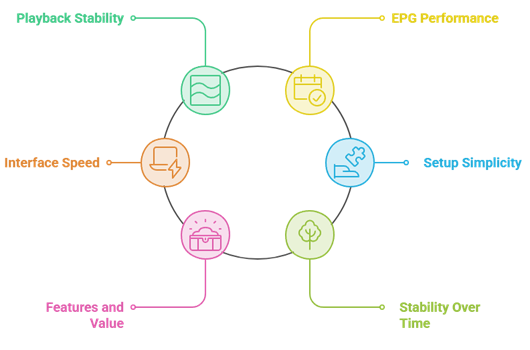
I ranked each player on the things that actually shape a night of viewing on the Shield, not on marketing claims. Every app was loaded with the same playlists, opened dozens of times, and pushed with 4K channels, large EPG files, and rapid channel changes. I also weighed how easy each one is to set up for someone who has never sideloaded an app before, since the best player is only useful if you can get it running.
- Playback Stability: How cleanly the player handled 4K and HDR streams without buffering, stutter, or audio drift during long sessions.
- EPG Performance: Whether the guide loaded quickly, stayed accurate, and made surfing hundreds of channels feel effortless on a remote.
- Interface Speed: How responsive menus felt on the Shield, since even a fast box can be let down by a heavy app.
- Setup Simplicity: The effort needed to install the app and load a playlist, from beginner friendly to advanced only.
- Features and Value: Recording, favourites, multi-playlist support, and whether any paid tier is genuinely worth the money.
- Stability Over Time: Whether the app kept working after updates and heavy use rather than crashing or forgetting settings.
How to Set Up an IPTV Player on Your Nvidia Shield
Getting an IPTV player running on the Nvidia Shield is quick once you know the steps. Most of these apps live on the Google Play Store, so you rarely need to sideload anything at all. Before you start, have your provider’s M3U URL or Xtream Codes login ready, along with a stable internet connection that can comfortably carry HD or 4K streams. Here is the simple path I follow whenever I set up a new player on my own Shield.
- Open the Play Store: Search for your chosen IPTV player and install it directly onto the Shield home screen.
- Launch and Allow Permissions: Open the app and grant storage or network access so playlists can load correctly.
- Add Your Playlist: Enter your M3U link or Xtream Codes details exactly as your provider supplied them.
- Wait for the Guide: Let the channels and EPG data populate, which can take a minute on large playlists.
- Arrange Favourites: Hide unused groups and pin the channels you watch most for faster access later.
If an app is not on the Play Store, enable installation from unknown sources in settings and use a trusted file manager such as Downloader to sideload the APK safely on your Shield.
Is Using an IPTV Player Legal?
IPTV players like the ones in this guide are completely legal. They are neutral tools, much like a web browser or a media player, and they do not host or provide any channels themselves. What matters is the service you connect to the player. When you load a playlist from a licensed, paid provider, you are streaming legal content through a legal app. Problems only arise when a playlist points to pirated streams that redistribute copyrighted channels without permission, which is where the real legal risk actually sits.
To stay on the right side of the line on your Shield, pair your player with a legitimate subscription rather than a random free list. Our guide to the best IPTV for Nvidia Shield is a good place to find reliable, paid options.
Free, unofficial playlists that promise thousands of premium channels for nothing are the ones to avoid, since they are usually unlicensed, unstable, and can expose you to malware or sudden takedowns.
- The Player Is Legal: Installing TiviMate, VLC, or Kodi on your Shield breaks no laws on its own.
- The Source Matters: Only a licensed, paid provider guarantees the channels you stream are legitimate.
- Avoid Free Piracy Lists: Playlists offering every premium channel free are almost always unlicensed and risky.
- Use a Paid Service: A reputable subscription keeps your viewing legal, stable, and far better quality.
- Consider a VPN: Many viewers add a VPN for privacy, though it does not make illegal streams legal.
Types of IPTV Players Explained
Not every IPTV player works the same way, and knowing the categories helps you pick the right tool for your Shield. Some apps are built specifically for IPTV playlists, with polished guides and favourites baked in. Others are general media players that happen to open live streams, while a third group are full media centres that can do far more than IPTV alone. Each type has a different learning curve, and the best choice depends on how much control and tinkering you actually enjoy.
On a powerful box like the Shield, you can comfortably run any of them, so the decision is really about your habits. A casual viewer wants something that simply works out of the box, while a power user may prefer an app they can heavily customise and extend.
- Dedicated IPTV Players: Apps like TiviMate and OTT Navigator are built purely for playlists, with strong EPGs, favourites, and recording features.
- General Media Players: Tools such as VLC play almost any stream or file, but offer a simpler guide and fewer IPTV extras.
- Media Centre Suites: Kodi and Plex go beyond IPTV, blending live channels with your own movies, music, and add-ons in one hub.
- Lightweight Free Apps: Players like Megacubo and GSE keep things basic and free, ideal for quick, no-fuss live viewing.
Choose the player category that fits your authorised media workflow and accessibility needs.
Verdict:
After all my testing on the Nvidia Shield, three players stood out from the rest. Each one handled 4K playback cleanly, loaded a fast and accurate guide, and felt genuinely comfortable to drive with the Shield remote night after night. Here is where I would start:
- TiviMate: The most polished option overall, with the best EPG, favourites, and premium recording.
- IPTV Smarters Pro: A free, dependable all-rounder that loads any playlist quickly and cleanly.
- OTT Navigator: Endlessly customisable and free to start, the top pick for hands-on Shield tinkerers.
FAQs
Are IPTV players legal to use on the Nvidia Shield?
IPTV players are media applications and supply no programming. Whether an imported source may provide a programme depends on copyright, licences, and territory. Verify the operator and recognised rights holders before use; this general information is not legal advice.
Can I run multiple M3U playlists on a single player?
Multiple-playlist support depends on the current app and tier. Check official documentation for account limits, device limits, storage, profile separation, and purchases. Import only user-owned or authorised playlists and keep their addresses private.
What is the difference between an IPTV player and an IPTV service?
An IPTV player is only the app that displays channels, while an IPTV service supplies the actual channels through an M3U or Xtream login. You need both to watch anything. Every option in this list is a player; since the Shield runs Android TV, our best IPTV players for Android TV guide is a useful companion read.
Do these players support 4K and HDR on the Nvidia Shield?
Some Shield players and hardware configurations support high-resolution and HDR formats, but results depend on the authorised source, codec, app, display, cable, and network. Confirm current device and developer documentation rather than relying on a label.
Which IPTV player has the best EPG on the Nvidia Shield?
Guide quality depends on the player, authorised guide source, time zone, categories, refresh behaviour, and current app version. Compare TiviMate, OTT Navigator, and other verified players using your own authorised source and accessibility needs.