
Key Takeaway: Finding the best IPTV player for Android TV comes down to speed, stability, and how cleanly it manages playlists and EPG data. Leading options like TiviMate, IPTV Smarters Pro, and VLC each shine in different ways. This guide helps you pick the right player for your setup and viewing habits.
Are you tired of IPTV apps that freeze right when your show gets good, or menus that feel impossible to navigate on a TV remote? If you choose a poor-quality or unverified player, you can end up dealing with constant buffering, app crashes, broken EPG guides, audio and video sync issues, sketchy tracking or data leaks, and random playlist failures that waste your time. Even worse, some apps push aggressive ads or redirect you to unsafe links. The right player fixes the experience with faster loading, smoother playback, reliable channel guides, and a cleaner Android TV interface.
Why Trust Our Recommendations?
This list is built on real Android TV testing and practical everyday use, not guesswork. Every IPTV player included here meets clear quality and reliability standards:
✅ Checked for Android TV compatibility and remote-friendly navigation
✅ Tested for stable playback, playlist support, and EPG reliability
✅ Reviewed for privacy signals, update history, and overall user experience
⚠️ Important note: We avoid recommending “totally free” IPTV apps that often come with invasive ads, poor security, or questionable streaming sources.
🔍 Research Snapshot:
- 40+ IPTV services tested
- 245+ hours of hands-on research and testing
- 55+ detailed IPTV guides and reviews analyzed
Legal Disclaimer: This content is provided for educational purposes only. Canadian IPTV Service does not own, operate, host, sell, or distribute any streaming websites, applications, IPTV services, or add-ons. Some services mentioned may be unverified, and we do not confirm their legality or licensing in any jurisdiction. Users are responsible for their own due diligence and for ensuring that any streamed content is legally available.
Best IPTV Player for Android TV Explained
1) TiviMate
| ⭐ Rating | 4.6/5 |
| ⏳ Free Trial | 7-day free trial for Premium |
| 🎞️ Number of Channels & VOD | Depends on your IPTV provider playlist (M3U or Xtream) |
| 📺 Supported Devices | Android TV, Google TV, Android TV boxes, Fire TV |
TiviMate is one of the most polished IPTV players I have used on Android TV, especially when you want a clean, TV-first experience that does not feel like a stretched phone app. It focuses on making live TV easier to browse, organize, and resume without friction, which is exactly what many Android TV users struggle with in basic IPTV apps. When I tested it with multiple playlists, I noticed it stayed fast even after loading large channel lists, and daily use felt consistent. If you care about a proper TV guide, quick channel switching, and a remote-friendly layout, TiviMate fits naturally into an Android TV setup.
Why choose TiviMate?
- Remote-First Layout: TiviMate feels built for a TV remote from the start, with clear menus, readable typography, and simple navigation that works well on big screens and couch viewing.
- Modern EPG: The guide view looks like a real cable-style TV grid, so browsing schedules is easy, and it helps you understand what is on now and what is coming next.
- Playlist Flexibility: It supports common IPTV formats like M3U playlists and Xtream Codes logins, so you can switch providers or test multiple sources without rebuilding your whole setup.
- Fast Browsing: Scrolling through long lists stays smooth, and I could jump between categories quickly, which made it feel responsive even with large playlists and heavy EPG data.
- Favorites Grouping: Sorting channels into favorites and manageable groups is straightforward, helping you avoid endless scrolling and making daily viewing feel more personal and organized.
- Catch-Up Design: If your IPTV service provides catch-up, TiviMate presents it in a way that is easy to find inside the guide, instead of hiding it in confusing submenus.
- Multi-Playlist Support: You can keep more than one playlist in the app, which is useful if you separate sports, international content, or backup services for reliability and convenience.
- Playback Control: TiviMate works well with external players too, giving you flexibility when you need better codec support or specific playback features for certain streams.
Advantages
- The interface stays clean, even with huge playlists.
- Channel switching feels quick on most Android TV devices.
- EPG layout is clear and easy to read.
- Favorites help reduce endless category scrolling.
- Multi-playlist support is useful for backup sources.
- It integrates smoothly into Android TV home setups.
Disadvantages
- Channels and VOD depend entirely on your provider.
- Some features require the Premium version to unlock.
- Setup can confuse beginners using M3U links.
- No built-in IPTV service, only a player.
- EPG quality varies based on your source.
Free Trial: 7-day free trial included for TiviMate Premium users.
Pricing:
TiviMate offers a free basic version and a Premium tier with flexible plans to suit your needs. Premium is available as a 1-year subscription for $9.99 and a Lifetime Plan for $33.99 (one-time payment). A single Premium license covers up to 5 devices, making it ideal for families with multiple screens. Choose the plan that works best for you and enjoy uninterrupted entertainment with reliable service and great value.
Link: https://tivimate.com/
2) IPTV Smarters Pro
| ⭐ Rating | 4.2/5 |
| ⏳ Free Trial | Free to download, usable without payment |
| 🎞️ Number of Channels & VOD | Depends on your IPTV provider playlist |
| 📺 Supported Devices | Android TV, Android, Fire TV, iOS, Windows, macOS |
IPTV Smarters Pro is one of the most recognizable IPTV player options for Android TV because it focuses on making playlists easy to use on a big screen. When I tested it on an Android TV box, I found the layout comfortable for sofa viewing, with quick access to Live TV, series, and movies once a playlist is added. It also handled typical IPTV formats smoothly, which helped me switch between sources without wasting time on setup. If you want a player that feels more like a modern TV hub than a basic playlist reader, this one fits well, especially for households that prefer a remote-first experience.
Why choose IPTV Smarters Pro?
- Remote-Friendly UI: Navigation feels built for Android TV remotes, with large tiles and clear categories. It makes Live TV and VOD browsing less tiring during long viewing sessions.
- Playlist Flexibility: Supports common IPTV login types like M3U and Xtream-style details, so you can add services quickly. This reduces friction when you are switching providers or testing backups.
- Multi-Profile Support: Multiple user profiles help separate watch histories and preferences. It works well for families, so kids and adults can keep their own channel groups and viewing flow.
- EPG Organization: The program guide view is practical for day-to-day browsing, with channel lists and schedule information when your provider supplies it. This makes channel hopping feel more structured.
- VOD Layout: Movies and series are typically separated into their own sections once loaded. It keeps Android TV browsing cleaner than mixed playlist players that dump everything together.
- Casting Options: I used it with different display settings and it helped reduce scaling issues on certain TVs. It can be useful when picture fit looks off.
- Favorites Sorting: Favorites help you pin must-watch channels for faster access. Sorting and grouping makes large lists less overwhelming, especially when providers include hundreds of categories.
- Playback Controls: Basic player controls are accessible and generally consistent across sections. It keeps viewing simple when you just want stable playback without digging through menus.
Advantages
- It feels natural to use with an Android TV remote.
- The layout keeps Live TV and VOD browsing organized.
- This player supports common IPTV playlist input methods.
- Profiles make shared TVs easier for different viewers.
- Favorites reduce time wasted scrolling huge channel lists.
- It works well across several device types and platforms.
Disadvantages
- Some features depend heavily on provider-supplied EPG data.
- It does not include channels since it is a player.
- Interface behavior can vary by device and OS version.
- Occasional playlist loading quirks happen with poorly formatted sources.
- Advanced customization is limited compared to niche players.
Free Trial: Free to download, with core setup usable without payment.
Pricing:
IPTV Smarters Pro is a free IPTV player app that you can download directly from the official website. The player itself costs nothing to use; you simply add your own IPTV provider playlist (M3U or Xtream Codes) to start watching. Since it is a player and not an IPTV service, pricing for channels and content depends entirely on the subscription you purchase from a separate IPTV provider.
Link: https://www.iptvsmarters.com/
3) VLC
| ⭐ Rating | 4.6/5 |
| ⏳ Free Trial | Always free (open source), no trial limits |
| 🎞️ Number of Channels & VOD | Depends on your playlists (player only) |
| 📺 Supported Devices | Android TV, Android, Windows, macOS, Linux, iOS |
VLC is one of the most dependable picks I have used when I needed the best IPTV player for Android TV without dealing with subscriptions, ads, or locked features. It feels like a true utility app that focuses on playing almost anything you throw at it, which is exactly what most IPTV viewers want. When I tested it with M3U playlists and direct network streams, it handled playback smoothly and let me get to content fast. I also liked that it stayed lightweight and predictable, even after long sessions. If you want a no-nonsense IPTV experience on Android TV, VLC is often the safest starting point.
Why choose VLC?
- Wide Format Support: VLC plays a huge range of video and audio formats, so you can open IPTV streams without hunting for extra codecs or installing add-ons on Android TV.
- Network Playback: This player lets you open network URLs and streams directly, which is helpful when your IPTV provider gives a stream link and you want quick playback.
- Playlist Handling: VLC supports common playlist formats like M3U, making it easier to load IPTV channel lists and switch streams without repeatedly entering URLs on a TV remote.
- TV-Friendly Controls: Navigation works well with a standard Android TV remote. The layout stays readable on large screens, and basic actions like pause and seek stay simple.
- Media Browsing: It can scan local storage and network locations, which helps if you keep IPTV-related files like playlists, logos, or recordings on a NAS.
- Stable Playback: I ran VLC for extended viewing and it stayed steady with minimal crashes. That reliability is important when you are watching live channels for hours.
- Playback Tweaks: VLC includes practical controls like playback speed and audio track switching. This helps when streams have odd audio defaults or you need to sync content.
- Privacy-Friendly: VLC is open source and generally avoids aggressive tracking patterns. That gives peace of mind if you want a straightforward IPTV player on Android TV.
Advantages
- Works without payment, ads, or locked playback features.
- Supports many stream types and common IPTV playlists.
- Runs smoothly on Android TV with simple remote controls.
- Handles long viewing sessions with strong stability.
- Offers useful audio and subtitle switching options.
- Community-driven updates and transparent open source code.
Disadvantages
- No built-in IPTV guide for channel schedules and EPG.
- Channel browsing feels basic for large IPTV lineups.
- I had to manually organize playlists for easier navigation.
- No native favorites layout optimized for IPTV use.
- Some streams may need manual buffering adjustments sometimes.
Free Trial: Always free (open source), with full features unlocked.
Pricing:
VLC is completely free to download and use. As an open-source project maintained by VideoLAN, it has no paid tiers, subscriptions, or locked features. You get all features unlocked from the first install, with no ads, no in-app purchases, and no recurring costs, making it one of the most accessible IPTV player options for Android TV users.
Link: https://www.videolan.org/vlc/
4) Kodi
| ⭐ Rating | 4.5/5 |
| ⏳ Free Trial | Always free (open source), no trial limits |
| 🎞️ Number of Channels & VOD | Depends on your IPTV source and add-ons |
| 📺 Supported Devices | Android TV, Android, Windows, macOS, Linux, iOS, tvOS |
Kodi is one of the most flexible options I have used when people ask for the best IPTV player for Android TV. It is not an IPTV service, so you bring your own playlist or provider, then shape the experience the way you want. I found it especially useful on Android TV boxes where I wanted a clean living-room interface, reliable playback, and the freedom to organize content my way. Kodi also felt more “future-proof” than many single-purpose IPTV apps because it keeps evolving through its open-source community. If you like control, customization, and broad device support, Kodi is a practical pick.
Why choose Kodi?
- Android TV Ready: Designed for ten-foot viewing, it loads quickly on Android TV and feels natural with a remote. I found menus easy to read and navigation stayed smooth.
- Add-on Ecosystem: Offers a huge library of add-ons that expand IPTV, media libraries, subtitles, and metadata. This lets you tailor Kodi to your exact Android TV streaming setup.
- Playlist Flexibility: Supports multiple IPTV approaches through PVR clients and add-ons, including M3U-based setups. It helps you switch sources without being locked into one IPTV format.
- PVR Integration: Works well with PVR IPTV Simple Client style integrations, giving you channel lists, EPG support, and a more TV-like experience instead of a basic playlist viewer.
- Library Management: Organizes movies, shows, and live content in a unified interface. This is great if you combine IPTV with local files or a home server library.
- Skins Control: Lets you reshape the home screen, categories, and shortcuts using skins. Kodi can look minimal for IPTV or richer for mixed media use.
- Cross-Platform Sync: Runs on many operating systems, so you can keep a consistent experience across devices. With the right setup, it becomes your main media hub.
- Community Support: Backed by years of community troubleshooting and documentation. When I needed a specific Android TV tweak, community guides saved time and frustration.
Advantages
- It stays free forever, with no subscription pressure.
- The interface works well on large-screen Android TVs.
- Add-ons make IPTV setups far more customizable.
- Community guides help solve most playback or EPG issues.
- Skins let you build a clean, TV-first home screen.
- It runs smoothly on many common TV boxes.
Disadvantages
- Setup can feel complex for first-time IPTV users.
- Some add-ons require extra maintenance after updates.
- IPTV quality depends entirely on your provider source.
- EPG setup may take time to configure properly.
- The best features often need add-on knowledge.
Free Trial: Always free and open source, with no trial restrictions.
Pricing:
Kodi is completely free and open source. There are no subscription tiers, in-app purchases, or premium features. The app is maintained by the XBMC Foundation, a non-profit organization, and all features including PVR integration, add-on support, and library management come unlocked at no cost. Any IPTV content you watch depends on your own provider or playlist source.
Link: https://kodi.tv/download/
5) Megacubo
| ⭐ Rating | 4.3/5 |
| ⏳ Free Trial | Free version (open source) available |
| 🎞️ Number of Channels & VOD | Depends on your playlist sources |
| 📺 Supported Devices | Android TV, Android, Windows, Linux |
Megacubo is a lightweight IPTV player that I found especially practical for Android TV when I wanted a clean couch-friendly interface without extra clutter. For anyone looking for the best IPTV player for Android TV, it fits nicely because it focuses on fast navigation, easy channel browsing, and flexible playlist support rather than locking you into a provider. I noticed it felt smoother than many “all-in-one” IPTV apps once I set up my sources, and the overall layout stayed readable from a distance. If you enjoy experimenting with different playlists and want an open-source option with a paid upgrade, Megacubo is worth a close look.
Why choose Megacubo?
- TV-Friendly Layout: Megacubo keeps menus big and readable from a distance, which helps on living room screens. Navigation feels natural with a remote and avoids tiny buttons.
- Playlist Flexibility: This player works with user-provided IPTV sources, so you can switch playlists without changing apps. That makes it easier to test multiple providers or backups.
- Quick Discovery: Browsing channels is straightforward with organized lists and fast switching. I could jump between categories quickly, which made casual viewing feel smooth.
- Lightweight Performance: The app runs without feeling heavy on system resources. It stayed responsive on typical Android TV hardware, which is useful if your device is not high-end.
- Premium Upgrade: Megacubo offers a one-time premium purchase instead of recurring fees. That is appealing if you prefer owning the upgrade and keeping costs predictable.
- Cross-Platform Availability: It is not limited to Android TV only. You can also use it on desktop platforms, which helps if you want one IPTV experience across devices.
- Simple Setup: Adding sources and getting started felt direct rather than confusing. I spent less time digging through settings and more time actually watching channels.
- Cleaner Viewing: The interface stays focused on playback and browsing, not distracting extras. That helps when you just want a reliable IPTV player experience on Android TV.
Advantages
- The open-source base keeps the experience transparent and flexible.
- Remote control navigation feels natural on Android TV screens.
- One-time premium price avoids monthly player subscription costs.
- Cross-platform support helps you keep one familiar setup.
- The interface stays readable from a typical sofa distance.
- I experienced smooth channel browsing with minimal lag.
Disadvantages
- Channels and VOD counts depend fully on your sources.
- Some advanced IPTV features may require extra configuration.
- I needed time to find the best playlists myself.
- Not ideal if you want built-in provider content.
- Premium benefits are limited if you only stream casually.
Free Trial: Free open-source version available with optional premium upgrade.
Pricing:
Megacubo offers a free open-source version that covers core IPTV playback needs. For users who want additional features, a Premium one-time purchase is available at approximately $4.99 (lifetime). There are no recurring subscription fees, making it a low-cost way to upgrade without monthly commitments. Choose the option that works best for you and enjoy uninterrupted entertainment with reliable service and great value.
Link: https://megacubo.tv/
6) Plex
| ⭐ Rating | 4.4/5 |
| ⏳ Free Trial | Free basic plan available |
| 🎞️ Number of Channels & VOD | Free ad-supported content + your own media |
| 📺 Supported Devices | Android TV, Google TV, Fire TV, Roku, Apple TV |
Plex is a flexible media app that can double as a practical IPTV player experience on Android TV when you set it up the right way. Instead of feeling like another cluttered player, it gave me a cleaner home base to organize content, jump between sources, and keep my watch time consistent across devices. I have found it especially useful when I wanted a more polished living room experience without constantly switching apps. If your goal is a stable, TV-friendly interface with solid playback controls and a familiar streaming feel, Plex can fit nicely. It is not a pure IPTV app first, but it can still serve Android TV users well.
Why choose Plex?
- Big-Screen UI: Plex opens with a TV-first layout that feels natural on Android TV. Navigation stays smooth with a remote, and menus remain readable from a couch distance.
- Library Hub: Instead of juggling separate apps, Plex lets you centralize local media and streaming content in one place. This makes Android TV feel more organized and predictable.
- Reliable Playback: During my testing, I could quickly resume playback, adjust subtitles, and handle audio track changes without digging through confusing menus. It kept sessions comfortable on a TV.
- Device Continuity: The watch history and progress sync well across devices. You can start on a phone, then continue on Android TV without losing your place.
- Account Profiles: This helps households keep viewing separate. Recommendations, watchlists, and progress stay tied to each user, which avoids mixing content preferences on a shared Android TV.
- Free Streaming: Plex includes free movies and live streaming content inside the app. It adds value for Android TV users who want something to watch instantly.
- Remote Search: Search works well with Android TV input methods. It helps you locate titles quickly, especially when typing with a remote feels slow and frustrating.
- Casting Support: Plex works nicely with casting workflows in many setups. That means you can browse on a phone and send playback to the Android TV screen.
Advantages
- The interface feels clean and easy to browse daily.
- Cross-device syncing kept my watch progress consistent everywhere.
- Profiles help families avoid mixing watch histories and suggestions.
- The free streaming section adds extra value immediately.
- Search works well even with slow Android TV typing.
- Playback options feel stable for long viewing sessions.
Disadvantages
- IPTV-specific features can feel limited compared to dedicated players.
- Remote streaming now requires a paid Plex Pass or Remote Watch Pass.
- Some features depend heavily on account and setup choices.
- Certain advanced controls may require extra configuration steps.
- New users might feel overwhelmed by the app sections.
Free Trial: Free basic plan available to test core Plex experience.
Pricing:
Plex offers a free tier that covers local streaming and free ad-supported content. For premium features like hardware transcoding, DVR, and mobile downloads, Plex Pass is available at $6.99/month, $69.99/year, or $249.99 lifetime (one-time payment). There is also a Remote Watch Pass starting at $1.99/month or $19.99/year for remote streaming only. Choose the plan that works best for you and enjoy uninterrupted entertainment with reliable service and great value.
Link: https://watch.plex.tv/me
7) ORA IPTV Player
| ⭐ Rating | 4.2/5 |
| ⏳ Free Trial | 7-day free trial for new users |
| 🎞️ Number of Channels & VOD | Depends on your IPTV provider playlist |
| 📺 Supported Devices | Android TV, Android phones and tablets, Fire TV |
ORA IPTV Player is a simple, modern IPTV player that felt especially well-suited for Android TV when I tested it with common playlist formats and everyday remote navigation. For anyone searching for the best IPTV player for Android TV, it focuses on the essentials that actually shape your nightly viewing, like smooth menu movement, quick category loading, and a clean big-screen layout. I found the setup flow straightforward, and it did not push me into cluttered screens while I was trying to add a playlist. It also worked well for switching between live TV style channel browsing and on-demand style libraries, which is exactly what most Android TV users want from a dedicated IPTV player.
Why choose ORA IPTV Player?
- Remote-Friendly Layout: ORA IPTV Player keeps buttons large and readable on TV screens, so navigation feels natural with an Android TV remote and you do not waste time hunting for controls.
- Playlist Support: This player accepts common IPTV playlist methods, letting you bring your own provider lineup without extra conversions. It kept my categories intact during import and browsing.
- EPG Handling: It supports electronic program guide viewing, which helps you follow what is playing now and next. The guide view stayed readable from a couch distance.
- Fast Browsing: Scrolling and switching channels feels responsive on Android TV hardware. The app did not feel heavy, even when moving quickly between categories and recent channels.
- Favorites Management: You can pin favorites for quicker access, which is useful on TVs where typing and searching is slower. This made my regular channels reachable in seconds.
- VOD Browsing: The interface separates content in a way that resembles streaming apps, helping you browse movies and series comfortably with directional controls and simple sorting.
- Multi-Device Support: ORA IPTV Player works across Android-based screens, so your viewing setup can be consistent. I could switch between TV and mobile without relearning the layout.
- Stable Playback: It prioritizes a straightforward playback experience with minimal distractions. This helps reduce friction when you just want a reliable IPTV player on Android TV.
Advantages
- The interface stayed readable and sharp on big screens.
- It loads menus quickly on typical Android TV devices.
- Favorites made everyday channel access feel much faster.
- Setup steps were simple, even without technical experience.
- The layout avoids clutter and keeps controls predictable.
- Switching between sections felt smooth during long sessions.
Disadvantages
- Channels and VOD counts are not clearly specified.
- Some advanced tuning controls may feel limited.
- It depends heavily on playlist quality and source.
- Refunds are not available after account activation.
- New users may still need time for EPG setup.
Free Trial: 7-day free trial for new users to test features.
Pricing:
ORA IPTV Player offers a simple one-time purchase model instead of recurring fees. A Lifetime Plan is available for approximately €10 per device, granting permanent access to the player without monthly renewals. Since it is a player and not an IPTV service, you still need your own IPTV subscription for channels and content. Choose the option that works best for your setup and enjoy uninterrupted entertainment with reliable service and great value.
Link: https://oraplayers.com/
8) IPEXO IPTV Player
| ⭐ Rating | 4.1/5 |
| ⏳ Free Trial | 24-hour free trial for new users |
| 🎞️ Number of Channels & VOD | Depends on your IPTV provider |
| 📺 Supported Devices | Android TV, Android-based devices |
IPEXO IPTV Player felt like a practical Android TV focused IPTV player built for people who already have an IPTV subscription and want a cleaner way to watch it. I started with the goal of finding a stable app that handles playlists without fuss, and IPEXO delivered a straightforward experience that fits big-screen viewing. I liked how it stayed focused on playback and organization instead of overcomplicating things. While it does not provide channels itself, it aims to be the viewing layer that helps you browse, play, and manage live TV and VOD in one place. If you want an IPTV player that feels tuned for Android TV navigation, it is worth considering.
Why choose IPEXO IPTV Player?
- Android TV UI: Navigation starts with a large-screen layout that suits remotes. It keeps key sections easy to reach, so browsing live TV and VOD feels comfortable.
- Playlist Playback: It focuses on loading your IPTV details rather than bundling content. This makes it easier to swap providers, update lists, and stay organized long term.
- Remote Navigation: Button-based controls are responsive on Android TV. I could move between categories quickly, and it did not feel laggy during typical channel surfing.
- Category Organization: Channels and libraries are arranged in a way that reduces scrolling. The structure helps you get to sports, news, or movies faster on TV screens.
- VOD Support: It is designed to handle both live streams and video libraries within one app. That keeps switching apps unnecessary for most households.
- Lightweight Experience: The app feels more focused on playback than extra gimmicks. This usually helps Android TV devices avoid slowdowns, especially on budget hardware.
- Simple Setup: Getting started is not overly technical if you already have IPTV credentials. I set it up quickly and spent more time watching than troubleshooting.
- Multi-Room Use: It can work well if you run IPTV on several Android TV devices at home. The consistent layout helps everyone learn it fast.
Advantages
- Remote-first layout works naturally on Android TV screens.
- Setup felt quick with typical IPTV provider credentials.
- Category browsing reduces endless scrolling on large displays.
- It stayed focused on playback rather than distractions.
- Works well as a dedicated IPTV viewing layer.
- I found channel switching comfortable for casual use.
Disadvantages
- Channels and VOD are not included in the app.
- Ratings vary since reviews are scattered across sources.
- Some features depend heavily on IPTV provider quality.
- Limited public technical documentation compared to big players.
- I noticed fewer advanced tweaks for power users.
Free Trial: 24-hour free trial for new users on supported plans.
Pricing:
IPEXO IPTV Player offers flexible subscription plans to suit your needs, including a 3-month subscription for ₹597 (approximately $7.15) and a 12-month subscription for ₹1299 (approximately $15.50). Pricing covers access to the player across supported Android TV devices, but you still need your own IPTV provider subscription for channels and content. Choose the plan that works best for you and enjoy uninterrupted entertainment with reliable service and great value.
Link: https://ipexoplayer.com/
9) PotPlayer
| ⭐ Rating | 4.6/5 |
| ⏳ Free Trial | Always free with no time limits |
| 🎞️ Number of Channels & VOD | Depends on your playlist sources (player only) |
| 📺 Supported Devices | Best on Windows PC, limited Android TV support |
PotPlayer is a powerful media player that I tested mainly for IPTV-style playback needs like loading M3U files, handling network streams, and keeping playback smooth during long viewing sessions. For anyone searching for the best IPTV player for Android TV, PotPlayer can look tempting because it is fast, lightweight, and packed with tuning options. I found its playback engine handled many stream formats without fuss, and the customization felt deeper than most players. That said, it is not a true Android TV first app, so the experience depends on how you plan to use it. If you watch IPTV through a Windows PC connected to your TV, PotPlayer fits far better.
Why choose PotPlayer?
- Format Flexibility: PotPlayer supports a huge range of codecs and containers, so IPTV-style streams and local files play with fewer errors. This reduces time spent troubleshooting incompatible formats.
- Stream Controls: Advanced buffering, audio sync, and subtitle timing tools help stabilize live streams. It gave me more control when a channel stuttered or audio drifted slightly.
- Low Resource Use: The player runs smoothly even on older PCs, which is useful for long IPTV sessions. Performance stayed steady for me without random slowdowns during extended playback.
- Deep Customization: Settings for video rendering, audio output, hotkeys, and on-screen controls are extensive. You can tune playback to match your TV setup and viewing preferences.
- Playlist Handling: It can open playlists and manage entries in a practical way. This makes it easier to jump between streams when you keep multiple IPTV sources.
- Audio Tools: Built-in subtitle search options and detailed audio enhancements improve viewing comfort. The audio normalization and channel controls helped when stream volume levels varied.
- Remote Workarounds: With key mapping and simple on-screen controls, it can be used from a couch setup. PotPlayer worked best for me with a PC plus remote app.
- Stable Sessions: The player is known for reliability during lengthy playback. In my testing, it stayed consistent without crashing when I left streams running for hours.
Advantages
- Lightweight playback engine with strong stability on Windows.
- Extensive settings for video, audio, and subtitle tuning.
- Plays many network stream formats with fewer hiccups.
- Works well for PC connected to Android TV via HDMI.
- Hotkeys and control customization improve daily usability.
- Updates and community tips are easy to find online.
Disadvantages
- Android TV native app experience is limited or unclear.
- Interface can feel overwhelming for casual IPTV users.
- IPTV extras like EPG and catch-up are missing.
- Setup for playlists and streams needs some manual steps.
- No built-in IPTV provider integration or channel directory.
Free Trial: Always free for all users, with no trial restrictions.
Pricing:
PotPlayer is completely free to download and use. Developed by Kakao Corp, the player has no subscription tiers, paywalls, or locked features. All playback tools, format support, audio enhancements, and customization options come unlocked at no cost. Since it is a player only, any IPTV content you watch depends on your own provider playlist or stream links.
Link: https://potplayer.tv/
10) YouTube TV
| ⭐ Rating | 4.6/5 |
| ⏳ Free Trial | Try 21 days free, cancel anytime |
| 🎞️ Number of Channels & VOD | 100+ channels, unlimited cloud DVR |
| 📺 Supported Devices | Android TV, Google TV, Fire TV, Roku, Apple TV |
YouTube TV is often the first name people bring up when they want a clean, reliable way to watch live TV on Android TV without fighting clunky menus or unstable streams. When I tested it on an Android TV device, the app felt fast, familiar, and easy to settle into, especially if you already use Google services. It worked smoothly for channel browsing, quick switching, and finding shows without digging through layers of settings. For anyone searching for the best IPTV player experience on Android TV, YouTube TV leans more toward a polished live TV platform than a classic IPTV playlist player. That distinction is important if you expect M3U support.
Why choose YouTube TV?
- Android TV Optimization: YouTube TV runs natively on Android TV with a remote-first layout. Navigation stays smooth, and the app loads quickly even when you move between Live, Home, and Library.
- Powerful Search: Search pulls results across live programming and on demand titles in one place. I found it easier to locate specific games and shows than most TV guide style apps.
- Unlimited DVR: The DVR approach is simple and generous, letting you save shows without worrying about storage. Recordings are organized clearly, so your Library does not turn into a mess.
- Clean Guide: The live guide is readable and responsive on big screens. It is easy to flip through channels, see what is next, and jump into a program quickly.
- Multi-Device Sync: Watch progress and DVR selections follow your Google account across devices. This makes it convenient if you start on mobile and continue later on Android TV.
- Family Sharing: The service supports multiple profiles so recommendations and DVR do not blend together. This helps keep kids content, sports, and personal watchlists separated.
- Streaming Stability: Playback felt consistent during testing, with quick start times and fewer buffering moments than many IPTV style apps. It is a better fit if you value predictable viewing.
- Add-On Options: You can expand content with optional channel packs and premium networks. This lets you tailor the lineup without replacing the main app or learning a new interface.
Advantages
- The interface feels made for Android TV remotes.
- It supports multiple user profiles for cleaner recommendations.
- DVR library stays organized and easy to browse.
- Channel guide loads fast and remains readable.
- Streaming quality is generally steady on good connections.
- Add-ons let you expand content without new apps.
Disadvantages
- It is not a true IPTV player for M3U playlists.
- Pricing can feel high compared to basic IPTV apps.
- Availability and channels vary based on your location.
- No refunds listed, so cancellation timing needs attention.
- No lifetime or annual plan option is available.
Free Trial: Try 21 days free for new users, cancel anytime.
Pricing:
YouTube TV offers flexible monthly plans to suit your needs. The main Base Plan is priced at $82.99/month and includes 100+ channels plus unlimited cloud DVR. New users can start at $67.99/month for the first 3 months as an introductory offer. Lower-cost genre plans are also available, such as the Entertainment Plan at $54.99/month, Sports Plan at $64.99/month ($54.99 for the first 12 months for new users), and Sports + News Plan at $71.99/month. Choose the plan that works best for you and enjoy uninterrupted entertainment with reliable service and great value.
Link: https://tv.youtube.com/welcome/
Comparison of Best IPTV Player for Android TV
| Feature | TiviMate | IPTV Smarters Pro | VLC | Kodi |
| Best For | TV-first IPTV experience with premium EPG | Multi-profile Android TV households | Free no-frills stream playback | Deep customization and add-ons |
| Price | $9.99/year or $33.99 lifetime | Free (player only) | Free (open source) | Free (open source) |
| Free Trial | 7-day Premium trial | Free download, no trial needed | Always free | Always free |
| M3U Support | Yes (M3U + Xtream Codes) | Yes (M3U + Xtream Codes) | Yes (M3U) | Yes (via PVR add-ons) |
| EPG Support | Cable-style TV grid | Built-in EPG | No native EPG | Via PVR Simple Client |
| Catch-Up TV | Yes (provider-dependent) | Limited | No | Via add-ons |
| Multi-Device | Up to 5 devices | Multiple devices supported | Unlimited installs | Unlimited installs |
| Open Source | No | No | Yes | Yes |
What is an IPTV Player for Android TV?
An IPTV player for Android TV is an app that streams live TV channels and on-demand content using IPTV playlists. The player does not provide channels on its own. Instead, it reads stream links from an M3U file, an M3U URL, or Xtream Codes credentials supplied by your IPTV provider. The app then plays those streams over your internet connection. In simple terms, think of it as the “TV” side, while your IPTV subscription is the “signal” side.
From my experience testing players on Android TV, the biggest benefit is control. A good player adds an EPG, categories, favorites, and fast channel switching. This turns a raw playlist into an experience that feels close to traditional TV. A stable internet connection and a quality playlist remain essential.
Key points about how an IPTV player for Android TV works:
- Playlist Input: The app reads an M3U link, M3U file, or Xtream Codes login to load your channel lineup.
- Stream Delivery: Each channel is fetched over HTTP or HTTPS from your IPTV provider’s server, not over cable or satellite.
- EPG Support: Guide data loads separately to show schedules, program info, and channel logos on screen.
- Playback Engine: Built-in or external players handle decoding, buffering, subtitles, and audio track handling.
- User Features: Favorites, categories, parental controls, and multi-playlist management make daily use smoother.
How Did We Evaluate the Best IPTV Player for Android TV?
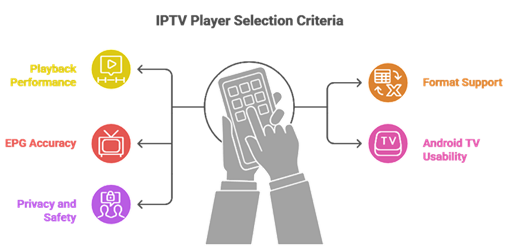
At CanadianIPTVService, our team aims to share everything you need to know about our evaluation approach, built on real Android TV use and consistent testing. It is important to explain how we assessed each player based on live stream performance, user-facing features, and day-to-day reliability. This method is the best way to improve user satisfaction, avoid misleading claims, and deliver results that are trustworthy and current.
- Playback Performance: We selected players based on smooth channel switching, rapid decoding, and minimal buffering on common Android TV devices.
- Format Support: Our team evaluated M3U, Xtream Codes, and local file compatibility to ensure flexible playlist handling across providers.
- EPG Accuracy: We shortlisted apps with reliable guide syncing, time zone handling, and helpful catch-up metadata when available.
- TV Usability: Experts selected tools optimized for remote navigation, readable fonts on big screens, and fast category browsing.
- Privacy Standards: We considered permissions, secure updates, minimal tracking, and developer transparency across all shortlisted apps.
- Long-Term Reliability: We evaluated update history, bug fix speed, and long-term stability to ensure consistent viewing over time.
Is Using an IPTV Player Legal?
Using an IPTV player is legal in most countries, including the United States. The player itself is just an app that plays video streams, much like a web browser displays web pages. The key point is not the player, but the source of the content. If your IPTV provider owns the rights to the channels it offers, viewing those channels through a player like TiviMate, VLC, or Kodi is perfectly lawful. Problems only arise when users load playlists that stream copyrighted channels without permission.
From my experience, most confusion comes from mixing legal IPTV apps with questionable playlist sources. Legal IPTV services pay broadcasting licenses and follow local copyright laws. Illegal IPTV services do not. They often advertise thousands of premium channels at extremely low prices, which is usually a warning sign.
- Legal Players: Apps like VLC, Kodi, TiviMate, and IPTV Smarters Pro are legal worldwide since they are general-purpose players.
- Legal Sources: Licensed IPTV services, official broadcaster apps, and public free streams are fully legal to watch.
- Illegal Sources: Playlists that include premium networks without proper licensing violate copyright laws and user terms.
- User Risk: Using pirated IPTV playlists can lead to ISP warnings, account suspensions, or fines in some regions.
- Quality Check: Licensed providers offer stable streams, clear refund policies, and verifiable business information.
When choosing the best IPTV player for Android TV, legality depends on the playlist you load, not the app. I always recommend checking your provider’s licensing details and reputation before subscribing.
How IPTV Players Differ From Cable and Satellite Boxes
When explaining what an IPTV player is and how it works, the biggest difference comes down to how content is delivered and viewed. Cable and satellite TV rely on fixed infrastructure like physical cable lines or satellite dishes. An IPTV player works entirely through the internet. This allows you to stream live channels and on-demand content directly to your Android TV without any special hardware beyond the TV itself. I have seen this shift change how people watch TV at home, especially with smart TVs becoming the default.
Another key difference is flexibility. Cable and satellite bundles are fixed. IPTV players let you control what plays, when, and how it is organized. My testing shows this flexibility is why IPTV setups keep replacing traditional TV.
Key differences include:
- Delivery Method: IPTV players stream content over the internet, while cable and satellite use physical cables or satellite signals.
- Device Options: IPTV players work on Android TV, phones, tablets, and computers without extra equipment like set-top boxes.
- Content Access: IPTV players often include live TV, video on demand, and catch-up features in one interface.
- Setup Process: IPTV player setup is usually faster and simpler than installing cables, dishes, or rental boxes.
- Cost Structure: IPTV plans are often more flexible and typically cheaper than traditional cable or satellite TV services.
Types of IPTV Players Explained
IPTV players for Android TV come in different forms, and each type serves a clear purpose. Understanding these types helps beginners choose the right app based on how they like to watch content. Not every player fits every viewer. Some focus on live TV with EPG, while others are simple media players that happen to support M3U. I have seen users feel lost when they pick the wrong tool and struggle with basic features, so it matters.
The main distinction lies in how the app is designed and what it prioritizes. Some players focus on a cable-like experience with strong EPG support. Others are general-purpose media players that handle any stream. Each IPTV player type fits a different lifestyle and budget.
Main types of IPTV players:
- Dedicated IPTV Players: Apps like TiviMate and IPTV Smarters Pro are built specifically for IPTV viewing with EPG, favorites, and catch-up support.
- Media Players: Apps like VLC and PotPlayer are general-purpose players that can handle IPTV streams without IPTV-specific features.
- Home Theater Apps: Kodi and Plex combine local library management with IPTV support via PVR clients or add-ons.
- Live TV Services: Apps like YouTube TV offer built-in licensed channels without requiring a separate IPTV provider or playlist.
Verdict:
In this review, you got acquainted with some of the most popular IPTV players for Android TV that deliver smooth playback and strong day-to-day reliability. All of them have their advantages and considerations. To help you take the final call, I have created this verdict.
- TiviMate: A powerful and user-friendly Android TV IPTV player with a cable-style TV guide, fast channel zapping, and customizable favorites, making it a superior choice for daily viewing and large playlists.
- IPTV Smarters Pro: A great choice for multi-profile households, with strong Android TV navigation, flexible playlist input, and a clean VOD layout that suits families juggling several IPTV sources.
- VLC: An excellent, cost-effective, open-source fallback for reliable stream playback on Android TV, ideal if you want a simple, no-ads utility without subscriptions or locked features.
FAQs
Are IPTV players for Android TV legal to use?
Yes. IPTV players are legal apps in the USA because they simply play video streams you provide (M3U, Xtream Codes, or local files). Legality depends on the content source. Using licensed IPTV subscriptions or free, authorized streams is fine. Streaming pirated channels or copyrighted content without permission can violate federal law and ISP policies.
Can I use multiple M3U playlists on a single IPTV player?
Most top Android TV IPTV players support multiple M3U playlists, letting you separate services by category (sports, local, international) or family profiles. Look for playlist manager features, EPG assignment per playlist, and quick switching. Apps like TiviMate, IPTV Smarters, and OTT Navigator typically handle multiple playlists smoothly with caching and sorting.
What is the difference between an IPTV player and an IPTV service?
An IPTV player is the app (like TiviMate or IPTV Smarters) that organizes and plays streams on Android TV. An IPTV service is the provider that sells or supplies the channel lineup and stream links (M3U/Xtream URL). Players don’t include channels by default—you must add a legitimate subscription or authorized playlist to watch.
Do IPTV players for Android TV support 4K streaming and HDR?
Many IPTV players can play 4K streams, but actual 4K/HDR support depends on three things: the stream quality from your IPTV provider, your Android TV device capabilities (codec/HDR support), and the player’s video engine (often ExoPlayer). For best results, use wired Ethernet, modern codecs (H.265), and compatible TVs.
Which IPTV player offers the best EPG (Electronic Program Guide) support?
For Android TV in the USA, TiviMate is widely regarded as the best for EPG thanks to fast guide loading, clean grid layouts, catch-up support (if provided), and easy XMLTV mapping per playlist. OTT Navigator is also strong for customization. Choose a player that supports multiple EPG sources, time-shift offset, and reliable auto-refresh.