
IPTV Smarters Pro is best evaluated as playback software, not as a subscription service. The application organises authorised M3U, API-style or portal credentials supplied by the user; installing it does not create an account with a programming provider and does not establish rights to any source.
This 2026 review concentrates on the player itself: official distribution, supported login formats, device compatibility, guide tools, local security, privacy and practical limitations. It also explains how to identify similarly named applications before sharing credentials.
Content and licensing notice: IPTV Smarters Pro is a player and does not sell or include programming. Use only accounts, playlists and media you own or are authorised to access. Verify the developer and application source because similarly named products may have different owners, policies and permissions.
What This Smarters Review Actually Evaluates
The useful questions are whether the correct app can be identified, whether it receives updates, how it stores credentials and whether its controls work well on the chosen device. Catalogue claims belong to the source added by the user, not to the player, so they should never be presented as a Smarters feature.
- Confirm the developer name and official store listing.
- Review permissions and avoid granting access unrelated to playback.
- Use separate profiles for authorised household sources.
- Remove saved credentials before selling or resetting a device.
What Is IPTV Smarters Pro and How Does It Work?
IPTV Smarters Pro is a free application that acts as a front end for an IPTV subscription. On its own it shows no content; its job is to take the login details or playlist supplied by an IPTV provider and organise them into a clean, easy-to-navigate interface. Think of it as the equivalent of a media player: the app provides the screen and the controls, while your subscription provides the actual channels and films.
In practice it works in two main ways. You either paste an M3U playlist URL, which loads a flat list of channels, or you enter Xtream Codes credentials — a username, password and server URL — which pull in live channels, video-on-demand, episodic titles and the programme guide together in one organised login. The second method is far richer, which is why most premium providers issue Xtream Codes details. Once loaded, the app sorts everything into Live TV, on-demand titles, episodic titles and time-shift feature sections, applies channel logos and an EPG, and lets you start watching. It is this transformation of a messy playlist into a tidy, tile-based experience that has made the app so popular.
IPTV Smarters Pro Key Features at a Glance
IPTV Smarters Pro packs a surprising amount into a free app. Its headline strengths are broad device support, compatibility with both major playlist formats, and a genuinely modern interface with a working programme guide. The table below summarises the essentials I confirmed during testing so you can see what the app offers before reading the detail. Crucially, almost everything listed is available on the free version, with no premium unlock required to reach the core viewing experience.
| ⭐ My Rating | 4.3 / 5 |
| 💵 Price | Free (subscription required) |
| 🔌 Playlist Formats | M3U & Xtream Codes API |
| 📺 Content Types | Live TV, VOD, episodic titles, time-shift feature |
| 🗓️ EPG | Full electronic programme guide |
| 👥 Extras | Multi-screen, parental controls, favourites |
| 🖥️ Devices | Android, iOS, Firestick, Windows, Mac |
- Live TV, on-demand titles, episodic titles and time-shift feature in one interface
- A full electronic programme guide with now-and-next
- Multi-screen viewing, favourites and parental controls
- External player support and multiple user profiles
- Works with both M3U playlists and Xtream Codes logins
Is IPTV Smarters Pro Free? What You Actually Need
Yes, IPTV Smarters Pro is free to download and use on most platforms, which is a big part of its appeal. There is no subscription fee for the app itself, and no ads cluttering the interface. However, the app is useless without content, and that is the part that costs money. To watch anything you need an active IPTV subscription from a provider, which supplies the M3U link or Xtream Codes login you feed into the app.
So the honest answer is that the software is free, but a complete setup is not. Budget for a subscription from a reliable provider, and treat the app purely as the viewing layer on top of it. One small caveat: on Apple devices the equivalent player has historically carried a one-off load fee for adding a playlist, so iOS users may pay a token amount, while Android, Firestick and Windows users generally pay nothing for the app. If you need a service to pair with it, the recommended options above are a sensible starting point.
Supported Devices and Compatibility
Device support is one of IPTV Smarters Pro’s strongest areas. During testing it ran smoothly on an Amazon Firestick, an Android phone and a Windows laptop, and the app is also available for iOS, macOS and Android TV boxes. This broad coverage is a major reason it has become the default recommendation for so many providers, since a single familiar interface works across almost every screen in the house.
There is one important limitation to flag for 2026. The app is no longer directly available on Samsung Tizen and LG webOS smart televisions, as those platforms removed it, so owners of those TVs will need to stream through a connected device such as a Firestick or Android box instead. On everything else, installation is straightforward: it is on the Amazon Appstore and Google Play, and Windows and Mac versions are available too. If you plan to watch on a streaming stick, my guide to the best IPTV for Firestick covers the app options in more depth.
| 📱 Platform | ✅ Availability |
| Android phones, tablets & TV boxes | Yes |
| Amazon Firestick / Fire TV | Yes |
| iPhone, iPad & Mac | Yes |
| Windows PC | Yes |
| Samsung Tizen / LG webOS | Not in 2026 (use a stick) |
How to Set Up IPTV Smarters Pro (Xtream Codes & M3U)
Setting up IPTV Smarters Pro is quick once you have your subscription details to hand. After installing the app, you are asked how you want to log in. The two options are Xtream Codes and M3U, and the choice matters. Xtream Codes, which asks for a username, password and server URL, is the better route because it loads live channels, on-demand titles, episodic titles and the programme guide together in one organised login. An M3U URL, by contrast, loads a flat list of channels with less metadata.
- Install IPTV Smarters Pro from your device app store
- Open the app and choose Xtream Codes or M3U login
- Enter your provider username, password and server URL
- Wait for the app to download the playlist and EPG
- Open Live TV, on-demand titles or episodic titles and start watching
Once you enter your details, the app connects to your provider’s server, downloads the playlist and populates the Live TV, on-demand titles and episodic titles sections. Adding your EPG happens automatically with Xtream Codes, or manually with an EPG URL if you use M3U. The whole process took me under five minutes on each device during testing. If channels fail to load, double-checking the server URL and credentials resolves it almost every time. Because the same login works across devices, setting it up on a second screen simply means repeating the same short process.
Interface, EPG and Playback Experience
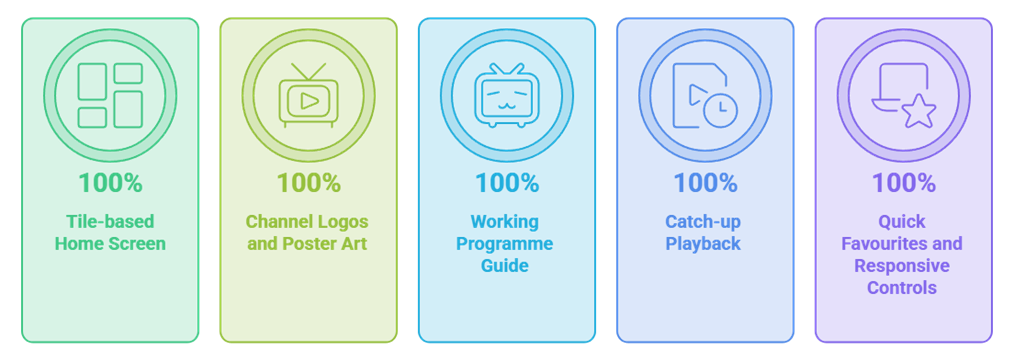
Where IPTV Smarters Pro genuinely shines is its interface. Rather than dumping you into a plain channel list, it presents a clean, tile-based home screen split into Live TV, on-demand titles, episodic titles and time-shift feature, with channel logos, poster art for films and a working electronic programme guide. It looks and feels far more like a mainstream streaming app than the raw playlist underneath it, which is exactly why so many viewers prefer it.
- A tile-based home screen split into Live, on-demand titles and episodic titles
- Channel logos and poster art instead of a plain list
- A working programme guide showing now and next
- time-shift feature playback where your provider supports it
- Quick favourites and responsive playback controls
In daily use the programme guide populated correctly, letting me see what was on now and next, and the time-shift feature feature allowed me to rewind recent programming where the provider supported it. Playback controls were responsive, favourites were easy to set, and the multi-screen option let me monitor several channels at once. The app also supports external players, so if a stream misbehaves you can hand it off to an alternative decoder. It is a polished, well-organised experience that makes a subscription far more pleasant to use.
Streaming Quality and Performance
It is worth stressing that IPTV Smarters Pro does not control your stream quality; that comes down to your subscription and your internet connection. What the app does control is how efficiently it plays what it is given, and here it performed well. During testing it handled high-definition and 4K streams from a good provider without adding stutter of its own, and channel switching was quick, taking a second or two to load a new feed.
The app’s built-in player was stable across live special-interest category, films and episodic titles, and when I deliberately loaded a weaker playlist, the option to switch to an external player helped smooth over problem streams. On a wired connection everything ran cleanly; on Wi-Fi during peak hours any dips traced back to the connection rather than the app. In short, IPTV Smarters Pro is a reliable, lightweight player that gets out of the way and lets a good subscription perform at its best. It never became the bottleneck during my testing, which is exactly what you want from a player: the quality you see is the quality your provider delivers.
Is IPTV Smarters Pro Legal and Safe?
This is where nuance matters. IPTV Smarters Pro, the app itself, is completely legal. It is simply a media player, in the same way a web browser or a video app is legal software. Downloading and installing it breaks no rules, and it is distributed through official app stores. The legal question has nothing to do with the app and everything to do with the subscription you load into it.
If you feed the app a playlist from a properly licensed IPTV service, you are on entirely solid ground. If you load a subscription from an unlicensed provider reselling premium channels it has no rights to, then the legality problem lies with that service, not the player. IPTV Smarters Pro is content-agnostic: it will play whatever you give it, legal or not, which is precisely why it is used by licensed and unlicensed subscribers alike. I am not a lawyer, so treat this as general information rather than legal advice, and make an informed choice about the service you pair it with.
On safety, the app is broadly trustworthy when downloaded from an official store such as Google Play or the Amazon Appstore. The main risk is sideloading a modified version from an unofficial website, which can carry malware, so always install from a reputable source. Beyond that, sensible habits apply: use a strong, unique password for your provider account, and consider a reputable VPN for privacy while streaming. The app requests no unusual permissions, and I encountered no security concerns during testing when using the official version. Keeping the app updated through its store listing also ensures you receive security fixes and compatibility improvements as they are released.
- Install only from Google Play or the Amazon Appstore
- Avoid modified versions from unofficial websites
- Use a strong, unique password for your provider account
- Consider a reputable VPN for privacy while streaming
- Keep the app updated for security and compatibility fixes
IPTV Smarters Pro vs Alternatives
IPTV Smarters Pro is not the only player worth considering, and the right choice depends on your device and how much you want to customise. TiViMate is the most common rival, especially on Android TV boxes, and it offers a more powerful, TV-focused experience with a superb guide, though its best features sit behind a paid tier. Other alternatives such as XCIPTV and Perfect Player target users who want deeper configuration options.
Where IPTV Smarters Pro wins is balance: it is free, it works on almost everything, and its interface is polished enough for non-technical users without demanding setup. TiViMate arguably edges it on Android TV for power users, while Smarters is the more universal, beginner-friendly pick. If you want to weigh the full field, my roundup of the best IPTV players compares the leading apps side by side so you can scheduled programme one to your device and needs.
IPTV Smarters Pro Pros and Cons
After several days of hands-on use across multiple devices, IPTV Smarters Pro showed clear strengths alongside a few limitations. Here is my honest summary so you can weigh them against what matters for your own setup.
Pros
- Completely free on most platforms
- Works on almost every device
- Clean, modern tile-based interface
- Supports both M3U and Xtream Codes
- Full EPG, time-shift feature and multi-screen
- Handles HD and 4K streams smoothly
Cons
- No content without a subscription
- Removed from Samsung and LG TVs
- Fewer power features than TiViMate
My Verdict on IPTV Smarters Pro
After putting it through real use, IPTV Smarters Pro earns a strong 4.3 out of 5 from me. As a free, universal player that turns a raw subscription into a polished, streaming-style experience, it is hard to beat. It supports the formats that matter, runs on nearly every device a Canadian household owns, and delivers a clean interface with a working guide, time-shift feature and multi-screen viewing without asking for a penny for the software itself.
Its limitations are honest ones: it carries no channels of its own, so you must pair it with a subscription, and its removal from Samsung and LG smart TVs means some viewers will need a streaming stick. Power users on Android TV may also prefer TiViMate. But for the vast majority of people who simply want a reliable, good-looking way to watch their IPTV subscription across every screen, IPTV Smarters Pro remains one of the easiest apps to recommend in 2026.
Frequently Asked Questions
Is IPTV Smarters Pro free?
Some versions are free to install while platform or premium features may vary. Check the current official listing. The player does not include programming and still requires an authorised source.
Is IPTV Smarters Pro legal?
The player is general-purpose software. Lawfulness depends on the source and rights attached to the programming added by the user. Use accounts or playlists you own or are authorised to access.
What is the difference between M3U and Xtream Codes?
M3U uses a playlist address. API-style credentials separate the server, username and password and may also organise guide data. Use only the format supplied by an authorised operator and keep it private.
Does IPTV Smarters Pro work on Firestick?
Compatibility depends on the current listing, Fire TV model, region and operating-system version. Search the Amazon Appstore first and verify the developer before considering its documented alternative install.
Can I use IPTV Smarters Pro on a Samsung or LG TV?
Store availability changes by model, region and platform version. Search the television’s official store and verify the developer. If no maintained app exists, use a supported external device.
Is IPTV Smarters Pro safe to install?
Risk depends on the source and permissions. Prefer a verified store or developer domain, avoid modified installers, review permissions and remove credentials before transferring the device.