
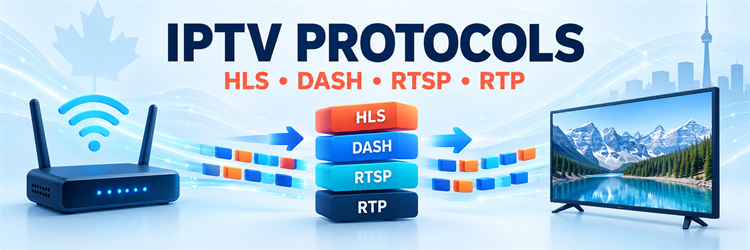
An IPTV protocol is a set of rules that controls one part of television delivery over an IP network. No single protocol does every job. HLS or MPEG-DASH may describe adaptive streams, HTTP and TCP may carry their files, RTSP may control a session, RTP may transport time-sensitive media, and IGMP may tell a managed network which multicast channel a receiver wants to join.
The practical lesson is to identify the layer before diagnosing a stream. A playlist, a transport protocol, a codec, and a container are related, but they are not interchangeable. Calling all of them “the IPTV protocol” hides the real cause of buffering, compatibility failures, and slow channel changes.
This guide separates those layers and shows where the major protocols fit. It covers public-internet streaming as well as operator-managed IPTV networks. It does not provide channels, playlists, credentials or instructions for accessing unauthorized programming.
| Protocol or technology | Main job | Where viewers commonly meet it |
|---|---|---|
| HLS | Adaptive streaming with playlists and media segments over HTTP | Apps, browsers, smart TVs and public-internet video services |
| MPEG-DASH | Standards-based adaptive streaming over HTTP | Web, mobile, connected TV and large streaming platforms |
| RTSP | Sets up and controls a real-time media session | Managed systems, cameras, encoders and some legacy players |
| RTP/RTCP | Carries real-time media and reports delivery conditions | Live contribution, conferencing and managed IPTV |
| IGMP | Manages IPv4 multicast group membership | Provider-controlled access networks and IPTV VLANs |
| TCP/UDP | Underlying transport for reliable or time-sensitive packet delivery | Nearly every IPTV architecture |
What Does IPTV Protocol Mean?
“IPTV protocol” is an umbrella phrase, not the name of one universal specification. Television delivery involves a chain: a service describes available content, a client requests a stream, packets cross one or more networks, the player reconstructs timed audio and video, and security systems decide whether playback is permitted. Different protocols handle different steps.
A public-internet service often packages video into short segments and exposes them through an HLS playlist or a DASH Media Presentation Description. The client downloads those resources through ordinary web infrastructure. A telecom operator may instead distribute a live channel once through its controlled network, then use multicast routing and IGMP membership messages to deliver that channel only where a subscriber has requested it.
- Application layer: HLS, DASH and RTSP tell software how to find, describe or control media.
- Media transport: RTP can carry timestamped audio or video in real time.
- Transport layer: TCP prioritizes reliable, ordered delivery; UDP avoids retransmission delays and keeps overhead lower.
- Network layer: IP addresses and routes move packets between endpoints or multicast groups.
- Membership control: IGMP tells a local IPv4 network which multicast groups have interested receivers.
The IPTV Protocol Stack at a Glance
Protocol names make more sense when arranged as a stack. At the top, an application sees a manifest or session-control interface. Below that, a delivery method carries media across a reliable or low-latency transport. IP then routes packets through local networks, service-provider infrastructure and the wider internet.
| Layer | Examples | Question it answers |
|---|---|---|
| Service and application | Electronic programme guide, entitlement system, player API | What can this account select and play? |
| Streaming or session | HLS, MPEG-DASH, RTSP | How is the presentation described or controlled? |
| Real-time media | RTP and RTCP | How are timed samples and delivery reports represented? |
| Transport | TCP, UDP and increasingly QUIC for HTTP-based delivery | How are packets delivered between endpoints? |
| Network | IPv4, IPv6 and multicast routing | Where should each packet go? |
| Local multicast control | IGMP for IPv4; MLD for IPv6 | Which receivers want a multicast group? |
One program can cross several of these layers at once. For example, an HLS player reads an M3U8 playlist, selects a rendition, requests encrypted media segments through HTTPS, receives those requests over TCP or QUIC, decodes an H.264 or HEVC video track, and displays it inside a media container. HLS is the streaming protocol; HTTPS is the secure web delivery; the codec and container have different roles.
HLS for Adaptive HTTP Streaming
HTTP Live Streaming, or HLS, describes a presentation with UTF-8 playlists and media segments. A multivariant playlist can list several renditions with different bitrates, resolutions, codecs, audio languages or subtitles. The player chooses a rendition, downloads its media playlist and requests the listed segments in sequence.
The client can move between renditions as network conditions change. That is adaptive bitrate streaming: the viewer may briefly receive lower-resolution segments when bandwidth falls, then return to a higher rendition when the connection recovers. RFC 8216 defines the playlist formats and the responsibilities of HLS clients and servers.
- Strengths: Broad device support, web-friendly caching, scalable content delivery and adaptive quality.
- Trade-offs: Segment duration and player buffering add latency; incompatible codecs or malformed playlists can still prevent playback.
- Common files: M3U8 playlists plus MPEG-2 TS or fragmented MP4 media segments.
- Useful clue: Tags such as
#EXT-X-STREAM-INFand#EXT-X-TARGETDURATIONidentify HLS roles more reliably than a filename alone.
MPEG-DASH and Standards-Based Adaptive Delivery
MPEG-DASH also divides a presentation into addressable media segments delivered over HTTP. Its Media Presentation Description, normally an MPD XML document, describes periods, adaptation sets, representations, and segment locations. A representation may offer a particular bitrate, resolution, or codec, allowing the player to adapt without changing the program.
The official MPEG-DASH standards overview notes that DASH works with existing HTTP servers, CDNs, proxies and caches, and supports both live and on-demand streaming. DASH is codec-agnostic at the protocol level, although actual playback still depends on what the target device and browser can decode.
HLS and DASH therefore solve a similar delivery problem with different manifest formats and ecosystem histories. They can even use the same fragmented MP4 media when a packager follows compatible profiles. A service chooses between them—or supports both—according to devices, DRM systems, latency targets, advertising requirements and operational tooling.
RTSP, RTP and RTCP Have Separate Jobs
RTSP is a control protocol. It can establish a session, negotiate delivery, start playback, pause it, seek and tear the session down. It is often compared with a remote control because it manages the experience without necessarily carrying the video bytes itself. The current RTSP 2.0 specification allows delivery choices including UDP, multicast UDP and TCP, with RTP as one possible media-delivery mechanism.
RTP is the real-time transport protocol. It adds sequence numbers, timestamps, payload identification, and source information useful for reconstructing time-sensitive media. RTCP accompanies RTP with sender and receiver reports, loss and timing observations, and basic participant information. According to RFC 3550, RTP supplies transport functions for real-time data but does not reserve bandwidth or guarantee quality of service.
- RTSP: Controls the session.
- RTP: Carries timestamped real-time media packets.
- RTCP: Reports delivery quality and synchronization information.
- UDP or TCP: Provides the lower transport selected for that session.
Multicast, Unicast and IGMP
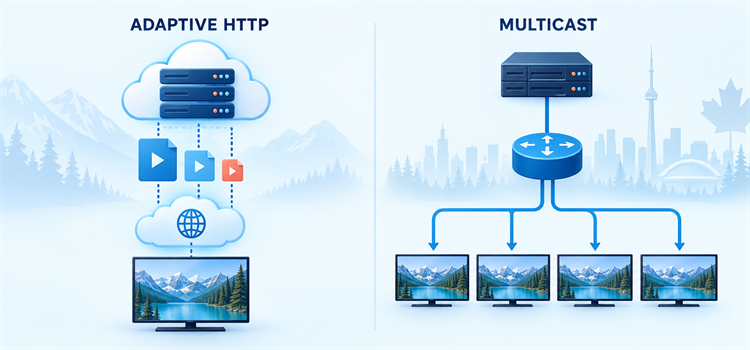
Unicast creates a delivery relationship between a source and one receiver. If ten viewers request the same unicast live channel, the service may need to deliver ten logical copies. This model fits public-internet streaming because each player can request a different rendition, segment or playback position.
Multicast distributes one packet stream to a group address, and the network replicates packets only where paths diverge toward interested receivers. It can be efficient for popular live channels inside an operator-controlled network. It is not simply “faster unicast,” and normal internet routers do not provide open end-to-end multicast delivery for consumer streaming.
IGMP handles IPv4 group membership between hosts and neighboring multicast routers. A set-top box can report interest in the group carrying a selected channel, then leave that group when the viewer changes channels. RFC 3376 defines IGMPv3 and its source-filtering capability. Switch features such as IGMP snooping use observed membership messages to avoid flooding multicast traffic to every local port. Snooping is a switch behavior rather than the IGMP protocol itself.
TCP vs UDP for IPTV Traffic
TCP delivers an ordered byte stream and retransmits missing data. That reliability suits HTTP-based HLS and DASH because a player can buffer ahead while the transport recovers lost packets. The cost is delay: loss can pause later bytes until missing data is retransmitted, and congestion control reduces the sending rate when the path appears overloaded.
UDP sends independent datagrams without built-in retransmission or ordering. That can reduce delay for real-time RTP and multicast, where an old packet may be less useful than the next on-time packet. The application must tolerate, conceal or repair loss where necessary. UDP does not automatically mean low latency, and TCP does not automatically mean buffering; encoding, segment size, server distance, Wi-Fi conditions and player policy all matter.
| Characteristic | TCP | UDP |
|---|---|---|
| Delivery model | Reliable, ordered byte stream | Independent datagrams |
| Loss handling | Retransmits missing data | Left to the application or ignored |
| Typical IPTV use | HTTPS delivery for HLS or DASH | RTP and managed multicast |
| Main advantage | Completeness and compatibility with web infrastructure | Low overhead and no retransmission wait |
| Main risk | Recovery can add delay under loss | Visible artifacts or gaps if loss is not concealed |
How Live TV, Catch-Up and VOD Differ
The same service can use different delivery paths for different content. Managed live television may use multicast because many households watch the same linear channel at once. Catch-up and video on demand are naturally personalized: viewers start at different times and seek to different positions, so unicast sessions or adaptive HTTP delivery are more practical.
| Viewing mode | Common protocol pattern | Reason |
|---|---|---|
| Managed live channel | UDP multicast, IGMP and sometimes RTP | One network stream can serve many simultaneous viewers |
| Internet live stream | HLS or DASH over HTTPS | Scales through CDNs and adapts to each connection |
| Catch-up TV | HLS or DASH unicast | Each viewer chooses a different start time |
| Video on demand | HLS, DASH or controlled RTSP/RTP | Playback, seeking and bitrate choices are individualized |
| Contribution feed | RTP-based or purpose-built low-latency transport | Moves live media between production systems before consumer packaging |
Where M3U and M3U8 Fit
M3U and M3U8 are playlist formats, not replacements for TCP, UDP, or RTP. An extended M3U catalog may list many channels and attach names, groups, or program-guide identifiers. Selecting one entry can lead to a separate HLS M3U8 manifest, an MPEG transport stream, or another supported media address.
An HLS M3U8 file can describe alternative renditions or the media segments of one rendition. The suffix alone is not enough to identify the layer. Inspect the tags, MIME type and surrounding delivery context. Our M3U vs M3U8 comparison covers encoding, manifest structure and safe inspection in greater depth.
Codecs and Containers Are Not Protocols
A codec compresses and decompresses media. H.264/AVC, H.265/HEVC, AV1, AAC, and AC-3 are codec examples. A container organizes encoded tracks and related metadata; MPEG-2 Transport Stream and fragmented MP4 are common streaming containers. A protocol describes communication behavior. Confusing these categories leads to vague claims such as “the H.265 protocol is down” when the network is healthy but the television cannot decode the selected representation.
- Manifest failure: The player cannot parse or refresh an HLS or DASH description.
- Transport failure: Requests time out, packets are lost or a route is unavailable.
- Container failure: The player cannot demultiplex the media tracks.
- Codec failure: The device lacks a compatible decoder, profile or level.
- Entitlement failure: Authentication or DRM policy blocks playback even though delivery works.
Security, Encryption and DRM
HTTPS encrypts communication between a client and web endpoint, protecting HLS or DASH requests from casual interception on the path. It does not prove that a service owns distribution rights. HLS and DASH can also reference encrypted media, while a digital rights management system supplies licenses and playback policy to authorized clients.
Keep subscription URLs, usernames, passwords, cookies, device identifiers and signed query strings out of public diagnostic tools. A playlist may expose keys or time-limited tokens. Use the provider’s official application or a maintained compatible player, apply device updates, and remove saved accounts before selling or sharing hardware.
Technical compatibility is not evidence of content authorization. A player can decode a stream regardless of whether the distributor has the necessary copyright and territorial permissions. Confirm the accountable operator, published terms, billing identity and the rights applicable in Canada before subscribing.
Diagnose Playback by Protocol Layer
Start with the symptom and move down the stack. If the program list loads but one channel fails, the catalog and basic account path are probably working. If every adaptive stream starts at low quality and later improves, the player may be responding normally to its initial bandwidth estimate. If multicast television fails only behind one home switch, local membership handling or VLAN configuration deserves attention.
- Nothing loads: Check DNS, network reachability, service status, account entitlement and device time.
- Manifest error: Confirm the response is a real playlist or MPD rather than an HTML sign-in or error page.
- Frequent stalls: Compare wired Ethernet with Wi-Fi, test sustained bandwidth and look for packet loss or congestion.
- Picture but no sound: Check audio codec support, selected language track and passthrough settings.
- Slow channel changes: Consider multicast join delay, decoder start-up, keyframe spacing and player buffering.
- Works on one device only: Compare codecs, DRM capability, app version, DNS and local network path.
Change one variable at a time and preserve non-sensitive evidence such as timestamps, error codes, and whether the failure affects one program or every program. The IPTV buffering troubleshooting guide provides a wider step-by-step network checklist.
Which IPTV Protocol Should a Viewer Choose?
Most viewers do not choose a wire protocol directly. The service, app, television, and network negotiate or prescribe the available method. The useful choice is a compatible, maintained client and a legitimate service that documents supported devices, network requirements, privacy terms, and cancellation routes.
- For public-internet viewing: Expect HLS or DASH over secure web delivery and adaptive quality.
- For an operator set-top box: The provider may combine multicast live TV with unicast catch-up and VOD.
- For low-latency production: RTP-based or specialist transports may appear before consumer packaging.
- For compatibility: Verify the complete chain—manifest, transport, container, codec, DRM and device—not one protocol name.
Conclusion
An IPTV protocol performs a defined task inside a larger delivery system. HLS and MPEG-DASH package adaptive presentations for HTTP infrastructure. RTSP controls sessions, RTP carries timed media, RTCP reports delivery conditions, and IGMP manages IPv4 multicast membership. TCP and UDP provide different transport trade-offs beneath those application protocols.
When playback fails, identify the layer before changing settings. A manifest problem needs a different fix from packet loss, unsupported audio, a multicast membership issue or an expired entitlement. That disciplined approach produces faster diagnoses and avoids exposing private playlist or account data.
FAQs
What is the main protocol used for IPTV?
There is no single main protocol for every IPTV system. HLS and MPEG-DASH are common for adaptive internet delivery. Managed networks may use UDP multicast with IGMP, while RTSP can control sessions and RTP can carry real-time media.
Is HLS the same as IPTV?
No. HLS is one streaming protocol that an IPTV or online video service can use. IPTV describes television delivered through IP networks and can involve many other protocols, applications, codecs, entitlement systems and network designs.
Does IPTV use TCP or UDP?
It can use either. HLS and DASH normally use HTTP delivery over a reliable transport such as TCP, while RTP and managed multicast commonly use UDP. Modern HTTP delivery may also use QUIC, which runs over UDP but supplies reliability and congestion control at a different layer.
What does IGMP do in an IPTV network?
IGMP lets an IPv4 receiver report multicast group membership to neighboring multicast routers. In a managed IPTV network, joining a group can request the multicast stream for a selected live channel, while leaving stops delivery when no receiver on that network segment wants it.
Are M3U and M3U8 IPTV protocols?
They are playlist formats rather than network transport protocols. An M3U catalog can list IPTV channels, and an M3U8 file can be an HLS manifest. The actual media may still travel through HTTP, RTP, TCP, UDP, or another supported delivery path.