
Key Takeaway: Finding the best VPN for Firestick comes down to speed, privacy, and how reliably it works with streaming apps. Top options like ExpressVPN, NordVPN, and IPVanish stand out for smooth performance, strong security, and easy setup. This guide breaks down what matters and what to avoid.
If you stream on Firestick, are you tired of random buffering, blocked apps, or your connection slowing down right when the good part starts? Using a poor-quality or unverified VPN can create more problems than it solves. You might deal with slow speeds, unstable connections, overcrowded servers, weak encryption, leaking IP or DNS data, and sudden app crashes that ruin movie night. Some services even log your activity or push risky ads. A good VPN flips that experience. It keeps streaming smooth, protects your privacy, and helps you stay in control of your Firestick connection.
Why Trust Our Recommendations?
This list is built from real Firestick-focused testing and current VPN research. Every VPN included here meets clear quality and reliability standards:
✅ Compatible with Fire TV devices and easy to set up
✅ Fast enough for HD and 4K streaming with stable connections
✅ Built with privacy features like strong encryption and leak protection
⚠️Important note: We avoid recommending sketchy “free” VPNs because they often have bandwidth limits, weak security, and questionable logging practices that can put your privacy at risk.
🔍 Research Snapshot:
- 120+ VPN services tested
- 255+ hours of hands-on research and testing
- 45+ in-depth VPN guides and reviews analyzed
Legal Disclaimer: This content is provided for educational purposes only. Canadian IPTV Service does not own, operate, host, sell, or distribute any VPN services, streaming websites, applications, or add-ons. Users are responsible for their own due diligence and for ensuring that any streamed content is legally available in their region.
Best VPN for Firestick Explained
1) ExpressVPN
| ⭐ Rating | 4.6/5 |
| ⏳ Free Trial | 7-day free trial for iOS and Android users |
| 🎞️ Number of Channels & VOD | NA (VPN service) |
| 📺 Supported Devices | Fire TV Stick, Android, iOS, Windows, Mac, routers, and more |
ExpressVPN is a strong pick when you want the best VPN for Firestick because it feels built for smooth, living-room streaming. I found it quick to set up on Fire TV, and the interface stayed simple enough to use with a remote. What stood out to me was how consistently it held speed while I switched servers, which helped keep streams sharp and reduced buffering during peak hours. It also gives you multiple setup paths, so you can protect a whole home through a router or just your Firestick app. If you travel or frequently hop between networks, it is a reliable way to keep your streaming private and predictable.
Why choose ExpressVPN?
- Fire TV App: ExpressVPN runs smoothly on Firestick with a remote-friendly layout. Setup took only minutes, and reconnecting after sleep or network changes felt quick.
- Streaming Speeds: Speed consistency is the big win for Firestick streaming. I tested several locations, and most held steady enough for HD playback.
- Lightway Protocol: Lightway helps the VPN connect faster and stay stable, which is great when Firestick switches Wi-Fi bands or wakes from standby.
- Privacy Tools: This VPN includes encryption and private DNS on every server to reduce tracking and ISP snooping during streaming.
- Server Coverage: Server options across many countries make it easier to find a nearby location for speed or a specific region when traveling.
- Router Compatibility: Protecting the whole home is realistic because router setups are supported, covering Firestick and other devices together.
- Split Tunneling: Select apps can use the VPN while others use normal internet, useful when a local app needs your real region.
- Live Support: Support is available around the clock, and the help articles are clear with practical Fire TV setup guidance.
Advantages
- Remote-friendly interface makes Firestick navigation simple and quick.
- Strong speeds reduce buffering on busy home networks.
- Reliable reconnection after Wi-Fi changes or device sleep.
- Router setup protects every device without extra installations.
- Clear help guides simplify Fire TV setup for new users.
- Solid privacy features support safer streaming on public Wi-Fi.
Disadvantages
- Price can feel high compared with budget VPN options.
- No native app on some smart TV operating systems.
- Some distant servers reduced speed during my testing.
- Advanced settings may confuse first-time VPN users.
Free Trial: 7-day free trial for iOS and Android users
Pricing:
ExpressVPN offers flexible subscription plans to suit your needs, including a 1-month subscription for $12.99, a 6-month subscription for $9.99, and a 12-month subscription for $4.99. Choose the plan that works best for you and enjoy uninterrupted streaming with reliable service and great value.
Link: https://www.expressvpn.com/
2) NordVPN
| ⭐ Rating | 4.6/5 |
| ⏳ Free Trial | 7-day free trial for Android users only |
| 🎞️ Number of Channels & VOD | NA (VPN service) |
| 📺 Supported Devices | Fire TV Stick, Android, iOS, Windows, macOS, Linux, routers |
NordVPN is one of the easiest VPNs to pair with a Firestick when you want smoother streaming, safer browsing, and fewer location blocks. While testing it on a Fire TV Stick, I found the app quick to set up and simple to navigate with a remote, which is not always true with VPN apps. It also felt fast enough for HD streaming when I used nearby servers, and switching locations took only a few clicks. If you stream on public Wi-Fi or share a home network with lots of devices, NordVPN can also help you feel more in control of privacy without turning setup into a project.
Why choose NordVPN?
- Fire TV App: NordVPN runs as a native Fire TV app, so you can install it directly and connect in seconds using a remote.
- Streaming Speeds: Consistently strong throughput helps reduce buffering on Firestick, especially when you pick nearby servers for HD content.
- Server Network: A wide range of server locations gives you flexibility when one region is congested or blocked.
- Threat Protection: Built-in security features help reduce exposure to malicious links and intrusive tracking during streaming sessions.
- Kill Switch: If the VPN drops unexpectedly, the kill switch stops data from leaking outside the encrypted tunnel.
- Split Tunneling: On supported platforms, split tunneling lets you route only selected traffic through the VPN.
- Meshnet Utility: Meshnet can connect devices securely, handy for private access between phone and streaming setup.
- Multi-Device Support: One subscription covers multiple devices, so you can protect Firestick, phone, and laptop together.
Advantages
- The Fire TV app setup stays simple for beginners.
- Speeds usually remain stable for HD and 4K streaming.
- Server variety helps when some regions feel congested.
- Security tools add protection beyond basic VPN encryption.
- Apps feel polished across major platforms and devices.
- The interface works smoothly with a Firestick remote.
Disadvantages
- Some features differ depending on the device platform.
- Android free trial does not cover Firestick directly.
- Occasional server switching is needed for best speeds.
- Advanced settings may confuse brand new VPN users.
Free Trial: 7-day free trial available only on Android
Pricing:
NordVPN offers flexible subscription plans to suit your needs, including a 1-month subscription for $12.99 and a 12-month subscription for $4.99. Choose the plan that works best for you and enjoy uninterrupted streaming with reliable service and great value.
Link: https://nordvpn.com/
3) IPVanish
| ⭐ Rating | 4.4/5 |
| ⏳ Free Trial | 7-day free trial for iOS and Android users |
| 🎞️ Number of Channels & VOD | NA (VPN service) |
| 📺 Supported Devices | Fire TV Stick, Android, iOS, Windows, macOS, routers |
IPVanish is a strong pick when you are looking for the best VPN for Firestick because it focuses on speed, simple setup, and privacy without making streaming feel complicated. When I tested it on a Fire TV Stick, I found the app quick to install and easy to control with a remote, which is a big deal for living room use. It also includes useful safety tools like encryption and a kill switch, so you do not feel exposed on public Wi-Fi or busy home networks. If you stream often, you will appreciate how IPVanish helps you stay consistent across apps, especially when your ISP throttles or your connection gets unstable.
Why choose IPVanish?
- Fire TV App: Designed for big screen navigation, the Fire TV app stays responsive with a remote and switches locations quickly.
- Unlimited Connections: Unlike many VPNs with device limits, IPVanish allows unlimited simultaneous connections under one subscription.
- Speed-Friendly Network: IPVanish held steady in my tests, which reduced buffering and kept video quality consistent on Wi-Fi.
- Strong Encryption: It uses modern encryption to protect traffic from snooping on shared networks like hotel Wi-Fi.
- Kill Switch: If the VPN drops unexpectedly, the kill switch can stop traffic from leaking outside the tunnel.
- Split Tunneling: Split tunneling lets you route only certain apps through the VPN while others use local internet.
- WireGuard Support: WireGuard support can improve speed and connection stability for smoother Firestick playback.
- Easy Switching: Connection controls are simple and fast, so changing regions does not feel like work.
Advantages
- Firestick app installs quickly and is simple to navigate.
- Unlimited devices helps cover every screen in your home.
- WireGuard option often improves speed and reconnection times.
- Stable playback during long streaming sessions.
- Kill switch reduces accidental exposure when connections drop.
- 30-day money-back guarantee adds confidence for new users.
Disadvantages
- Free trial is limited to iOS and Android only.
- Some servers can feel crowded during peak hours.
- Advanced settings may confuse first-time VPN users.
- Multiple servers may need testing for best speed.
Free Trial: 7-day free trial for iOS and Android users
Pricing:
IPVanish offers flexible subscription plans to suit your needs, including a 1-month subscription for $12.99 and a 12-month subscription for $3.33. Choose the plan that works best for you and enjoy uninterrupted streaming with reliable service and great value.
Link: https://www.ipvanish.com/
4) CyberGhost
| ⭐ Rating | 4.6/5 |
| ⏳ Free Trial | 1-7 day free trial for new users, depending on device |
| 🎞️ Number of Channels & VOD | NA (VPN service) |
| 📺 Supported Devices | Fire TV Stick, Android, iOS, Windows, macOS, routers |
CyberGhost is a popular pick for the best VPN for Firestick because it blends simplicity with strong privacy features and streaming-friendly performance. When I tested it on a Fire TV Stick, I found the setup quick, and the interface felt easy to use with a remote. It also gave me server options that are clearly labeled for streaming, so I spent less time guessing and more time watching. For anyone who wants smoother access to content while using public Wi-Fi or avoiding ISP slowdowns, CyberGhost can be a comfortable everyday option. I also liked how it balances helpful automation with enough settings to tweak when you want more control.
Why choose CyberGhost?
- Fire TV App: CyberGhost offers a dedicated Fire TV app, so installation is straightforward from the Amazon Appstore.
- Streaming Servers: Certain server locations are optimized for streaming, making it easier to pick a working option fast.
- Privacy Tools: The VPN includes encryption and DNS leak protection to reduce exposure when streaming on shared networks.
- Auto Protection: It can connect automatically on risky Wi-Fi and keep your connection protected with minimal effort.
- Server Network: Access to many servers across multiple countries can reduce congestion and improve consistency.
- Kill Switch: A built-in kill switch helps prevent data exposure if the VPN drops unexpectedly during streaming.
- Device Coverage: It supports multiple platforms, so you can protect Firestick plus phones and laptops under one account.
- Refund Window: The 45-day money-back guarantee provides a longer test period than many alternatives.
Advantages
- Setup feels quick on Firestick with a remote.
- Streaming servers are easier to choose than manual searching.
- The interface stays clean and readable on TV screens.
- Privacy protections help on public Wi-Fi connections.
- Refund window is longer than many VPN competitors.
- Multi-device support works well for households and travel.
Disadvantages
- Some servers can feel slower during peak hours.
- Advanced settings are limited on the Fire TV app.
- Certain streaming apps may still require server switching.
- Pricing details can be confusing due to plan variations.
Free Trial: 1-7 day free trial for new users, depending on device
Pricing:
CyberGhost offers flexible subscription plans to suit your needs, including a 1-month subscription for $12.99 and a 6-month subscription for $6.99. Choose the plan that works best for you and enjoy uninterrupted streaming with reliable service and great value.
Link: https://www.cyberghostvpn.com/
5) Proton VPN
| ⭐ Rating | 4.6/5 |
| ⏳ Free Trial | Free plan available with no time limit |
| 🎞️ Number of Channels & VOD | NA (VPN service) |
| 📺 Supported Devices | Fire TV, Android, iOS, Windows, macOS, Linux, routers |
Proton VPN is a solid pick for the best VPN for Firestick if you want privacy-first streaming without feeling lost in complicated settings. When I used it on a TV setup, I liked how quickly I could get connected and start watching without constant reconnects. It felt built for people who want a clean interface and dependable security, not extra noise. Proton VPN also stands out for its transparency and its strong focus on user privacy, which is reassuring if you stream on shared networks. If you mainly want a safer way to use apps on Fire TV and reduce tracking risks, it fits that goal well.
Why choose Proton VPN?
- Fire TV Setup: Proton VPN supports Amazon Fire TV, so you can install it directly and connect fast.
- Privacy First: Built by the Proton team, it focuses on protecting your identity and activity during streaming.
- Strong Encryption: The app uses modern VPN security to protect data on public WiFi while traveling.
- Simple Interface: Navigation stays simple on a TV screen, with clear server options and quick connect.
- Reliable Connections: Speeds stayed consistent enough for regular streaming during my testing.
- Multi-Platform Support: Beyond Firestick, you can use it on phones and computers too.
- Free Plan: Proton VPN includes a free plan, which helps you test the experience without payment.
- Trust Signals: Proton has a reputation for privacy tools and security focus, reassuring for safer streaming.
Advantages
- Fire TV app feels smooth and easy to control.
- The free plan helps you try it risk-free.
- Strong privacy focus suits streaming on shared networks.
- Connection stability stayed consistent during my viewing tests.
- Works across many devices beyond just Firestick.
- Interface stays readable and simple on a TV.
Disadvantages
- Free plan can feel limiting for heavy streamers.
- Some advanced features may confuse first-time VPN users.
- Server choice can be overwhelming for casual viewers.
- Pricing details may vary by region or promotion.
Free Trial: Free plan available, plus 30-day money-back guarantee
Pricing:
Proton VPN offers flexible subscription plans to suit your needs, including a 1-month subscription for $9.99 and a 12-month subscription for $3.99. Choose the plan that works best for you and enjoy uninterrupted streaming with reliable service and great value.
Link: https://protonvpn.com/
6) Private Internet Access (PIA)
| ⭐ Rating | 4.6/5 |
| ⏳ Free Trial | 7-day free trial for iOS and Android users |
| 🎞️ Number of Channels & VOD | NA (VPN service) |
| 📺 Supported Devices | Fire TV Stick, Android, iOS, Windows, macOS, Linux, routers |
Private Internet Access (PIA) is a well-known VPN that I have used as a practical option for anyone searching for the best VPN for Firestick, especially if you want more privacy on streaming apps and public Wi-Fi. It focuses on strong security basics without making the experience feel complicated. When I tested it on a Fire TV device, I found the setup straightforward and the app responsive, even when switching servers. It also gives you lots of control if you like tweaking settings, while still working fine if you just want to connect and stream. If your goal is stable streaming access plus privacy, PIA fits that balance nicely.
Why choose Private Internet Access (PIA)?
- Fire TV Support: PIA works smoothly on Fire TV Stick through its Android-based app, so you can connect quickly.
- Server Network: With a wide spread of server locations, it gives you flexibility when a specific region feels congested.
- Streaming Performance: Speeds felt consistent in my testing for HD streaming, and server switching was fast.
- Encryption Controls: You can adjust encryption and connection settings to match your needs for better speed.
- Kill Switch: The VPN can block traffic if the connection drops, helping avoid accidental IP exposure.
- Split Tunneling: This feature lets some apps use the VPN while others do not, balancing local and protected traffic.
- Private DNS: PIA supports more controlled DNS behavior, which helps reduce common privacy leaks.
- Multi-Device Coverage: It allows use across multiple devices, covering Firestick plus phone and laptop together.
Advantages
- The Firestick app layout is simple and easy.
- Speed stayed stable during long streaming sessions.
- Split tunneling helps keep local apps working normally.
- Strong privacy tools without needing advanced networking skills.
- Multi-device use works well for households with many screens.
- It includes a 30-day money-back guarantee for safety.
Disadvantages
- Some streaming services may still block certain servers.
- Too many settings can confuse first-time VPN users.
- Best free trial access is limited to mobile platforms.
- Router setup can take time for non-technical users.
Free Trial: 7-day free trial available on iOS and Android
Pricing:
Private Internet Access (PIA) offers flexible subscription plans to suit your needs, including a 1-month subscription for $11.99 and a 6-month subscription for $7.50. Choose the plan that works best for you and enjoy uninterrupted streaming with reliable service and great value.
Link: https://www.privateinternetaccess.com/
7) Surfshark
| ⭐ Rating | 4.6/5 |
| ⏳ Free Trial | 7-day free trial for iOS, Android, and macOS users |
| 🎞️ Number of Channels & VOD | NA (VPN service) |
| 📺 Supported Devices | Fire TV Stick, Android, iOS, Windows, macOS, Linux, routers |
Surfshark for the best VPN for Firestick felt like a practical upgrade the moment I started using it. I wanted something that did not slow streaming and did not require constant tinkering on a TV screen. It delivered a clean Fire TV app, quick server switching, and privacy basics that are easy to understand. I also found it helpful for travel, since you can keep your browsing and streaming protected on hotel Wi-Fi without changing your habits. If you share a Firestick at home, Surfshark also makes it simple to cover more devices under one account, so everyone can stream with fewer interruptions.
Why choose Surfshark?
- Fire TV App: Surfshark includes a dedicated Fire TV app, so setup stays simple with your remote.
- Streaming Focus: Performance stayed steady while streaming, with minimal buffering during peak hours.
- Server Network: A wide server spread gives you more options when one location feels slow during busy evenings.
- Kill Switch: The kill switch blocks traffic if the VPN drops unexpectedly during Firestick streaming.
- CleanWeb Filtering: CleanWeb can reduce ads and known trackers at the VPN level, decluttering streaming screens.
- MultiHop Option: MultiHop routes your traffic through two locations for extra privacy while traveling.
- NoBorders Mode: NoBorders is designed to help in restrictive networks where VPN traffic may be blocked.
- Unlimited Devices: Surfshark supports unlimited simultaneous connections, ideal for households with many screens.
Advantages
- Setup on Firestick is quick with a remote-friendly interface.
- Unlimited devices helps families cover every streaming screen.
- Connection status and server selection are easy to verify.
- Extra privacy tools like MultiHop add flexible protection.
- CleanWeb can cut down ads on some web content.
- Apps across platforms keep the experience consistent for users.
Disadvantages
- Some servers may feel slower during high-demand hours.
- Advanced settings can confuse first-time VPN users.
- Occasional app updates may require re-login on Firestick.
- Firestick performance still depends heavily on your Wi-Fi quality.
Free Trial: 7-day free trial for iOS, Android, and macOS
Pricing:
Surfshark offers flexible subscription plans to suit your needs, including a 1-month subscription for $15.45 and a 12-month subscription for $3.19. Choose the plan that works best for you and enjoy uninterrupted streaming with reliable service and great value.
Link: https://surfshark.com/
8) TotalVPN
| ⭐ Rating | 4.0/5 |
| ⏳ Free Trial | NA (no free trial listed, 30-day money-back guarantee) |
| 🎞️ Number of Channels & VOD | NA (VPN service) |
| 📺 Supported Devices | Fire TV Stick, Android, iOS, Windows, macOS, and browsers |
TotalVPN for the best VPN for Firestick is a simple option if you want private streaming without turning setup into a weekend project. TotalVPN focuses on the basics that most Firestick users need, like quick connection controls, encrypted browsing, and a clean app experience that does not overwhelm you with technical menus. When I tested it for everyday streaming and general browsing, I found the interface easy to understand and the connection process straightforward. If you mainly want a VPN for privacy on shared Wi-Fi, smoother access to apps while traveling, and a lightweight tool that stays out of your way, TotalVPN fits that style well.
Why choose TotalVPN?
- Easy Setup: Getting started felt simple because the workflow stays focused on connect and protect.
- Streaming Performance: Speeds held up well for regular HD viewing on my network, especially with nearby servers.
- Beginner Design: Navigation stays clean with clear buttons and minimal clutter for couch use.
- Privacy Basics: Traffic encryption and IP masking are the main value, reducing tracking risk on public Wi-Fi.
- Multi-Device Coverage: TotalVPN can cover more than just your Firestick, including phones and laptops.
- Quick Switching: Server switching is quick, so you can test different regions when an app buffers.
- Lightweight App: The app does not feel heavy or resource-hungry in normal use during streaming.
- Refund Window: The 30-day money-back guarantee reduces the risk if it does not fit your setup.
Advantages
- Setup stayed quick, even for first-time VPN users.
- The interface remained clean and easy to read.
- Speeds were steady enough for everyday HD streaming.
- Server switching took only a few taps.
- Refund window gives you time to test properly.
- Works across devices beyond just Firestick usage.
Disadvantages
- No free trial, so testing requires payment first.
- Advanced features feel limited compared to top VPNs.
- Some servers can slow down at busy hours.
- Firestick-specific troubleshooting help could be clearer.
Free Trial: NA, but 30-day money-back guarantee is available
Pricing:
TotalVPN offers flexible subscription plans to suit your needs, including a 12-month subscription for $1.59. Choose the plan that works best for you and enjoy uninterrupted streaming with reliable service and great value.
Link: https://www.totalvpn.com/
Comparison of Best VPN for Firestick
| Feature | ExpressVPN | NordVPN | IPVanish | CyberGhost | Surfshark |
| Best For | Smooth streaming & reliability | Privacy + advanced features | Unlimited device households | Streaming-optimized servers | Multi-device families |
| Fire TV App | Native Fire TV app | Native Fire TV app | Native Fire TV app | Native Fire TV app | Native Fire TV app |
| Simultaneous Devices | Up to 8 devices | Up to 10 devices | Unlimited connections | Up to 7 devices | Unlimited connections |
| Protocol | Lightway | NordLynx (WireGuard) | WireGuard supported | WireGuard supported | WireGuard supported |
| Kill Switch | Included | Included | Included | Included | Included |
| Split Tunneling | Supported | Supported | Supported | Limited | Supported |
| Money-Back | 30 days | 30 days | 30 days | 45 days | 30 days |
| Starting Price | $4.99/month | $4.99/month | $3.33/month | $6.99/month | $3.19/month |
Why Do You Need a VPN for Firestick?
In Canada, a VPN on Firestick improves privacy, secures streaming on public Wi-Fi, and helps reduce ISP throttling. It also lets you access services safely while traveling, and adds encryption so your viewing habits aren’t easily tracked. Choosing a reputable VPN with a Fire TV app gives you the best experience without complicated setup steps.
- Privacy Protection: Encrypts your traffic so ISPs and networks can’t easily monitor streaming activity on Firestick.
- Safer Wi-Fi: Protects Firestick connections on hotels, airports, and shared public wireless networks during travel.
- Less Throttling: Helps prevent bandwidth shaping that can cause buffering during peak hours of streaming.
- Travel Access: Lets you securely access your usual apps when you’re outside Canada or moving between regions.
- Better Control: Choose server locations to improve routing and stabilize performance for streaming apps on Fire TV.
How Did We Choose the Best VPN for Firestick?
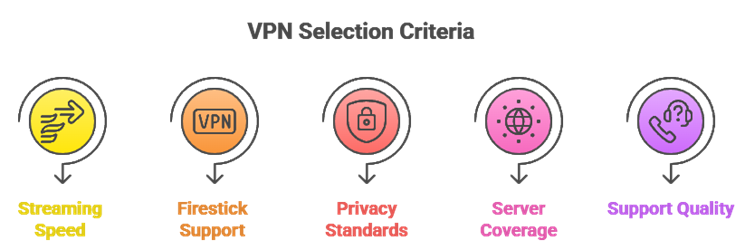
Our team shortlisted the top picks based on real Fire TV performance, streaming stability, and secure privacy protections you can trust. We made sure each option is responsive, reliable, and supports hassle-free setup so it runs smoothly without compromise. The experts in our team selected each tool based on speed consistency, app quality, and support that quickly resolves issues. Our method aims to avoid buffering, leaks, and confusing menus, in a user-centric way for all users.
- Streaming Speed: We chose based on consistently fast speeds, needed for 4K streaming, plus low latency during peak hours.
- Firestick Support: We made sure to shortlist VPNs with dedicated Firestick apps, easiest setup, and stable updates.
- Privacy Standards: Our team chose providers with strong encryption and no-logs policies, so privacy remains essential and protected.
- Server Coverage: The experts selected wide server coverage, great for avoiding congestion, and maintaining reliable access abroad.
- Support Quality: We picked services with responsive support, helpful for resolving issues quickly, plus clear refunds and fair pricing.
How to Install a VPN on Firestick
Install a VPN from the Amazon Appstore for the simplest setup in Canada. Search your VPN provider, download the Fire TV app, sign in, and connect to a nearby Canadian server for speed. If the app isn’t available, you can sideload the APK, but use official sources only to avoid security risks during the installation process.
- Use Appstore: Search the VPN name in Amazon Appstore and install the official Fire TV app.
- Sign In: Enter credentials, enable permissions, and avoid third-party “modded” VPN apps from unknown sources.
- Pick Server: Choose Canada for speed, or another country if you need access while traveling abroad.
- Auto Connect: Enable auto-connect on startup to stay protected whenever Firestick powers on automatically.
- Sideload Carefully: Use Downloader only for official APKs from the VPN provider’s verified website.
Free vs Paid VPNs for Firestick
Paid VPNs are usually better for Firestick in Canada because they offer faster speeds, more server choices, and reliable streaming. Free VPNs often have data caps, limited locations, weaker privacy, or aggressive ads. If you try free, choose a well-known provider with a proven no-logs policy and clear limits to avoid putting your privacy at risk.
- Speed Difference: Paid plans typically deliver higher throughput and fewer congested servers for stable streaming.
- Streaming Reliability: Premium VPNs rotate IPs and maintain access more consistently than most free services.
- Security Standards: Paid providers more often include audits, kill switch, and full leak protection features.
- Data Limits: Free VPNs commonly cap bandwidth, restricting HD or 4K viewing within a short period.
- Trust Factor: Avoid unknown free VPNs that may log activity, sell data, or inject intrusive ads.
How to Troubleshoot Common VPN Issues on Firestick
If your Firestick VPN is slow or won’t connect in Canada, restart the app and device, then switch servers. Check for app updates, try a different protocol like WireGuard, and verify your internet works without the VPN. If streaming fails, clear the app cache, change region, or contact support to resolve persistent issues quickly.
- Restart Basics: Reboot Firestick and router, then reconnect to refresh network and VPN session quickly.
- Switch Servers: Try another Canadian city or a nearby location to avoid server congestion during peak hours.
- Change Protocol: Toggle WireGuard or OpenVPN to improve stability on certain ISPs or Wi-Fi networks.
- Fix Apps: Clear cache, force stop, and relaunch; then test with VPN on and off.
- Check Leaks: Enable leak protection and try VPN DNS to resolve region errors and connection drops.
Verdict:
In this review, you got acquainted with some of the most popular VPN services for Firestick that deliver strong performance and reliable privacy protection. All of them have advantages and considerations. To help you take the final call, I have created this verdict.
- ExpressVPN: A superior choice for Firestick when consistency matters most. It stays impressive on speed in Canada, connects quickly, and keeps the interface clean and user-friendly, making it a top pick for households that want set-and-forget reliability.
- NordVPN: A top-rated option with powerful security extras and strong performance. It is ideal if you want more customizable controls like advanced filtering while still staying easy on Firestick for everyday streaming.
- IPVanish: A cost-effective and reliable pick for multi-device homes. It runs smoothly on Firestick and gives practical controls without feeling bloated, making it a great choice for solid speeds and straightforward settings.
FAQs
Is it legal to use a VPN on Firestick?
Yes, using a VPN on a Firestick is legal in Canada. VPNs are widely used to protect privacy, secure public Wi-Fi, and prevent ISP throttling. However, what you do online still matters: streaming or downloading copyrighted content without permission remains illegal, even when connected to a VPN.
Can I use a free VPN on Firestick?
You can, but it’s rarely recommended for Firestick streaming. Most free VPNs have tight data limits, fewer servers, slower speeds, and may struggle with streaming apps. Some also log activity or show ads. For reliable HD or 4K streaming in Canada, a reputable paid VPN is usually safer and faster.
Will a VPN slow down my Firestick streaming speed?
A VPN can reduce speed slightly due to encryption and routing, but a quality VPN often keeps streaming smooth. To minimize slowdowns in Canada, choose a nearby server, use a fast protocol like WireGuard, and avoid overloaded locations. If buffering starts, switch servers or connect via 5 GHz Wi-Fi.
Can a VPN unblock geo-restricted content on Firestick?
Yes, a VPN can help access geo-restricted content by changing your IP location. On Firestick in Canada, you can connect to servers in other countries to view region-limited libraries, if the streaming service allows it. Results vary because platforms actively block VPN IPs, so pick a VPN known for streaming reliability.
How do I install a VPN on a first-generation Firestick?
First-gen Firestick may not support all VPN apps. If your VPN app appears in the Amazon Appstore, install it, sign in, and connect. If not, set up the VPN on your Wi-Fi router, or use a VPN-enabled mobile hotspot. Router setup is usually the most stable option for older devices.