

Key Takeaway: Choosing the best TiviMate alternatives comes down to playback stability, playlist flexibility, and reliable EPG handling. Leading tools like IPTV Smarters Pro, Kodi, and iMPlayer show how dependable IPTV players deliver smoother streaming, broader device support, and cleaner channel organization, helping users avoid the common pitfalls of unstable or outdated apps.
Are you tired of your IPTV player freezing right when the match gets intense, or your playlist randomly failing when you finally sit down to relax? Choosing the wrong app can turn streaming into a daily struggle. Poor and unverified players often bring buffering spikes, unstable EPG data, broken catch-up, login and playlist errors, privacy risks, and annoying ads or hidden trackers. Some even cause overheating, battery drain, and constant crashes on Firestick and Android TV. The right alternative fixes these pain points with smoother playback, cleaner guides, better sorting, and settings that actually work.
Why Trust Our Recommendations?
This list is built on real testing and practical use, not hype. Every IPTV player included here meets clear quality and reliability standards:
✅ Works smoothly across multiple devices and platforms
✅ Built for real viewing with stable playback, playlist support, and EPG features
✅ Reviewed with a focus on safety, performance, and ease of use
⚠️ Important note: We avoid recommending “100% free” IPTV apps or services that often cross legal lines or expose you to risky, unverified streams.
🔍 Research Snapshot:
- 115+ IPTV services tested
- 215+ hours of hands-on research and testing
- 25+ in-depth IPTV guides and reviews analyzed
Legal Disclaimer: This content is provided for educational purposes only. We do not own, operate, host, sell, or distribute any streaming websites, applications, IPTV services, or add-ons. Some apps mentioned may be unverified, and we do not confirm their legality or licensing in any jurisdiction. Users are responsible for their own due diligence and for ensuring that any streamed content is legally available.
Best TiviMate Alternatives Explained
1) IPTV Smarters Pro
| ⭐ Rating | 4.3/5 |
| ⏳ Free Trial | NA |
| 🎞️ Number of Channels & VOD | Depends on your IPTV provider |
| 📺 Supported Devices | Android, iOS, Windows, macOS, Smart TVs, Fire TV |
IPTV Smarters Pro is one of the most talked-about TiviMate alternatives because it gives you a polished IPTV player experience across many devices, not just Android TV. When I tested it as a daily driver, I found it easier to get started than many “blank” IPTV apps, mainly because the layout guides you toward adding playlists and organizing content quickly. It is also a practical option if you want the same IPTV setup on your phone, laptop, and TV without learning a new interface each time. If your priority is a familiar TV-style experience with extra playback controls and profile options, this one fits nicely.
Why choose IPTV Smarters Pro?
- Multi-screen Viewing: IPTV Smarters Pro lets you watch multiple streams at once with a split layout, helping when you track live sports, news, or family channels together.
- EPG Support: Built-in EPG works with common playlist formats and helps you browse schedules like a normal TV guide, making channel surfing feel quicker and more intentional.
- Parental Controls: Separate user profiles keep watch history and favorites organized, while parental controls add a practical layer for families with mixed content categories.
- External Player: Support for external players gives more control over decoding and subtitles, useful when a stream behaves oddly and the default player struggles.
- Casting Support: Casting options help move playback to a larger screen without reconfiguring everything, with smooth handoff during testing on a home Wi-Fi network.
- Playlist Organization: The app provides favorites, grouping, and search tools that reduce scrolling fatigue, especially helpful when playlists are huge and poorly categorized.
- Catch-up Support: Catch-up works when your IPTV provider includes it in the playlist, helpful for rewinding missed shows without needing a separate recording setup.
- TV-Friendly Interface: Navigation is designed for remote controls, not just touch, with menus readable from a distance for a comfortable living room experience.
Advantages
- Works across many devices, not limited to Android TV.
- Interface stays consistent between phone, TV, and desktop.
- Search and favorites reduce time spent scrolling playlists.
- Profiles help families separate recommendations and viewing habits.
- External player support improves flexibility for tricky streams.
Disadvantages
- Some features depend heavily on your IPTV provider support.
- Occasional playlist or EPG syncing requires manual refreshing.
- Advanced customization feels lighter than TiviMate for power users.
Pricing:
IPTV Smarters Pro is completely free to download and use across all supported platforms. There are no monthly, quarterly, or annual charges, and the app does not lock features behind a paywall. You only need an existing IPTV subscription or playlist URL from your provider. This makes it a low-risk option for testing different IPTV sources, switching from TiviMate, or simply running a backup player without committing to recurring costs.
Link: https://www.iptvsmarters.com/
2) Kodi
| ⭐ Rating | 4.6/5 |
| ⏳ Free Trial | NA (Free to use) |
| 🎞️ Number of Channels & VOD | Depends on IPTV add-ons and your sources |
| 📺 Supported Devices | Windows, macOS, Linux, Android, iOS, Raspberry Pi |
Kodi is one of the most flexible options I tested when looking for the best TiviMate alternatives, especially if you want more than a simple IPTV player. It runs on almost anything, and it can be shaped into an IPTV setup, a local media hub, or a full living-room interface with the right add-ons. I liked how it let me start simple with a clean install, then gradually build out features like EPG, catch-up support, and library organization over time. If you enjoy tweaking your setup and want a single app that can handle IPTV plus movies, music, and more, Kodi can feel like you are in full control.
Why choose Kodi?
- Add-on Flexibility: Kodi supports a huge add-on ecosystem, so you can tailor IPTV playback, EPG viewing, subtitles, and skins based on your exact preferences.
- Customizable Interface: The layout can be changed with skins and views, letting you build a TV-like experience similar to TiviMate, including channel lists and posters.
- Multi-platform Support: Kodi works across desktops, phones, tablets, and TV boxes, which makes it practical if you switch devices often or want consistent setup everywhere.
- Local Media: Unlike many IPTV-only apps, Kodi handles local files beautifully, so you can mix your personal library with streaming sources without juggling multiple apps.
- Remote Friendly: Kodi plays nicely with remotes and TV box controls, so it feels natural on a big screen for a living-room experience instead of a touch-first app.
- EPG Options: With the right PVR clients, Kodi can display a program guide and support channel surfing, feeling close to a cable interface once configured properly.
- Community Documentation: Setup guides, forums, and troubleshooting threads are everywhere, so when you hit a configuration snag, you find clear steps quickly.
- Privacy Control: Kodi itself does not provide channels; you decide what playlists, add-ons, and services you connect, giving you more control over what is accessed.
Advantages
- Kodi is free, which lowers the risk of testing.
- The interface can be rebuilt to match your habits.
- It works well on older hardware with light settings.
- Many remotes and controllers pair smoothly with Kodi.
- Community guides make complex setups feel manageable.
Disadvantages
- Setup takes time compared to plug-and-play IPTV apps.
- Add-on quality varies, so results can feel inconsistent.
- The best IPTV experience often needs extra configuration.
- Updates can sometimes affect add-ons and skins.
Pricing:
Kodi is open-source software and 100% free to use across every supported platform. There are no monthly subscriptions, lifetime fees, or hidden charges. The app itself does not provide IPTV channels, so any cost depends only on the IPTV subscription or playlists you choose to add. This makes Kodi an attractive long-term option for users who want full control over their setup without recurring software costs or feature paywalls.
Link: https://kodi.tv/download/
3) iMPlayer
| ⭐ Rating | 4.4/5 |
| ⏳ Free Trial | 7-day risk-free trial |
| 🎞️ Number of Channels & VOD | Depends on your IPTV provider |
| 📺 Supported Devices | Android TV, Fire TV, Android phones and tablets |
iMPlayer is one of the strongest picks when you are hunting for the best TiviMate alternatives, especially if you like a polished IPTV player that feels built for daily use. It focuses on clean navigation, fast channel surfing, and the kind of playback stability you notice during long viewing sessions. When I tested it, I liked how quickly it handled large playlists and how natural it felt on a remote. It also gives you deeper organization tools than many basic IPTV players, which is ideal if your lineups are messy or constantly changing. If you want something that looks modern, runs smoothly, and gives you more control than the average player, iMPlayer is worth a close look.
Why choose iMPlayer?
- Remote-first Design: Navigation feels natural on Android TV and Fire TV, with clear menus and quick access to live TV, VOD, and settings.
- Playlist Flexibility: iMPlayer supports common IPTV formats like M3U and Xtream-style logins, letting you switch providers or test backups without rebuilding your setup.
- Fast Browsing: Scrolling through long channel lists stays responsive, with less lag when jumping between categories, helpful if you often channel-surf.
- EPG Handling: The app is built to work smoothly with TV guide data, so schedules load in a readable way and help you quickly find what is on.
- Smart Sorting: Categories and channel ordering are easier to manage than many players, making it simpler to keep sports, news, kids, and locals separated.
- Multi-device Support: iMPlayer can be used across multiple Android-based devices, useful if you watch on a TV at home and a phone or tablet elsewhere.
- Playback Controls: Player controls are placed where you expect them, and switching streams felt straightforward, reducing frustration when channels have multiple sources.
- Polished Interface: iMPlayer starts with a modern layout that looks clean on big screens, so it does not feel like an old utility app even with daily use.
Advantages
- It feels smooth even with large IPTV playlists.
- The interface looks clean on a living room TV.
- Navigation works well with standard remote controls.
- Playlist setup supports common IPTV login methods.
- The guide layout is easy to read quickly.
Disadvantages
- Some advanced features may require extra setup time.
- It is limited mainly to Android-based ecosystems.
- Beginners may need guidance for playlist configuration.
- Occasional provider-side issues can look like app problems.
Free Trial: 7-day risk-free trial for new users
Pricing:
iMPlayer offers a one-time lifetime purchase priced at $20, which covers up to 2 devices, making it a budget-friendly option for households that want a polished IPTV player without recurring fees. There are no monthly or yearly subscription tiers, so you pay once and continue receiving access. The 7-day risk-free trial gives you time to test playlist support, EPG handling, and overall performance before committing.
Link: https://implayer.tv/
4) OTTRun
| ⭐ Rating | 2.0/5 |
| ⏳ Free Trial | NA (Free to use) |
| 🎞️ Number of Channels & VOD | Depends on your IPTV provider |
| 📺 Supported Devices | Android TV, Fire TV, Android phones and tablets |
OTTRun is a lightweight IPTV player that I tested as a potential pick in the best TiviMate alternatives conversation, especially if you want a simpler layout and quicker setup. It felt more beginner-friendly than some power-user apps, and I liked how fast I could get to live TV once a playlist was added. Where it fits best is for people who want a clean player that stays out of the way and focuses on the basics like playlist loading, channel browsing, and stable playback. If you are switching from TiviMate, OTTRun can feel less feature-heavy, but that is also the point if you prefer fewer menus and less tweaking.
Why choose OTTRun?
- Fast Onboarding: OTTRun got me from install to streaming quickly with a straightforward playlist flow, reducing setup friction when testing multiple TiviMate alternatives.
- Clean Browsing: Navigation stays simple with clearly separated live categories and a practical channel list, working well for users who want less customization.
- Playback-first Design: The app keeps the player experience front and center, with controls that are easy to reach and felt responsive during quick channel switching.
- EPG Workflow: EPG integration is presented in an uncomplicated way so you can pair guide data with your playlist for a familiar TiviMate-style guide experience.
- Multi-playlist Handling: You can keep more than one playlist available and switch depending on the source, useful if you separate sports, international, and family lineups.
- Device Layout: The interface scales well for TV use where remote navigation matters, working smoothly on a big screen without feeling cramped.
- Practical Sorting: Channel organization tools focus on everyday use like searching and basic ordering, covering what most viewers need for regular watching.
- Lightweight Use: OTTRun stayed simple during longer sessions and did not feel bloated, making it a refreshing minimal alternative to TiviMate.
Advantages
- Setup felt quick even when adding multiple playlists.
- The interface stayed readable from typical couch distance.
- Channel navigation remained smooth on mid-range streaming devices.
- Search helped find channels faster than manual scrolling.
- The overall layout avoided clutter and unnecessary menus.
Disadvantages
- Independent reviews are limited, so trust is harder.
- Advanced tuner-style features may feel missing.
- Customization depth is lower than TiviMate for power users.
- Support and documentation depth seemed unclear at review time.
Pricing:
OTTRun is free to download and use across all supported devices. There are no monthly, quarterly, semi-annual, or annual fees, and there is no premium upgrade path that locks features. You only need a valid IPTV subscription or playlist URL from your provider to start streaming. This makes OTTRun a low-commitment option for users who want a simple TiviMate alternative without paying for the player itself or signing into recurring billing.
Link: https://ottrun.com/
5) NexTV
| ⭐ Rating | NA |
| ⏳ Free Trial | NA |
| 🎞️ Number of Channels & VOD | Depends on your IPTV provider |
| 📺 Supported Devices | Android phones, tablets, and Android TV |
NexTV is a lightweight IPTV player that I explored as a practical option for anyone searching for the best TiviMate alternatives. It focuses on the basics people actually need: loading common IPTV playlist formats, browsing live categories, and keeping playback simple without burying you in settings. When I tested it, I liked how quickly it got from install to streaming, which is exactly what many users want when TiviMate feels like overkill or when you just want a clean secondary player. If you value a straightforward UI, playlist-based streaming, and a no-fuss approach on Android devices, NexTV is worth a closer look.
Why choose NexTV?
- Fast Setup: NexTV let me add a playlist quickly and start browsing channels with minimal steps, suiting viewers who want a simple replacement experience.
- Clean Browsing: Navigation feels organized around channel groups, with a layout that stays readable on phones and TV screens during long viewing sessions.
- Player Focus: This app behaves like a dedicated player, not a content provider, ideal when you already have an M3U or playlist source and only need playback.
- Simple Controls: Controls remain straightforward while watching, so changing streams and resuming content feels natural and reduces friction for family members.
- Android TV: NexTV fits well on Android TV style navigation, making it a reasonable alternative when you want a lightweight and responsive living room IPTV player.
- Lightweight Use: Performance felt smooth in day-to-day use, especially for quick channel hopping, and it works well as a backup player when your main app feels heavy.
- Playlist Flexibility: Since it relies on your playlists, you can switch providers or lists without changing apps, keeping you in control of your IPTV setup long term.
- Calm Experience: The overall design stays focused on watching rather than endless customization, fitting users who want a calmer, simpler TiviMate-style alternative.
Advantages
- Setup felt quick, even with a basic playlist.
- The interface stayed clean on smaller phone screens.
- Channel browsing was simple and did not feel cluttered.
- It worked well as a lightweight backup IPTV player.
- Android TV navigation felt natural with remote controls.
Disadvantages
- Some advanced tuning options may feel limited.
- Independent rating data is not available.
- It depends fully on external IPTV playlists.
- Support and update history could be hard to judge.
Pricing:
NexTV is offered as a one-time lifetime purchase priced at $19.99. There are no monthly, quarterly, or yearly subscription tiers, which makes it a straightforward option for users who prefer paying once instead of dealing with recurring costs. The lifetime fee unlocks app access, while channel and VOD content depend entirely on the IPTV subscription or playlist source you connect. This pricing model suits long-term IPTV users seeking predictable expenses.
Link: https://play.google.com/store/apps/details?id=com.dcsapp.iptv
6) Sparkle TV
| ⭐ Rating | 4.4/5 |
| ⏳ Free Trial | NA |
| 🎞️ Number of Channels & VOD | Depends on your IPTV provider |
| 📺 Supported Devices | Android phones, Android TV, Google TV devices |
Sparkle TV is one of the best TiviMate alternatives I kept coming back to when I wanted a cleaner, simpler IPTV experience on Android TV. It felt built for people who prefer watching over tweaking settings for hours. When I tried it, channel browsing stayed smooth, and the layout made it easy to stay focused on what I was actually watching. Sparkle TV also fits nicely if you juggle live TV and playlist-based streaming, since it keeps core playback controls close and easy to reach. If you like a modern TV-style interface but want something that feels less crowded than TiviMate, this is a strong option to consider.
Why choose Sparkle TV?
- TV Layout: Sparkle TV presents menus and playback controls in a big-screen friendly layout, so browsing categories and channels feels natural on a remote.
- Fast Switching: Switching channels felt responsive during my testing, helpful when flipping through sports, news, and regional channels quickly.
- Playlist Focus: This player is clearly designed around IPTV playlist use, so adding and managing sources feels straightforward, even without complex setup steps.
- EPG Handling: The guide experience is one of its stronger points, keeping schedule data readable and accessible so you spend less time guessing what is live.
- Clean Playback: The player keeps the video front and center and avoids clutter, making it easier to watch longer content without constant interface distractions.
- Remote Controls: Navigation works well with standard Android TV remotes, and the key actions are placed logically for friction-free operation.
- Stable Performance: It handled daily use reliably with fewer random hiccups than some newer IPTV apps, providing a steady feel valuable for family use.
- Polished Experience: Unlike apps that copy TiviMate too closely, this one takes a simpler direction, ideal if you want less complexity but still want polish.
Advantages
- The interface stays clean and easy for everyday viewing.
- It works smoothly on Android TV and Google TV.
- Channel browsing feels fast even with larger playlists.
- The guide layout stays readable from a distance.
- Setup steps feel lighter than many IPTV players.
Disadvantages
- It is Android-focused and not ideal for Apple devices.
- Some advanced tuning options feel more limited.
- Free trial is not currently offered.
- A few features may require paid access.
Pricing:
Sparkle TV offers flexible pricing across short-term and long-term plans. The 1-month subscription is priced at $1.49, while the 12-month subscription costs $7.49, providing strong value for users committing for a year. A lifetime option is also available for $19.99, removing recurring fees entirely. Each tier unlocks the same playlist support, EPG handling, and Android TV experience, so users can pick a duration that matches their viewing routine and preferred budget.
Link: https://play.google.com/store/apps/details?id=se.hedekonsult.sparkle
7) OTT Navigator
| ⭐ Rating | 2.0/5 |
| ⏳ Free Trial | NA |
| 🎞️ Number of Channels & VOD | Depends on your IPTV provider |
| 📺 Supported Devices | Android phones, Android TV, Fire TV, tablets |
OTT Navigator is one of the most talked-about TiviMate alternatives when you want a highly customizable IPTV player, not an IPTV service. It focuses on how you browse, sort, and play your own playlists, which is exactly what many TiviMate users look for when switching. While testing it, I noticed it gives you a lot more control over layout and filtering than many simpler players, but that power can feel intense at first. If you enjoy fine-tuning your TV experience, building category rules, and adjusting playback behavior to match your setup, OTT Navigator can feel rewarding. If you want something that works perfectly with minimal setup, you may need patience.
Why choose OTT Navigator?
- Playlist Flexibility: Unlike basic IPTV players, it supports multiple playlist inputs and typical provider formats, making switching sources easier when testing different providers.
- Sorting Controls: Filtering and sorting options help you reshape large channel lists into something usable, great when provider categories are messy or have duplicates.
- Powerful Search: Search feels fast and practical across channels and groups, finding sports and regional channels quickly even when the playlist was huge.
- Playback Customization: Player settings let you tune how streams start and behave, helpful when certain streams need different decoding behavior or smoother switching.
- Layout Options: OTT Navigator offers multiple viewing styles and density controls, allowing you to make the guide compact on Android TV without wasting screen space.
- Favorites History: Favorites and recently watched sections reduce the need to dig through categories, helpful when you bounce between a small set of channels daily.
- EPG Handling: It supports EPG mapping and display options so your guide can look cleaner, with extra controls useful when EPG data is inconsistent.
- Remote Friendly: Navigation works well on TV devices with a remote, designed for couch use rather than just touch screens.
Advantages
- This player gives strong control over channel organization.
- It works well on Android TV and Fire TV.
- Search makes large playlists easier to handle quickly.
- The interface can be adjusted to match your viewing style.
- Favorites and history reduce daily browsing time.
Disadvantages
- It can feel complex for first-time IPTV users.
- Some features require time to set up properly.
- Certain streams may need manual playback adjustments.
- The overall experience varies by device performance.
Pricing:
OTT Navigator offers a budget-friendly monthly subscription priced at just $0.99, ideal for short-term users who want a low-commitment way to test the player. For long-term users, the lifetime option is available at $19.99, providing permanent access without recurring fees. Both tiers unlock the same playlist flexibility, sorting controls, and EPG handling features, so the choice mainly comes down to whether you prefer paying monthly or making a one-time purchase.
Link: https://ottnav.github.io/faq.html
8) Televizo
| ⭐ Rating | 4.4/5 |
| ⏳ Free Trial | 1-hour free trial |
| 🎞️ Number of Channels & VOD | Depends on your IPTV provider |
| 📺 Supported Devices | Android phones, tablets, Android TV, TV boxes |
Televizo is one of the Android IPTV players I kept coming back to when looking for the best TiviMate alternatives, mainly because it stays simple while still covering the basics power users expect. I tested it with both M3U links and Xtream Codes, and setup felt quick even when I switched between different playlists. What I liked is how it focuses on reliable playback, clean navigation, and practical features like EPG support without turning everything into a complex project. If you want a lightweight IPTV player for Android TV or mobile that does not overwhelm you, Televizo fits nicely, especially when you prefer a straightforward interface over heavy customization.
Why choose Televizo?
- TV Layout: Televizo keeps the interface minimal and readable on big screens, so channel browsing feels natural on Android TV and TV boxes without awkward menus.
- Playlist Flexibility: Supports common IPTV inputs like M3U playlists and Xtream Codes, making it easier to switch providers or test backups without rebuilding setup.
- EPG Integration: The app works well with EPG sources, so you can check what is on now and next, helping when you want a cable-like experience.
- Quick Setup: I added a playlist and got channels loading quickly, with fewer steps than many players, helpful when setting up IPTV for family members.
- Stable Playback: It prioritizes smooth playback and responsive controls, so routine actions like channel switching and resuming streams feel consistent across daily use.
- Sorting Tools: Channel grouping and basic organization options help reduce scrolling fatigue, especially with large playlists containing many categories and mixed channels.
- Companion Usability: Televizo Companion adds convenience for managing parts of the experience from a phone, easier than typing on a remote.
- Lighter Experience: Instead of copying every premium-style feature, it offers a lighter experience that still covers playlists, EPG, and watchability for everyday viewing.
Advantages
- Simple interface that feels comfortable on Android TV.
- Playlist loading was quick during my basic testing.
- EPG support helps plan viewing without extra tools.
- Works well for users who dislike complicated menus.
- Lightweight feel compared to many feature-heavy players.
Disadvantages
- Some advanced customization fans may feel limited.
- Certain features may require more setup than expected.
- Organization tools are solid, not exhaustive.
- Not every device gets identical performance with all streams.
Free Trial: 1-hour free trial for quick testing before subscribing
Pricing:
Televizo offers flexible pricing tiers to suit different viewing habits. The 1-month subscription is priced at $1.99 for short-term users, while the 12-month subscription costs $11.99, providing better value for committed annual users. There is also a lifetime option available at $9.99, which is one of the most affordable lifetime IPTV player deals on this list. The 1-hour free trial lets you test the player before committing to any tier.
Link: https://play.google.com/store/apps/details?id=net.televizo.companion
Comparison of Best TiviMate Alternatives
| Feature | IPTV Smarters Pro | Kodi | iMPlayer | OTTRun | Sparkle TV |
| Best For | Multi-device IPTV viewing | Customizable media hub | Polished Android TV experience | Lightweight, simple setup | Clean Android TV interface |
| Free Trial | NA | NA (Free) | 7-day risk-free trial | NA | NA |
| Pricing | Free | Free | $20 lifetime (2 devices) | Free | $1.49/month, $7.49/year, $19.99 lifetime |
| EPG Support | Yes | Yes (via PVR clients) | Yes | Yes | Yes |
| M3U / Xtream | Both supported | Both supported (via add-ons) | Both supported | M3U supported | Both supported |
| Multi-screen | Yes | Limited | No | No | No |
| Device Support | Android, iOS, Windows, macOS, Smart TV, Fire TV | Windows, macOS, Linux, Android, iOS, Raspberry Pi | Android TV, Fire TV, Android phones, tablets | Android TV, Fire TV, Android phones, tablets | Android phones, Android TV, Google TV |
| Casting | Yes | Yes | Yes | Yes | Yes |
What is an IPTV Player and How Does it Work?
An IPTV player is an app that takes a playlist (usually M3U or Xtream Codes) and turns it into a watchable TV-style interface. It does not provide channels itself. Instead, it reads the URLs in your playlist, requests the live streams over the internet, and displays them with a guide, categories, and playback controls. This is different from cable or satellite, which broadcast all channels at once. With an IPTV player, only the channel you select is streamed.
From my testing, the biggest advantage is flexibility. You can switch providers, organize favorites, and tune playback settings to match your network and device. A stable internet connection is the key requirement, and consistent speed matters more than raw bandwidth.
Key points about IPTV players:
- Playlist Reader: The player loads your M3U or Xtream credentials and displays channels organized by category and group.
- EPG Display: The app pairs guide data with channels so you see schedules, current programs, and upcoming shows like cable.
- Stream Playback: When you select a channel, the player streams that specific URL using internal or external decoders.
- Customization: IPTV players let you sort, hide, favorite, and group channels for a personal viewing experience.
How Did We Evaluate the Best TiviMate Alternatives?
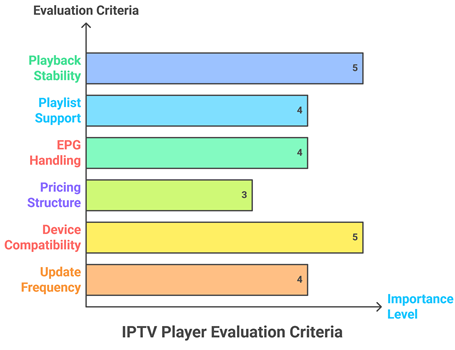
Our team aims to share everything you need to know about our evaluation approach, built on hands-on testing and real performance data. It is important to explain how we assessed each IPTV player according to industry standards and user-centric expectations. This method is the best way to improve user satisfaction, ensure reliability, and deliver results that are trustworthy and current.
- Playback Stability: We selected apps based on smooth playback, low buffering, and reliable channel switching during long viewing sessions.
- Playlist Support: Our team evaluated compatibility with M3U URLs, Xtream Codes, and other common IPTV provider formats.
- EPG Handling: We shortlisted players with strong guide support, including timezone fixes, mapping, and multiple EPG sources.
- Pricing Structure: Pricing was assessed for fairness, availability of trials, and value across monthly, yearly, and lifetime tiers.
- Device Compatibility: We considered support across Android TV, Fire TV, iOS, smart TVs, and desktop platforms for hassle-free setup.
- Update Frequency: We evaluated how often each app receives updates, since active maintenance reduces bugs and improves long-term reliability.
Why are users looking for TiviMate Alternatives in 2026?
Users seek TiviMate alternatives in 2026 due to device limitations, changing IPTV needs, and reliability concerns. Some want iOS support, easier setup, or stronger EPG and recording tools. Others prioritize smoother playback, better parental controls, and faster updates. Alternatives also help if an interface feels complex or subscription value drops.
- iOS Support: Many users want a player that works beyond Android TV and Firestick ecosystems.
- Stream Stability: Users switch to apps with stronger decoding, caching, and stream recovery features.
- Modern Interface: Cleaner navigation, quicker channel search, and easier playlist management drive migration decisions.
- EPG Improvements: Better guide matching, series recording, and storage options matter for sports-heavy viewing.
- Active Updates: Actively maintained apps reduce bugs, security risks, and compatibility issues over time.
How to Migrate from TiviMate to Another IPTV Player
To migrate from TiviMate, first export or note your playlist details (M3U URL or Xtream Codes), EPG link, and preferred settings. Take screenshots of groups, favorites, and custom EPG offsets. Install the new IPTV player, import the playlist and EPG, then recreate favorites. Test streams, adjust buffering, and verify timezone settings.
- Save Credentials: Save M3U/Xtream details, EPG URL, and any VPN or DNS settings you rely on.
- Document Layout: Screenshots of favorites, hidden channels, and sort order speed up reconfiguration later.
- Clean Import: Add playlist first, then EPG, then run an update to populate channels accurately in the new player.
- Match Settings: Replicate decoding, audio track preferences, subtitles, and buffer size for consistent performance across players.
- Validate Guide: Confirm timezone, EPG shift, and channel mapping before deleting your TiviMate setup.
Free vs Paid TiviMate Alternatives: Which One Should You Choose?
Free TiviMate alternatives can work well for casual viewing, but paid apps often deliver better EPG reliability, fewer ads, and advanced features like recording, multi-screen, and cloud sync. Choose free if you only need basic playlists. Choose paid if you watch sports daily, need stability, or manage multiple devices and profiles.
- Light Use: Ideal for occasional streaming, minimal customization, and testing providers before committing long-term to one player.
- Advanced Tools: Recording, multi-view, profiles, and detailed EPG controls usually require paid subscriptions or lifetime fees.
- Total Cost: A small annual fee can beat time wasted fixing crashes, ads, or limited functionality in free options.
- Trial Options: Prefer apps offering trials to confirm performance with your specific IPTV source before paying.
- Support Updates: Paid products often patch bugs faster and stay compatible with operating system changes over time.
Verdict:
In this review, you got acquainted with some of the best TiviMate alternatives that deliver reliable performance and flexible playlist handling. All of them have advantages and considerations. To help you take the final call, I have created this verdict.
- IPTV Smarters Pro: A user-friendly option with broad playlist support and a polished layout that works across many devices, making it a top choice for households that want a comprehensive, customizable experience with dependable EPG and catch-up handling.
- Kodi: A powerful, robust platform and a superior choice for tinkerers; it is ideal if you want deep customization, add-on flexibility, and local media in one hub, though it can take more setup to fine-tune.
- iMPlayer: An impressive, reliable pick for Android TV with a clean UI and strong playback controls; recommended if you want a top-notch balance of performance, multi-playlist management, and a streamlined living-room experience.
FAQs
Is TiviMate the best IPTV player or are there better alternatives available?
TiviMate is one of the best IPTV players for Android TV thanks to its EPG and interface, but “best” depends on your needs. Strong alternatives include IPTV Smarters Pro (easy setup), OTT Navigator (advanced filtering), Kodi (deep customization), and Sparkle TV (modern UI). Compare device support, EPG accuracy, and update frequency to find the right match for your viewing routine.
Do TiviMate alternatives work on Amazon Firestick and Android TV?
Yes. Most TiviMate alternatives run well on Amazon Firestick and Android TV, including IPTV Smarters Pro, OTT Navigator, and iMPlayer. On Firestick, you may need to sideload apps not available in the Amazon Appstore. Ensure the app supports remote navigation, EPG loading, and stable playback with your preferred player and IPTV source for best results.
Can I use TiviMate alternatives on iPhone, iPad, or Apple TV?
Yes, but TiviMate itself is Android-only. For iPhone and iPad, common alternatives include IPTV Smarters Pro (iOS version), GSE Smart IPTV, and similar players depending on availability. For Apple TV, options are more limited, so verify App Store availability, M3U/Xtream support, and EPG performance before switching from your current Android-based setup.
Do these TiviMate alternatives support M3U URLs and Xtream Codes API?
Most reputable TiviMate alternatives support M3U playlists, and many also support Xtream Codes API for easier setup and EPG mapping. IPTV Smarters Pro, iMPlayer, and several Android IPTV apps commonly support both formats. Always confirm in the app’s login or add-playlist screen. If your provider supplies XMLTV EPG, ensure the app can import it properly.
Will my existing IPTV subscription work with TiviMate alternatives?
Usually, yes—if your IPTV subscription provides standard credentials like an M3U URL, Xtream Codes API login, or portal URL. TiviMate alternatives typically accept the same inputs, so you can reuse your existing service without changing providers. If your subscription is locked to a specific app or uses DRM, compatibility may be limited or unavailable.
Are TiviMate alternatives free to use, or do they require a subscription?
It depends on the player. IPTV Smarters Pro, Kodi, and OTTRun are free to download and use. Others like iMPlayer ($20 lifetime), NexTV ($19.99 lifetime), Sparkle TV, OTT Navigator, and Televizo offer paid tiers ranging from monthly to lifetime plans. Free apps cover the basics, while paid players often add advanced features, faster updates, and better long-term support.
Which TiviMate alternative offers the best EPG and Catch-Up support?
For strong EPG and catch-up support, IPTV Smarters Pro and iMPlayer are reliable picks since they handle Xtream Codes well, which often unlocks catch-up. OTT Navigator stands out for advanced EPG mapping and timezone fixes, while Kodi can deliver excellent guide support through PVR clients. Final results depend heavily on your IPTV provider’s EPG and catch-up capabilities.