
Key takeaway: TiviMate is a player, not a television subscription. Plex, PotPlayer and IPTV Smarters Pro are software choices; the other entries sell account or playlist access that must be verified separately. Compare publisher identity, platform, price, trial terms, cancellation and Canadian territorial information before adding any credentials.
This guide preserves all ten original entries while correcting the product categories that matter most. A polished interface or a successful login proves only that software and supplied data work together. It does not identify the legal seller, confirm a refund promise or establish permission for particular programming. Keep the player purchase, seller contract and source authorization as three separate records.
Content and licensing notice: This article reviews player software, public pricing, device requirements and consumer-protection checks. We do not host, retransmit or provide television programming, playlists or account credentials. Availability and distribution permission vary by country and programme. Before using a source, independently confirm that its accountable seller is authorized for the content and territory involved. Some outbound links may generate a commission.
Why Trust Our Recommendations?
Every entry was rechecked on August 19, 2026 with a source-first method. Software facts were taken from the publisher or app-store page. Seller prices and trial terms were used only when visible on the documented commercial domain. When a page was under maintenance or a trial duration was not published, the missing fact is stated instead of estimated.
- Publisher check: Confirm the developer, store listing, signature and privacy controller before installation.
- Product check: Separate a player licence from any seller account or supplied playlist.
- Cost check: Record the complete term, currency, connection count, renewal and refund deadline.
- Territory check: Ask the accountable seller for Canadian information tied to the intended programming.
- Security check: Never use modified applications, look-alike domains or public posts containing credentials.
Best IPTV Player for Tivimate Explained
| Name | No. of Channels | Starting Price | Free Trial | Link |
|---|---|---|---|---|
| Plex | Not playlist-based | US$0; Plex Pass from US$6.99/month | Free base application | Official Page |
| PotPlayer | User-supplied media | US$0 | Freeware | Official Page |
| IPTV Smarters Pro | No included channels | US$0 for the player | Free player access | Official Page |
| Kemo IPTV | 21,000+ advertised | US$9/month | 24 hours | Official Page |
| OrigineTV | 55,000+ advertised | €34.99/3 months | 24 hours | Official Page |
The first five rows show three software products and two account sellers, so the channel column deliberately explains the source model where a player includes no channels. Prices were checked on official pages on August 19, 2026 and can change. “Free” describes the player or trial only; it does not validate an independently supplied source.
1) Plex
| Rating | 4.4/5 |
| Free Trial or Free Access | Free base application; paid Plex Pass is optional |
| Channel / Library Data | Uses Plex libraries and its own licensed catalogue; it does not use a seller playlist as TiviMate does |
| Starting Price | US$0; Plex Pass from US$6.99/month |
| Supported Devices | Android TV, Apple TV, Fire TV, Roku, iOS, Android, web and desktop |
Plex belongs in this list as a companion rather than a TiviMate replacement. It organizes personal media and Plex-provided programming behind a single account, while TiviMate reads playlists that the user adds. That difference changes the setup, billing and rights questions. A household using both should keep each application tied to its official publisher and avoid importing unknown files simply to make one product imitate the other.
Why consider Plex?
- Clear product boundary: Plex states that its optional pass adds software features and does not create access to additional premium programming.
- Account-centred use: Profiles, watch history and server permissions make it suitable for a managed household media library.
- Broad device coverage: The same account can be used across major television, mobile, browser and desktop platforms.
- Official pricing record: Plex publishes its current subscription terms; the base application remains available without a paid pass.
- Separate source model: It is not a direct M3U or portal substitute for TiviMate, so the two should not be configured as though they were identical.
Advantages
- Free base application
- Official publisher and account controls are identifiable
- Wide platform support
- Useful for personal media organization
Disadvantages
- Not a direct TiviMate-style playlist manager
- Premium software features cost extra
- Some functions depend on a separately operated media server
Pricing: Plex listed Plex Pass at US$6.99 per month and US$69.99 per year on its official Canadian page. Plex also announced that a new lifetime pass increased to US$749.99 on July 1, 2026. The base Plex application remains free. Prices and applicable currency can vary by account region, so confirm the amount displayed while signed in.
Official page: https://www.plex.tv/
2) PotPlayer
| Rating | 4.6/5 |
| Free Trial or Free Access | Freeware; no paid trial is required |
| Channel / Library Data | Uses media files or URLs supplied by the user; no included channel catalogue |
| Starting Price | US$0 |
| Supported Devices | Windows computers |
PotPlayer is the desktop utility in this comparison. It can open local media and supported network URLs on Windows, but it does not reproduce TiviMate’s television-first guide and remote-control workflow. Its value is precise playback testing on a computer. The safest use is to obtain the signed installer from the publisher’s documented site and use only media or URLs that the user is authorized to access.
Why consider PotPlayer?
- Windows focus: It is designed for desktop operation, so it suits keyboard-and-mouse troubleshooting more than living-room navigation.
- Playback controls: Hardware acceleration, codec handling, subtitle controls and diagnostics can help isolate a device-specific playback problem.
- No bundled catalogue: The program does not supply a television package; every file or URL still needs a legitimate source.
- Installer verification: Confirm the Kakao publisher signature and current official download route before installation.
- Complementary role: Use it to compare decoder behaviour on Windows, not as evidence that a seller account is reliable or authorized.
Advantages
- Free for personal use
- Detailed playback controls
- Useful Windows diagnostics
- Supports many common media formats
Disadvantages
- Windows only
- No television-first guide comparable to TiviMate
- Advanced settings can be difficult for beginners
Pricing: PotPlayer is published as freeware. Its official licence permits free installation and use for viewing media files. There is no subscription price or timed trial to calculate. Verify the publisher signature and avoid modified download mirrors.
Official page: https://potplayer.tv/
3) IPTV Smarters Pro
| Rating | 4.2/5 |
| Free Trial or Free Access | Free player access; no fixed trial window is published |
| Channel / Library Data | No included channels; content depends on the authorized source added by the user |
| Starting Price | US$0 for the player |
| Supported Devices | Android, iOS, Windows, macOS, compatible Smart TVs and Fire TV |
IPTV Smarters Pro is the closest software comparison to TiviMate because it accepts user-supplied account or playlist information and provides a multi-platform interface. The player itself does not establish who owns or licenses the material loaded into it. Before entering credentials, confirm the application publisher, download source, privacy policy and data-deletion route, then verify the underlying source separately.
Why consider IPTV Smarters Pro?
- Player-only distinction: The application organizes supplied data but does not include or validate a television subscription.
- Cross-platform option: It can be useful when one household needs a similar interface outside Android TV.
- Credential caution: Use only the official publisher’s application and never place account details into a renamed or modified copy.
- Source accountability: Keep the seller contract, receipt and territorial explanation separate from the player account.
- Migration planning: Test favorites, guide data and captions with an authorized source before moving every household device.
Advantages
- Player is available without a subscription fee
- Covers more platforms than TiviMate
- Supports common playlist login methods
- Separates software from the content source
Disadvantages
- Quality depends on the supplied source
- Look-alike applications can create publisher confusion
- Interface behaviour varies by platform
Pricing: The official IPTV Smarters site presents the player as free software and does not publish a subscription charge for the player itself. Any separate seller account has its own price and terms. Confirm that an app-store listing names the expected publisher before installation.
Official page: https://www.iptvsmarters.com/
4) Kemo IPTV
| Rating | 4.2/5 |
| Free Trial or Free Access | 24-hour free trial published on the official site |
| Channel / Library Data | 21,000+ channels and 100,000+ library items advertised by the provider |
| Starting Price | US$9/month |
| Supported Devices | Android TV, Fire TV, smartphones, Smart TVs, MAG and computers |
Kemo IPTV is not a player. It is a seller that advertises account credentials compatible with third-party applications. That distinction should remain visible throughout the decision. A successful TiviMate login only confirms technical compatibility; it does not establish the seller’s identity, refund reliability or permission for particular programming in Canada. Start with the free test, verify the contracting party and keep the first paid term short.
Why consider Kemo IPTV?
- Trial purpose: Use the 24-hour test for installation, guide loading and support response with material you are authorized to access.
- Published terms: The site lists one-, three-, six- and twelve-month prices, allowing the complete prepaid amount to be compared.
- Seller identity: Match the operator in the terms with the checkout recipient and payment descriptor before ordering.
- Application separation: Install TiviMate from its official publisher rather than accepting a modified player from an account seller.
- Territory question: Request a written Canadian explanation for the intended programming and retain the complete response.
Advantages
- 24-hour test is publicly offered
- One-month entry limits the first commitment
- Several fixed terms are displayed
- TiviMate-compatible credentials are advertised
Disadvantages
- Catalogue figures are provider claims
- Seller permission requires separate verification
- A free login cannot prove long-term reliability
Pricing: Kemo IPTV displayed US$9 for one month, US$20 for three months, US$35 for six months and US$49 for twelve months on August 19, 2026. The site also offered a 24-hour free trial. Confirm taxes, connection allowance, refund conditions and the final merchant descriptor before payment.
Official page: https://kemo-tv.us/
5) OrigineTV
| Rating | 4.4/5 |
| Free Trial or Free Access | 24-hour free trial without card details |
| Channel / Library Data | 55,000+ channels and 270,000+ library items advertised by the provider |
| Starting Price | €34.99/3 months |
| Supported Devices | Android TV, Fire TV, phones, tablets, Smart TVs and computers |
OrigineTV supplies account access rather than the TiviMate application. Its public site begins with a three-month paid term and also markets an open-ended plan, which makes operator continuity and refund evidence more important than a simple monthly equivalent. The no-card trial lowers the initial payment risk, but it should be used only for technical evaluation. Canadian permission remains a documentary question for the accountable seller.
Why consider OrigineTV?
- No-card evaluation: The short test can confirm setup and support responsiveness without supplying payment details.
- Long-term caution: An open-ended marketing label is not a guarantee that a business, application or distribution permission will continue.
- Currency record: Save the euro total, card conversion, taxes and statement descriptor so the actual Canadian cost remains traceable.
- Manual renewal: The site states renewal is manual; preserve that wording with the final checkout and receipt.
- Rights evidence: Ask for an attributable Canadian territory answer before assigning value to the advertised catalogue.
Advantages
- Trial does not require card details
- Several prepaid terms are shown
- Manual renewal is stated
- Device instructions are widely available
Disadvantages
- Three months is the shortest paid term
- Euro conversion affects total cost
- Open-ended access increases continuity risk
Pricing: OrigineTV listed €34.99 for three months, €48.99 for six months, €67.99 for twelve months and €99.99 for its open-ended option on August 19, 2026. It advertised a 24-hour free trial without card details. Reconfirm the selected connection count, refund wording and currency at checkout.
Official page: https://originetv.com/
6) DigitalLizard
| Rating | 4.3/5 |
| Free Trial or Free Access | A trial is published; duration is not stated on the accessible FAQ |
| Channel / Library Data | 12,000+ channels and 80,000+ library items advertised by the provider |
| Starting Price | US$8/month for one connection |
| Supported Devices | Android TV, Fire TV, smartphones, tablets, Smart TVs and computers |
DigitalLizard advertises a low one-connection entry price and says a trial is available, but the accessible FAQ does not state its duration. This is exactly where a careful comparison should avoid filling a blank with an assumption. Ask support to identify the test length, eligible device and expiry time in writing. Then verify the legal operator, payment recipient, application publisher and Canadian territorial position before buying.
Why consider DigitalLizard?
- Unstated trial length: Obtain a dated answer before treating the trial as a specific number of hours.
- Connection pricing: The homepage starts at US$8 for one connection, while the visible selected tab can show higher multi-connection totals.
- Checkout comparison: Verify that the connection count and term in the cart match the price used in the article.
- Credential hygiene: Keep TiviMate credentials private and do not post screenshots containing server, username or password details.
- Canadian verification: Ask the responsible seller to explain its territorial basis for the exact programming being considered.
Advantages
- Low public one-connection entry price
- Trial availability is stated
- Multiple connection tiers are offered
- Device guidance is published
Disadvantages
- Trial duration is not stated in the accessible FAQ
- Displayed price changes with connection tab
- Catalogue claims require independent checking
Pricing: DigitalLizard advertised plans starting at US$8 per month for one connection on August 19, 2026. Its FAQ confirmed that a trial is offered but did not state a duration in the accessible answer. Confirm the exact trial window, selected connection tier, refund terms and final checkout total before paying.
Official page: https://digitalizard.com/
7) Worthystream
| Rating | 4.3/5 |
| Free Trial or Free Access | One-day free trial shown on the official billing page |
| Channel / Library Data | 15,000+ channels and 40,000+ library items advertised by the provider |
| Starting Price | US$15/month |
| Supported Devices | Android TV, Fire TV, phones, tablets and compatible boxes |
Worthystream publishes a one-day free trial and a one-month paid plan, making its initial terms easier to identify than offers that hide the test window. The trial page says account information may be delivered by email. Check the sender domain before following links, and use the test to validate the intended device and support route. Operator identity, renewal, refund and Canadian permission still require separate records.
Why consider Worthystream?
- Email provenance: Confirm the sender domain and avoid unexpected attachments or unrelated sign-in pages.
- One-day test: Use the published window for technical compatibility without assuming it validates the seller’s catalogue claims.
- Monthly baseline: A US$15 paid month offers a short comparison point after the free evaluation.
- Account controls: Locate renewal, cancellation, support and deletion routes before moving to a longer term.
- Rights separation: Keep territorial permission evidence distinct from player setup and stream availability.
Advantages
- One-day trial is clearly priced at zero
- One-month paid option is available
- Official billing page states the entry amount
- Compatible player use is documented
Disadvantages
- Email delivery requires sender verification
- Catalogue totals are self-reported
- Longer-term value depends on seller continuity
Pricing: Worthystream’s official billing page displayed a one-day trial at US$0 and a one-month plan at US$15 on August 19, 2026. Confirm whether the account renews, the connection limit, refund eligibility and the identity of the payment recipient before continuing beyond the test.
Official page: https://worthystream.com/home/
8) XTREAM VIEW
| Rating | 4.2/5 |
| Free Trial or Free Access | No current trial could be verified while the official homepage was under maintenance |
| Channel / Library Data | 31,000+ channels and 130,000+ library items previously advertised by the provider |
| Starting Price | No current price published on the accessible maintenance page |
| Supported Devices | Previously advertised for Android TV, Fire TV, mobile, Smart TVs and computers |
XTREAM VIEW’s official homepage displayed a maintenance notice during the August 19 review. That means the previous trial, catalogue and price statements cannot be treated as current. The responsible editorial choice is to retain the tool in the article while clearly marking the verification gap. Do not order through an imitation domain or rely on an old screenshot; wait for the documented site to publish a secure checkout and current terms.
Why consider XTREAM VIEW?
- Maintenance state: A functioning historical domain is not the same as an accessible current commercial offer.
- No substituted facts: Previous price and trial wording should remain unconfirmed until the seller republishes it.
- Domain discipline: Do not move to a look-alike site, chat account or payment page that cannot be tied to the documented operator.
- Credential safety: Avoid submitting TiviMate account information while legal, support and checkout pages are unavailable.
- Recheck requirement: Verify the full offer again when the official page returns, including Canadian territorial information.
Advantages
- Known official domain remains reachable
- Maintenance state is transparent
- No payment is needed to inspect the page
Disadvantages
- Current price is unavailable
- Current trial cannot be confirmed
- Contract and support details cannot be evaluated now
Pricing: The official XTREAM VIEW homepage showed a maintenance notice on August 19, 2026 and did not publish an accessible current price or trial. Earlier figures in this article were therefore not carried forward as verified facts. Recheck the official domain when normal pages return.
Official page: https://xtreamview.com/
9) EVESTV
| Rating | 4.4/5 |
| Free Trial or Free Access | Free 24-hour single-device trial |
| Channel / Library Data | 38,000+ channels and 160,000+ library items advertised by the provider |
| Starting Price | US$12.99/month |
| Supported Devices | Android TV, Fire TV, Smart TVs, iOS, Android and computers |
EVESTV publishes a free 24-hour single-device trial and a detailed term table. Those facts make the commercial comparison clearer, but they do not answer the Canadian rights question. Use the trial for device setup, guide import, captions and support response with authorized material. Before payment, match the legal operator, checkout recipient, receipt and cancellation route, then request an attributable territorial explanation.
Why consider EVESTV?
- Clear trial line: The official pricing panel labels the 24-hour single-device test as free.
- Term totals: One-, three-, six-, twelve- and twenty-four-month amounts are shown separately rather than only as monthly equivalents.
- Connection scope: Confirm whether a single-device plan also restricts simultaneous connections and how upgrades are billed.
- Seller traceability: Save the operator and payment details before moving from a zero-cost test to a prepaid term.
- Permission check: Do not treat a large vendor-advertised catalogue as proof of Canadian distribution authority.
Advantages
- Free 24-hour trial is published
- One-month plan is available
- Five paid durations are listed
- Connection tiers are clearly separated
Disadvantages
- Catalogue figures are seller claims
- Long terms increase prepaid exposure
- Permission remains a separate documentary check
Pricing: EVESTV listed a free 24-hour single-device trial, US$12.99 for one month, US$22.99 for three months, US$42.99 for six months, US$72.99 for twelve months and US$92.99 for twenty-four months on August 19, 2026. Confirm current bonuses, renewal and refund terms in the cart.
Official page: https://evestv.shop/
10) Elon IPTV
| Rating | 4.2/5 |
| Free Trial or Free Access | No free trial was found on the accessible official offer |
| Channel / Library Data | 85,000+ combined items advertised for the Gold plan |
| Starting Price | €30/3 months for Gold |
| Supported Devices | Compatible television, mobile and computer players |
Elon IPTV’s official site publishes its current plans in euros. The previous article used dollar values and stated a 24-hour trial that was not visible during this review. Both details have been corrected. Because the shortest published term is three months, confirm the operator, refund route, application source and Canadian territorial information before prepaying. TiviMate compatibility should be evaluated separately from the seller’s commercial and rights claims.
Why consider Elon IPTV?
- Currency correction: Use the official euro totals and record the card conversion rather than repeating an unsupported dollar price.
- Trial correction: No accessible free-trial statement was found, so a specific duration is not claimed.
- Plan distinction: Gold and Premium are separate offers with different totals; verify which product is in the cart.
- Three-month minimum: The first payment covers a longer period than a monthly option, increasing the value of pre-purchase checks.
- Territorial record: Request a seller-attributable Canadian explanation and preserve it with the dated offer and receipt.
Advantages
- Current euro totals are visible
- Gold and Premium plans are separated
- Six- and twelve-month options are shown
- Device compatibility information is published
Disadvantages
- No free trial was found
- Three months is the shortest term
- Two plan families can confuse checkout comparison
Pricing: Elon IPTV listed Gold at €30 for three months, €45 for six months and €59 for twelve months on August 19, 2026. Premium was listed at €40, €49 and €69 for the same terms. No free trial was visible on the accessible official offer. Confirm the selected plan, conversion cost and refund conditions before ordering.
Official page: https://elon-iptv.net/
Comparison of Best IPTV Players for Tivimate
| Name | Role | Primary Platform | Starting Price | Free Access or Trial | Most Important Check |
|---|---|---|---|---|---|
| Plex | Media platform | TV, mobile, web and desktop | US$0; Plex Pass from US$6.99/month | Free base application | Do not confuse Plex Pass with a playlist subscription |
| PotPlayer | Desktop media player | Windows | US$0 | Freeware | Download only from the Kakao-published route |
| IPTV Smarters Pro | Playlist player | TV, mobile and desktop | US$0 for the player | Free player access | Confirm the exact publisher before entering credentials |
| Kemo IPTV | Account and playlist seller | Compatible television and mobile players | US$9/month | 24 hours | Request attributable Canadian territorial information |
| OrigineTV | Account and playlist seller | Compatible television and mobile players | €34.99/3 months | 24 hours | Treat open-ended access as risk, not permanence |
| DigitalLizard | Account and playlist seller | Compatible television and mobile players | US$8/month for one connection | Trial offered; duration unstated | Confirm the trial duration in writing before relying on it |
| Worthystream | Account and playlist seller | Compatible television and mobile players | US$15/month | One day | Verify email sender and account terms before activation |
| XTREAM VIEW | Account and playlist seller | Compatible television and mobile players | No current price published on the accessible maintenance page | Not verifiable during maintenance | Wait for the official site to publish current terms |
| EVESTV | Account and playlist seller | Compatible television and mobile players | US$12.99/month | 24 hours | Verify the seller’s rights explanation independently of its catalogue |
| Elon IPTV | Account and playlist seller | Compatible television and mobile players | €30/3 months for Gold | No free trial found | Use the euro plan table, not the old dollar figures |
Use this comparison as a classification tool, not a single winner table. A player should be judged by publisher identity, supported platforms, accessibility, updates and data handling. A seller requires additional checks covering the contracting operator, payment recipient, cancellation, refunds and Canadian territorial information.
What is Tivimate IPTV Player and How Does it Work?
TiviMate is an Android TV media player developed by Armobsoft FZE. Its official Google Play listing states that the application provides no content. The user adds a compatible authorized playlist or account, after which the app can display categories, guide information, favourites and playback controls. A paid upgrade unlocks application features only; it does not purchase programming.
- Player layer: TiviMate reads supported playlist or portal information and renders it in a television-friendly interface.
- Source layer: The user remains responsible for choosing an authorized source and protecting its credentials.
- Guide layer: Schedule accuracy depends on the data supplied by the source, not only on the player.
- Device layer: The official listing is designed for Android TV and remote navigation rather than touch-first phones.
- Licence layer: Premium affects software functions and must not be described as a programming subscription.
How Did We Evaluate the Best IPTV Player for Tivimate?
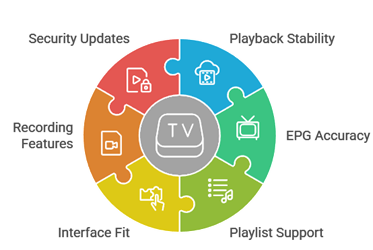
The evaluation begins by determining what each named product actually is. Software publishers are checked for platform support, current store identity, pricing and source boundaries. Account sellers are checked for official-domain pricing, trial wording, connection scope and the evidence a Canadian buyer should request. No catalogue total, rating or successful test is treated as proof of distribution permission.
- Role accuracy: Player, media platform and account seller are labelled separately.
- Official evidence: Current pricing and trial wording must be visible on the documented publisher or seller page.
- Device fit: The intended operating system, remote control and store availability are verified before purchase.
- Consumer terms: Currency, renewal, cancellation, refund and connection limits are captured with the offer.
- Authorization: Canadian rights questions remain unresolved until attributable evidence is provided by the responsible seller.
Key Features to Look for in the Best IPTV Player for Tivimate
A useful player comparison should concentrate on software qualities the publisher controls. Source catalogue claims belong in a separate seller review. Prioritize a verifiable publisher, official updates, accessible navigation and privacy controls before cosmetic features.
- Official distribution: A recognised app store or publisher site with an identifiable developer and current policy pages.
- Format support: Compatibility with the authorized source format without requiring modified software.
- Guide and favourites: Clear schedule navigation, search, category management and household-friendly organization.
- Accessibility: Captions, readable text, focus indicators and predictable remote-control behaviour.
- Account control: Documented renewal, cancellation, device removal and data-deletion procedures.
- Safe diagnostics: Logs and playback controls that do not expose usernames, passwords or server details.
How to Install and Set Up Tivimate on Your Device
On a compatible Android TV device, start with the official Google Play listing and confirm the developer name before installation. If the device store does not carry the app, use only the download route documented by the official publisher. Avoid “premium unlocked” copies, bundles and instructions that ask you to disable security controls.
- Verify the publisher: Check Armobsoft FZE, the official support address and the latest update information.
- Install cleanly: Grant only permissions required for playback and storage features you intend to use.
- Secure the account: Use a unique password and keep purchase records outside the television device.
- Start with one source: Add only an authorized source so guide and playback problems can be isolated.
- Hide credentials: Do not photograph or post playlist URLs, usernames, passwords or portal addresses.
How to Pair an IPTV Service with Tivimate
Pairing should begin only after the source is authorized and the seller is attributable. Obtain the required format from the accountable seller, then enter it directly into the official player. A working login confirms technical compatibility only. Preserve the seller’s contract, Canadian explanation, receipt and cancellation route as separate evidence.
- Identify the contract: Match the legal operator, website, support contact and payment recipient.
- Confirm Canadian scope: Ask for a written answer tied to the programming and territory being considered.
- Check connection rules: Clarify device changes versus simultaneous use before adding another screen.
- Test privately: Use one intended device and never share the credentials with public troubleshooting forums.
- Keep an exit path: Save renewal, cancellation, refund and account-deletion instructions before the first paid term.
Tivimate Free vs Premium: Which Version Is Right for You?
The free version is appropriate for confirming that the official application installs and that a single authorized source is technically compatible. Premium is a software upgrade for households that need the additional player functions shown at the point of purchase. The official terms say subscription plans and prices are displayed during checkout and may vary by region. Neither version supplies programming.
- Choose free first: Validate installation, remote navigation and one authorized source before buying software features.
- Choose Premium for features: Pay only when the listed guide, recording, multi-playlist or customization functions solve a real need.
- Check the price in account: Use the amount and currency shown by the official store or website, not an old third-party screenshot.
- Record renewal: Note whether the selected plan renews and where it can be cancelled.
- Do not bundle decisions: Evaluate the player licence independently from any seller account.
Verdict:
There is no single winner across these ten entries because they perform different roles. Plex is a managed media platform, PotPlayer is a Windows utility and IPTV Smarters Pro is a multi-platform playlist player. The remaining entries are seller accounts that require a higher level of operator, payment and Canadian territorial verification. Start with official software, use the shortest documented evaluation path and extend a paid term only when every record is attributable.
- OrigineTV: a reviewed seller entry with a no-card test; confirm Canadian territorial information before purchase.
- IPTV Harmony: an additional comparison starting point; verify its operator, term, application and Canadian scope independently.
- Stream IPTV 4K: another page-linked option for separate due diligence; do not rely on compatibility or catalogue marketing alone.
FAQs
Is Tivimate available on iOS or Apple TV devices?
The official Google Play listing describes TiviMate as an Android TV application and says it is not optimized for touch devices. Do not install an unrelated iOS or Apple TV application simply because it uses a similar name. Choose a player whose official publisher explicitly supports the required platform.
How much does Tivimate Premium cost?
TiviMate’s official terms say that available plans, billing periods and prices are shown at the point of purchase and can renew at the then-current price. Check the official store or signed-in website for the current amount in your region, then save the receipt and renewal date. Avoid third-party pages that bundle a player licence with programming.
Do I need a separate IPTV subscription to use Tivimate?
TiviMate provides no content. It requires user-supplied authorized playlist or account information before it can display anything. A separate source must be evaluated for operator identity, permission, territorial scope, price, cancellation and privacy. A paid TiviMate upgrade changes software features only.
What internet speed is recommended for smooth Tivimate streaming?
There is no single speed that fits every authorized source and picture format. Begin with the source and publisher requirements, then test the actual device using Ethernet or stable Wi-Fi. Measure sustained throughput, latency and packet loss while other household traffic is active. Lower the authorized source quality before disabling security controls or installing modified software.
Can I record live TV shows using Tivimate Player?
TiviMate includes recording-related features, but the right to record depends on the authorized source, subscription terms, programme rights and local rules. Confirm those conditions before enabling recording. Use storage you control, protect the device from shared access and delete recordings when the applicable terms require it.