

Key takeaway: Kodi is open-source player software; it does not supply a television subscription. The ten retained entries are external account sellers. OrigineTV, Tellystudio and StreamingNordic IPTV illustrate why player setup, seller identity and Canadian territorial permission must be checked separately.
Use the official Kodi application and built-in client system. Avoid modified builds, unknown repositories and setup files that conceal their publisher. For every seller, record the legal operator, payment recipient, current price, trial or guarantee, connection rule, cancellation route and an attributable Canadian explanation before adding credentials.
Content and licensing notice: This article compares public seller terms, Kodi compatibility and consumer-protection checks. We do not host, retransmit or provide television programming, playlists, add-ons or account credentials. Availability and distribution permission vary by country and programme. Use only sources authorized for the content and Canadian territory involved. Some outbound links may generate a commission.
Why Trust Our Recommendations?
This update separates facts visible on official pages from details that could not be confirmed. Prices and trial terms were checked on August 19, 2026. Security warnings, blocked price pages and unstated durations are disclosed. No successful login, channel count or seller rating is treated as proof of Canadian distribution permission.
- Kodi provenance: Install only the official application and supported built-in client.
- Seller attribution: Match the legal operator, domain, checkout, receipt and support identity.
- Complete cost: Record term, currency, connections, renewal, cancellation and refund.
- Territory evidence: Ask for a Canadian explanation tied to the intended programming.
- Private setup: Keep credentials out of repositories, screenshots and public messages.
Best IPTV for Kodi: Top Picks!
| Name | No. of Channels | Starting Price | Free Trial | Link |
|---|---|---|---|---|
| OrigineTV | 55,000+ advertised | €34.99/3 months | 24 hours | Visit Now |
| Tellystudio | 30,000+ advertised | US$15/month | One day | Visit Now |
| StreamingNordic IPTV | Previous vendor claim | Current price page was not accessible | Duration unstated | Visit Now |
| USA LIVE IPTV | 20,000+ advertised | US$49.96/3 months | 30-day guarantee | Visit Now |
| Stream IPTV 4K | Vendor figure requires checkout confirmation | US$14.99/month | 36 hours | Visit Now |
The table preserves the five leading original entries and adds complete price and trial wording. A guarantee is not labelled as a free trial, and an inaccessible price is not replaced with an old estimate.
1) OrigineTV
| Rating | 4.4/5 |
| Free Trial or Guarantee | 24-hour free trial without card details |
| Provider-Advertised Catalogue | 55,000+ channels and 270,000+ library items advertised |
| Starting Price | €34.99/3 months |
| Kodi / Device Fit | Compatible players on Android TV, Fire TV, mobile, Smart TVs and computers |
OrigineTV is a paid account seller, not a Kodi add-on. Its no-card test can confirm whether an authorized account format imports cleanly into Kodi, but a successful guide load does not establish Canadian distribution permission. The three-month minimum also makes operator identity, euro conversion and cancellation evidence important before purchase.
Kodi-specific checks
- Client provenance: Confirm which Kodi client and account format the seller supports without installing a third-party repository.
- Commercial record: Save the manual-renewal statement, checkout identity and Canadian territorial response with the receipt.
- Credential privacy: Never expose server, username, password or playlist details in screenshots or public support posts.
- Rights separation: A working Kodi import does not establish permission for the supplied programming in Canada.
Advantages
- A 24 hours evaluation or protection period is documented
- The pricing field records €34.99/3 months without a placeholder
- Kodi can remain the official player rather than accepting a modified application
Disadvantages
- The seller account is separate from Kodi and needs independent verification
- Prepaid cost creates operator and refund risk
- Advertised catalogue figures are provider claims, not territorial evidence
Pricing: €34.99/3 months. Reconfirm the final currency, connection allowance, renewal, cancellation and refund wording on the official checkout.
Official page: https://originetv.com/
2) Tellystudio
| Rating | 4.2/5 |
| Free Trial or Guarantee | One-day free trial shown at US$0 |
| Provider-Advertised Catalogue | 30,000+ channels and 157,000+ library items advertised |
| Starting Price | US$15/month |
| Kodi / Device Fit | Compatible television, mobile and computer players |
Tellystudio publishes a zero-cost day followed by a US$15 month. That creates a sensible technical test sequence for Kodi: install only the official Kodi client, add the authorized account privately and check guide mapping, captions and support response. The trial still cannot answer who controls specific programming in Canada.
Kodi-specific checks
- Client provenance: Record the exact one-day expiry and remove credentials from Kodi if the test is not continued.
- Commercial record: Compare the US$15 monthly checkout with the published longer totals and verify the payment recipient.
- Credential privacy: Never expose server, username, password or playlist details in screenshots or public support posts.
- Rights separation: A working Kodi import does not establish permission for the supplied programming in Canada.
Advantages
- A one day evaluation or protection period is documented
- The pricing field records US$15/month without a placeholder
- Kodi can remain the official player rather than accepting a modified application
Disadvantages
- The seller account is separate from Kodi and needs independent verification
- Prepaid cost creates operator and refund risk
- Advertised catalogue figures are provider claims, not territorial evidence
Pricing: US$15/month. Reconfirm the final currency, connection allowance, renewal, cancellation and refund wording on the official checkout.
Official page: https://tellystudio.com/
3) StreamingNordic IPTV
| Rating | 4.4/5 |
| Free Trial or Guarantee | Free test request; duration is not stated on the accessible current page |
| Provider-Advertised Catalogue | 30,000+ channels and 200,000+ library items previously advertised |
| Starting Price | Current price page was not accessible |
| Kodi / Device Fit | Compatible Smart TV, Fire TV, Android, iOS, MAG and computer players |
StreamingNordic currently publishes a free test request, but the accessible page does not state its duration and the linked price route could not be verified. The article therefore keeps the original tool while withdrawing the old numeric price as a current fact. Do not use an imitation checkout or bypass a browser security block merely to obtain credentials for Kodi.
Kodi-specific checks
- Client provenance: Ask support for the test expiry, official checkout URL and Kodi-compatible format in one attributable response.
- Commercial record: Recheck the legal operator, currency, refund policy and Canadian scope when the plan page is accessible.
- Credential privacy: Never expose server, username, password or playlist details in screenshots or public support posts.
- Rights separation: A working Kodi import does not establish permission for the supplied programming in Canada.
Advantages
- The verification gap is now stated instead of guessed
- The pricing field records Current price page was not accessible without a placeholder
- Kodi can remain the official player rather than accepting a modified application
Disadvantages
- The seller account is separate from Kodi and needs independent verification
- A current numeric price could not be confirmed
- Advertised catalogue figures are provider claims, not territorial evidence
Pricing: Current price page was not accessible. Reconfirm the final currency, connection allowance, renewal, cancellation and refund wording on the official checkout.
Official page: https://streamingnordic.pro/tv-portugal/
4) USA LIVE IPTV
| Rating | 4.5/5 |
| Free Trial or Guarantee | No free trial found; 30-day money-back guarantee advertised |
| Provider-Advertised Catalogue | 20,000+ channels and 136,000+ library items advertised |
| Starting Price | US$49.96/3 months |
| Kodi / Device Fit | Compatible LG TV, MAG, Fire TV, Android, iOS and computer players |
USA LIVE IPTV starts with a paid three-month term and a refund guarantee rather than a free trial. Kodi users should read the guarantee before paying because a refund window begins after money changes hands. A United States-facing catalogue must not be treated as proof of Canadian territorial permission or local availability.
Kodi-specific checks
- Client provenance: Prepare the official Kodi client before payment so configuration time does not consume the refund window.
- Commercial record: Save the complete guarantee, merchant identity and Canadian response before entering the account in Kodi.
- Credential privacy: Never expose server, username, password or playlist details in screenshots or public support posts.
- Rights separation: A working Kodi import does not establish permission for the supplied programming in Canada.
Advantages
- A 30-day guarantee evaluation or protection period is documented
- The pricing field records US$49.96/3 months without a placeholder
- Kodi can remain the official player rather than accepting a modified application
Disadvantages
- The seller account is separate from Kodi and needs independent verification
- Prepaid cost creates operator and refund risk
- Advertised catalogue figures are provider claims, not territorial evidence
Pricing: US$49.96/3 months. Reconfirm the final currency, connection allowance, renewal, cancellation and refund wording on the official checkout.
Official page: https://iptvliveusa.com/
5) Stream IPTV 4K
| Rating | 4.3/5 |
| Free Trial or Guarantee | 36-hour free trial shown at US$0 |
| Provider-Advertised Catalogue | Catalogue totals should be reconfirmed on the official offer |
| Starting Price | US$14.99/month |
| Kodi / Device Fit | Compatible players on common television, mobile and computer devices |
Stream IPTV 4K publishes a 36-hour zero-cost trial and a US$14.99 month. The free window is long enough to check Kodi installation, guide import and ordinary authorized playback without buying a term. It is not evidence about the seller’s programming rights, uptime after the test or long-term support.
Kodi-specific checks
- Client provenance: Use the 36 hours to verify one intended Kodi device and avoid installing any unofficial build or repository.
- Commercial record: Confirm renewal, connection limits, refund terms and Canadian territorial information before paying US$14.99.
- Credential privacy: Never expose server, username, password or playlist details in screenshots or public support posts.
- Rights separation: A working Kodi import does not establish permission for the supplied programming in Canada.
Advantages
- A 36 hours evaluation or protection period is documented
- The pricing field records US$14.99/month without a placeholder
- Kodi can remain the official player rather than accepting a modified application
Disadvantages
- The seller account is separate from Kodi and needs independent verification
- Prepaid cost creates operator and refund risk
- Advertised catalogue figures are provider claims, not territorial evidence
Pricing: US$14.99/month. Reconfirm the final currency, connection allowance, renewal, cancellation and refund wording on the official checkout.
Official page: https://streamiptv4k.org/
6) KROOZ TV
| Rating | 4.2/5 |
| Free Trial or Guarantee | 24-hour free trial advertised on official indexed pages |
| Provider-Advertised Catalogue | 30,000+ channels advertised |
| Starting Price | US$15/month |
| Kodi / Device Fit | Compatible Fire TV, Android, iOS, Smart TV, MAG, Windows and Mac players |
KROOZ TV is retained with a security caveat: the main domain returned a connection reset during direct review, while official indexed billing pages showed the price and trial. Do not move to a look-alike domain or paste credentials into Kodi until the documented site loads securely and the checkout can be attributed.
Kodi-specific checks
- Client provenance: Wait for the official domain to validate normally, then verify the account format before changing Kodi settings.
- Commercial record: Confirm the US$15 month, no-card trial, renewal and refund route on the restored official page.
- Credential privacy: Never expose server, username, password or playlist details in screenshots or public support posts.
- Rights separation: A working Kodi import does not establish permission for the supplied programming in Canada.
Advantages
- A 24 hours evaluation or protection period is documented
- The pricing field records US$15/month without a placeholder
- Kodi can remain the official player rather than accepting a modified application
Disadvantages
- The seller account is separate from Kodi and needs independent verification
- Prepaid cost creates operator and refund risk
- Advertised catalogue figures are provider claims, not territorial evidence
Pricing: US$15/month. Reconfirm the final currency, connection allowance, renewal, cancellation and refund wording on the official checkout.
Official page: https://krooztv.net/
7) VocoTV
| Rating | 4.2/5 |
| Free Trial or Guarantee | 24-hour free trial; conditional refund statement |
| Provider-Advertised Catalogue | 30,000+ channels advertised |
| Starting Price | US$15/month |
| Kodi / Device Fit | Compatible Fire TV, Android TV, Smart TV, iOS, Apple TV, Windows and MAG players |
VocoTV previously displayed a conventional monthly plan and 24-hour trial, but the main domain produced a certificate warning during review. That warning takes priority over convenience. Do not bypass it or submit Kodi credentials until the certificate, domain and checkout route validate through the documented operator.
Kodi-specific checks
- Client provenance: Treat a clean certificate and attributable payment route as prerequisites, not optional technical details.
- Commercial record: Use the trial only after the official route is secure, and keep the conditional refund wording with the order.
- Credential privacy: Never expose server, username, password or playlist details in screenshots or public support posts.
- Rights separation: A working Kodi import does not establish permission for the supplied programming in Canada.
Advantages
- A 24 hours evaluation or protection period is documented
- The pricing field records US$15/month without a placeholder
- Kodi can remain the official player rather than accepting a modified application
Disadvantages
- The seller account is separate from Kodi and needs independent verification
- Prepaid cost creates operator and refund risk
- Advertised catalogue figures are provider claims, not territorial evidence
Pricing: US$15/month. Reconfirm the final currency, connection allowance, renewal, cancellation and refund wording on the official checkout.
Official page: https://vocotv.com/
8) OTTOcean
| Rating | 4.2/5 |
| Free Trial or Guarantee | Current trial terms were not verified during this review |
| Provider-Advertised Catalogue | Catalogue information should be reconfirmed |
| Starting Price | Current price requires official checkout verification |
| Kodi / Device Fit | Verify the required client and device support on the current official page |
OTTOcean remains because it was part of the original ten, but current commercial facts were not independently verified for this update. No old price or trial duration is presented as current. Before using it with Kodi, verify the official domain, legal operator, current checkout, supported account format and Canadian territorial explanation.
Kodi-specific checks
- Client provenance: Request a dated written setup answer that names the official Kodi client and avoids third-party repositories.
- Commercial record: Do not pay or enter account details while price, refund and operator identity remain unresolved.
- Credential privacy: Never expose server, username, password or playlist details in screenshots or public support posts.
- Rights separation: A working Kodi import does not establish permission for the supplied programming in Canada.
Advantages
- The verification gap is now stated instead of guessed
- The pricing field records Current price requires official checkout verification without a placeholder
- Kodi can remain the official player rather than accepting a modified application
Disadvantages
- The seller account is separate from Kodi and needs independent verification
- A current numeric price could not be confirmed
- Advertised catalogue figures are provider claims, not territorial evidence
Pricing: Current price requires official checkout verification. Reconfirm the final currency, connection allowance, renewal, cancellation and refund wording on the official checkout.
Official page: https://ottocean.com/
9) Worthystream
| Rating | 4.3/5 |
| Free Trial or Guarantee | One-day free trial shown at US$0 |
| Provider-Advertised Catalogue | 15,000+ channels advertised |
| Starting Price | US$15/month |
| Kodi / Device Fit | Compatible Android TV, Fire TV, mobile and other supported players |
Worthystream’s official billing page shows a one-day trial at zero and a US$15 month. Because trial information can arrive by email, verify the sender domain before following a link or entering credentials in Kodi. Test only one authorized source and remove saved details if the account is not continued.
Kodi-specific checks
- Client provenance: Check the email sender, account expiry and official support route before importing anything into Kodi.
- Commercial record: Keep renewal, cancellation, deletion and Canadian territorial evidence separate from the player configuration.
- Credential privacy: Never expose server, username, password or playlist details in screenshots or public support posts.
- Rights separation: A working Kodi import does not establish permission for the supplied programming in Canada.
Advantages
- A one day evaluation or protection period is documented
- The pricing field records US$15/month without a placeholder
- Kodi can remain the official player rather than accepting a modified application
Disadvantages
- The seller account is separate from Kodi and needs independent verification
- Prepaid cost creates operator and refund risk
- Advertised catalogue figures are provider claims, not territorial evidence
Pricing: US$15/month. Reconfirm the final currency, connection allowance, renewal, cancellation and refund wording on the official checkout.
Official page: https://worthystream.com/home/
10) Double Click TV
| Rating | 4.1/5 |
| Free Trial or Guarantee | Current trial terms were not verified during this review |
| Provider-Advertised Catalogue | Catalogue information should be reconfirmed |
| Starting Price | Current price requires official checkout verification |
| Kodi / Device Fit | Confirm current Kodi compatibility directly with the documented operator |
Double Click TV is retained without repeating unsupported legacy pricing. Current trial, operator and checkout information must be verified on the documented official route before it can be compared responsibly. Kodi compatibility alone would not resolve those commercial and territorial questions.
Kodi-specific checks
- Client provenance: Ask for the exact account format, connection rules and official setup guide without accepting a modified Kodi package.
- Commercial record: Proceed only when the seller, price, refund, payment recipient and Canadian scope are attributable.
- Credential privacy: Never expose server, username, password or playlist details in screenshots or public support posts.
- Rights separation: A working Kodi import does not establish permission for the supplied programming in Canada.
Advantages
- The verification gap is now stated instead of guessed
- The pricing field records Current price requires official checkout verification without a placeholder
- Kodi can remain the official player rather than accepting a modified application
Disadvantages
- The seller account is separate from Kodi and needs independent verification
- A current numeric price could not be confirmed
- Advertised catalogue figures are provider claims, not territorial evidence
Pricing: Current price requires official checkout verification. Reconfirm the final currency, connection allowance, renewal, cancellation and refund wording on the official checkout.
Official page: https://doubleclicktv.com/
What is IPTV and How Does It Work with Kodi?
Kodi is a media centre. Its PVR clients can read authorized playlist and guide data supplied by the user, then present that information in a television interface. Kodi does not grant rights to the source, verify a seller or include a commercial channel package. Those responsibilities remain outside the player.
- Application: Kodi provides navigation, decoding and library functions.
- PVR client: A supported component reads the authorized source format.
- Seller: A separate operator may issue account information and commercial terms.
- Guide data: Schedule accuracy depends on the supplied source.
- Permission: Canadian territorial rights must be verified independently.
How Did We Choose the Best IPTV for Kodi?
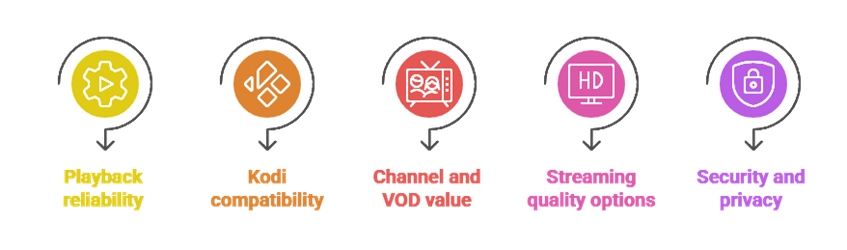
The assessment asks whether each seller publishes a current price, evaluation path, accountable operator and usable exit. Kodi fit is limited to documented account-format compatibility and safe setup through the official client system. Catalogue size and playback quality are treated as seller claims, not ranking proof.
- Official route: Domain, legal pages and checkout must be attributable.
- Current evidence: Old prices and trials are removed when the present page cannot confirm them.
- Kodi safety: No modified build or unknown repository is required.
- Device test: The intended television, remote, captions and guide are checked during the shortest evaluation.
- Canadian scope: Rights information must come from the responsible seller.
How to Set Up IPTV on Kodi Using PVR Simple Client?
Install Kodi from its official store or project site, then enable the supported PVR client from Kodi’s own repository. Add only an authorized source whose operator and Canadian scope have been verified. Enter information locally, restart the PVR component if required and confirm that no credential appears in logs or screenshots.
- Official install: Verify the Kodi publisher and current version.
- Built-in repository: Use Kodi’s documented client rather than an unknown package.
- Private entry: Type the authorized URL locally and do not share it.
- Guide check: Confirm timezone, captions and category mapping without disabling security.
- Remove safely: Delete credentials and cached data when the account ends.
Are These IPTV Services Legal to Use with Kodi?
Kodi is lawful open-source software, but that fact does not validate every source loaded into it. Permission depends on the specific programming, territory and accountable distributor. Ask the seller for Canadian information and compare it with the programme owner or an authorized Canadian outlet. Leave the source unresolved when the evidence cannot be attributed.
How Should Network Privacy Be Handled with Kodi?
Use ordinary network security for authorized services: current router firmware, encrypted Wi-Fi, unique passwords and a trusted connection. A privacy tool does not grant programming rights and should not be used to defeat territorial controls. Follow the publisher and authorized service terms, and never conceal an account problem instead of reporting it through the official support route.
How to Troubleshoot Buffering and Playback Issues on Kodi IPTV?
Start with controlled variables. Confirm account status and source permission, test the same authorized source on one device, compare Ethernet with Wi-Fi, check device storage and update Kodi from the official route. Record timestamps and error messages without exposing credentials. If the problem follows the account across networks, contact the accountable seller.
- One device: Remove simultaneous-use conflicts.
- One source: Avoid mixing unrelated playlists during diagnosis.
- Official updates: Update Kodi and the PVR client safely.
- Network comparison: Test wired versus wireless performance.
- Documented support: Preserve the seller’s response and cancellation option.
What to Look for When Choosing the Best IPTV for Kodi in Canada?
Prioritize an attributable Canadian permission record over a large catalogue. Then compare the official Kodi setup, term length, currency conversion, trial or guarantee, connection allowance, refund deadline, renewal and deletion route. The shortest documented test is safer than a long prepaid plan when the seller or source remains uncertain.
Verdict:
Kodi itself is the stable part of this comparison: use the official application and built-in client. The seller decision is separate. Prefer the shortest documented evaluation whose operator, checkout, application guidance, Canadian scope and exit can all be recorded. Do not proceed when a price page, security certificate or territorial explanation remains unresolved.
- OrigineTV: no-card test, but a three-month paid minimum and euro conversion require evidence.
- Tellystudio: one-day zero-cost test followed by a monthly option; verify seller and Canadian scope.
- StreamingNordic IPTV: free test request is visible, but current price and duration need written confirmation.
FAQs
Can I use these IPTV services on Kodi without any technical knowledge?
Basic setup is manageable when the seller provides a documented account format and Kodi’s official PVR client supports it. Do not accept remote-control access, modified builds or unknown repositories as a shortcut. Stop when the source, seller or Canadian permission cannot be verified.
Is Kodi a legal application for streaming IPTV?
Kodi is lawful open-source media-centre software. Legality and authorization of the material loaded into it are separate questions. Use only sources whose accountable distributor and Canadian territorial permission can be identified.
Do I need a VPN to use IPTV on Kodi?
No privacy tool is required to make an authorized source lawful, and such a tool does not grant rights. Use standard network security and follow the official service terms. Do not use privacy features to defeat territorial controls.
What internet speed is recommended for smooth IPTV streaming on Kodi?
Use the source and device requirements, then test sustained performance on the actual network. Latency, packet loss, Wi-Fi interference and decoder capability also matter. Reduce authorized source quality before altering security or installing unofficial software.
Can I use Kodi IPTV on Firestick, Android TV, and Smart TVs?
Kodi supports several platforms, but availability and performance vary by device and store. Confirm the official Kodi listing for the exact model. Some Smart TVs may require a separate supported device rather than an unofficial television package.