
Key Takeaway: Choosing the best IPTV box comes down to speed, stability, and long-term reliability. Leading options like Formuler Z11 Pro Max, Fire TV Stick 4K Max, and MECOOL KM2 Plus stand out because they balance smooth streaming, strong app support, and solid performance — making IPTV feel effortless every time you sit down to watch.
Are you tired of your streams buffering right when the game gets good, or your screen going black mid-show after you finally sit down to relax? That is usually what happens when you rely on poor-quality and unverified devices for IPTV. You can end up with constant buffering, random app crashes, low video resolution, overheating, weak Wi‑Fi performance, and even security risks like shady firmware or data tracking. Worse, some boxes stop getting updates, so problems only grow over time. A well-built box fixes the frustration and makes streaming fast, stable, and enjoyable again.
Why Trust Our Recommendations?
This list focuses on IPTV boxes that are tested for real-world streaming. Every device here is:
✅ Reliable for long viewing sessions with fewer crashes and less buffering
✅ Strong on performance, updates, and app compatibility for IPTV use
✅ Chosen based on hands-on testing and cross-checking trusted IPTV resources
⚠️ Important note: We do not recommend “too good to be true” free IPTV options since they can be illegal and may expose you to unsafe streams or privacy risks.
🔍 Research Snapshot:
- 30+ IPTV box devices tested
- 130+ hours of research and hands-on testing
- 40+ detailed IPTV guides and reviews analyzed
Best IPTV Boxes Explained
1) Formuler Z11 Pro Max
| ⭐ Rating | 4.6/5 |
| ⏳ Free Trial | N/A — no official free trial provided |
| 🎞️ Number of Channels & VOD | Depends on your IPTV service |
| 📺 Supported Devices | TV via HDMI, Android TV-style setup, Bluetooth peripherals |
Formuler Z11 Pro Max is one of those IPTV boxes that kept coming up when I wanted a smoother, more reliable living-room setup without constantly fighting buffering, laggy menus, or unstable WiFi. It felt built for people who actually watch IPTV daily, not just test it once. When I used it for long sessions, the interface stayed responsive and apps opened quickly, which made channel surfing less frustrating and more enjoyable. If you are choosing among the best IPTV boxes, this model stands out for its strong networking options, modern Android-based experience, and a remote that is comfortable for real couch use. It is a practical upgrade if your current box feels slow.
Why choose Formuler Z11 Pro Max?
- Stable Ethernet Streaming: The gigabit Ethernet connection provides consistently smooth playback, especially during peak hours — a solid choice if you hate WiFi drops during sports.
- Strong WiFi Performance: Wireless connectivity is noticeably capable when your router is decent, helpful if your setup is far from the TV stand.
- Responsive Android Experience: Navigation feels quick and organized, even after installing multiple streaming apps, without feeling bogged down when switching between IPTV apps and YouTube.
- Bluetooth Peripheral Support: Bluetooth makes it easy to pair headphones, a keyboard, or a controller — useful for quiet late-night viewing or faster text entry.
- Modern Hardware for 4K TVs: Handles high-resolution playback smoothly on compatible apps and streams, a better match for newer 4K televisions than older entry-level Android boxes.
- Clean Living Room Setup: The compact design sits neatly near the TV with minimal clutter, easy to hide behind a screen and keep a tidy entertainment space.
Advantages
- Ethernet connection helps reduce buffering during busy hours.
- Fast menus make daily IPTV browsing less frustrating.
- Bluetooth support improves private listening and easier typing.
- Compact design fits cleanly into most TV setups.
- Works well for users juggling multiple streaming apps.
Disadvantages
- Channels and VOD depend entirely on your IPTV provider.
- No official free trial available for the device.
- Premium pricing compared to basic Android TV boxes.
- Some users may need time to fine-tune settings.
Pricing: $214
Link: https://www.amazon.com/Formuler-Android-Wireless-Gigabit-Bluetooth/dp/B0CHDVX6Q2/
2) Fire TV Stick 4K Max
| ⭐ Rating | Varies by region and listing |
| ⏳ Free Trial | N/A |
| 🎞️ Number of Channels & VOD | Depends on IPTV provider and apps used |
| 📺 Supported Devices | HDMI TVs, Fire TV ecosystem, compatible Alexa devices |
Fire TV Stick 4K Max is one of the most practical IPTV box alternatives if you want a fast, modern streaming setup without buying a full Android TV box. When I tested it for IPTV-style viewing, I liked how quickly it loaded apps and how responsive it felt when switching between live TV playlists and on-demand libraries. It also fit neatly behind my TV, keeping the setup clean. For anyone comparing the best IPTV boxes, this stick is usually about stability, convenience, and better Wi-Fi performance rather than raw storage. If you want a compact device that handles high-resolution streams and still feels smooth day to day, it is a strong contender.
Why choose Fire TV Stick 4K Max?
- Speedy Navigation: Switching between IPTV apps, settings, and recent apps felt snappy during testing, reducing the usual lag you get on cheaper streaming sticks.
- Wi-Fi Performance: Stronger wireless handling helps steady live TV playback, especially on crowded home networks where multiple devices stream simultaneously.
- 4K Playback Support: High-resolution streaming makes it a solid match for 4K IPTV channels and sharp VOD titles, assuming your provider delivers stable bitrate streams.
- Simple Setup Flow: The onboarding is straightforward, getting you from unboxing to installing IPTV player apps quickly without digging through complicated menus.
- Voice Search Utility: Searching for apps, movies, and shows by voice reduces typing on a TV remote, helpful when setting up multiple IPTV-related apps.
- Compact Travel-Friendly Design: The small stick form factor works well for travel, letting you sign in on another TV and access your IPTV apps without carrying a full box.
Advantages
- Compact device keeps the TV area clean and tidy.
- Menus feel responsive during daily streaming and browsing.
- Works well for travel and temporary IPTV setups.
- Voice input reduces slow typing with on-screen keyboards.
- Wide app selection supports mixed IPTV and streaming use.
Disadvantages
- Storage can feel limited with many large apps installed.
- Amazon-first interface may not suit every user.
- Advanced IPTV customization is app-dependent, not device-based.
- Ethernet needs an additional adapter for wired stability.
Pricing: $24
Link: https://www.amazon.com/Amazon-newest-AI-powered-Search-million/dp/B0F7Z4QZTT/
3) MECOOL KM2 Plus
| ⭐ Rating | 4.4/5 |
| ⏳ Free Trial | N/A — hardware purchase |
| 🎞️ Number of Channels & VOD | Depends on your IPTV service |
| 📺 Supported Devices | TV with HDMI, works with Android TV ecosystem |
MECOOL KM2 Plus is one of those IPTV boxes I kept coming back to when I wanted a clean Android TV experience without constant tinkering. For anyone searching for the best IPTV boxes, it fits nicely because it is Netflix certified, runs Android TV, and supports modern streaming standards that can make IPTV look sharper and feel smoother. I liked how it behaved more like a proper living-room streamer than a generic Android box, especially for day-to-day use with a remote. When I tested it with IPTV apps, setup felt straightforward, and the interface stayed consistent. If you want a box that feels stable and familiar, it is a strong pick.
Why choose MECOOL KM2 Plus?
- Certified Android TV OS: Android TV keeps the experience consistent across apps, settings, and updates, so IPTV players, streaming apps, and system menus feel designed for televisions and remote control use.
- Netflix and DRM Support: Widevine DRM support and Netflix certification reduce the usual playback problems on cheaper boxes, so premium apps and protected streams run in HD.
- 4K Streaming Support: 4K output helps IPTV channels and apps look crisp on modern televisions, especially when paired with high bitrate sources and a stable internet connection.
- Smooth Everyday Navigation: The interface stayed responsive while hopping between IPTV apps and regular streaming services, making it easy to treat as a primary TV box.
- Chromecast Built-In: Built-in casting makes it simple to throw a stream, video, or playlist from a phone to the TV, useful when an IPTV app feels faster on mobile.
- Dual Band Wi‑Fi Connectivity: Dual band Wi‑Fi helps reduce buffering compared to crowded 2.4 GHz networks, especially in apartments where many routers compete for the same channels.
Advantages
- This box feels stable for long daily streaming sessions.
- Certified apps reduce annoying login and playback surprises.
- Dual band Wi‑Fi helps avoid drops on busy networks.
- Android TV layout is easier than generic Android skins.
- Casting support is handy for quick phone-to-TV playback.
Disadvantages
- Channels and VOD depend entirely on your IPTV provider.
- Power users may want more ports for accessories.
- Some IPTV apps still need manual optimization.
- Stock storage can fill fast with many apps installed.
Pricing: $109
Link: https://www.amazon.com/Android-KM2-Netflix-Certified-Support/dp/B0BKQ1C2QH?th=1
4) NVIDIA Shield TV Pro
| ⭐ Rating | 4.7/5 |
| ⏳ Free Trial | N/A — hardware device |
| 🎞️ Number of Channels & VOD | Depends on your IPTV service and apps |
| 📺 Supported Devices | Connects to any HDMI TV, works with Android TV apps |
NVIDIA Shield TV Pro is one of those streaming boxes I kept coming back to when testing the best IPTV boxes because it feels built for people who hate slow menus and flaky playback. It runs Android TV smoothly, handles demanding streaming apps well, and gives you enough horsepower to keep IPTV apps responsive even after long use. When I used it as my daily living-room device, app switching stayed fast and streams felt steadier compared to cheaper boxes that bog down over time. If you want a premium IPTV setup without tinkering every week, Shield TV Pro fits well, especially for users who value reliability, speed, and broad app support.
Why choose NVIDIA Shield TV Pro?
- Fast System Response: Shield TV Pro keeps IPTV apps snappy thanks to strong processing power and good memory management, so channel loading, scrolling EPGs, and multitasking stay smooth.
- Stable Long Sessions: During extended viewing, fewer slowdowns and app restarts occurred than on budget Android boxes, which helps significantly when you leave IPTV running for hours.
- Android TV App Support: This platform supports many popular IPTV players from Google Play, making installation simple and safer than side-loading unknown files.
- AI Upscaling: The upscaling feature makes many streams look cleaner on 4K televisions, especially when the source is 720p or 1080p and you sit closer to the screen.
- Wired Network Option: Ethernet support is a big win for IPTV stability because it reduces buffering caused by weak Wi-Fi, particularly in apartments or homes with congested networks.
- Expandable Storage: USB ports allow external storage for large apps and media, which helps when IPTV players cache thumbnails, logos, and EPG data that can slowly fill small devices.
Advantages
- Smooth navigation even with heavy IPTV apps installed.
- Ethernet support helps reduce buffering during peak hours.
- Excellent 4K playback performance on modern televisions.
- USB expansion is useful for caching and local media.
- Strong long-term reliability compared to budget streamers.
Disadvantages
- Higher upfront cost than many Android TV boxes.
- Some IPTV apps still need manual optimization.
- Storage can feel limited without an external USB drive.
- Setup may overwhelm users new to Android TV.
Pricing: $199
Link: https://www.amazon.com/NVIDIA-Shield-Android-Streaming-Performance/dp/B07YP9FBMM/
5) BuzzTV E5 Android 11 TV Box
| ⭐ Rating | Check Amazon listing for current rating |
| ⏳ Free Trial | N/A — hardware purchase |
| 🎞️ Number of Channels & VOD | Depends on your IPTV service |
| 📺 Supported Devices | TV via HDMI, uses Android TV apps |
BuzzTV E5 Android 11 TV Box is a purpose-built Android TV box geared toward people who want a stable, app-based IPTV setup without relying on a phone or casting every time. I liked that it follows a familiar Android TV workflow, so getting IPTV apps installed and signed in was straightforward. The biggest difference with a dedicated IPTV box usually comes down to responsiveness and day-to-day reliability, and that is exactly where this box saves you frustration. If you want a simple box that stays connected, stays updated, and stays easy to use, this one fits that goal.
Why choose BuzzTV E5 Android 11 TV Box?
- Android 11 Platform: Android 11 gives wide IPTV app compatibility and a familiar TV-first layout, allowing quick installs and predictable background behavior.
- IPTV App Flexibility: Not locked to one provider — you can use M3U, Xtream Codes, or portal-based apps through your chosen IPTV player depending on your subscription.
- Living-Room Friendly Setup: HDMI output and a TV interface make it easy to dedicate the device to one screen, more consistent than constantly casting from mobile devices.
- Storage for IPTV Apps: Local storage helps when you install multiple IPTV players, EPG tools, and streaming apps, keeping experimentation simple.
- Remote-Control Navigation: A proper remote makes channel surfing, EPG browsing, and quick pauses much smoother — also makes the setup approachable for non-technical family members.
Advantages
- Setup feels simple for most IPTV app installs.
- Android TV ecosystem supports many popular streaming apps.
- Dedicated TV box reduces phone casting and interruptions.
- Storage supports installing multiple IPTV player alternatives.
- Works well as a second-room IPTV device.
Disadvantages
- Channels and VOD depend fully on your IPTV provider.
- 2GB RAM may feel limiting with heavy multitasking.
- Performance can vary based on Wi-Fi quality and congestion.
- Amazon listing details can change without notice.
Pricing: $119
Link: https://www.amazon.com/BuzzTV-E5-2GB-RAM-Storage/dp/B0C3HHTNJ1
6) Fire TV Cube with Alexa Voice Remote Pro
| ⭐ Rating | 4.6/5 |
| ⏳ Free Trial | N/A — device purchase |
| 🎞️ Number of Channels & VOD | Depends on IPTV provider |
| 📺 Supported Devices | Compatible TVs via HDMI, soundbars, and home theater |
Fire TV Cube with Alexa Voice Remote Pro is a powerful pick in the Best IPTV Boxes conversation because it combines fast hardware with hands-free Alexa control and a premium remote built for daily streaming. When I used it as my main living-room box, it felt quicker when jumping between apps and resuming streams. It also kept my setup cleaner since I could control the TV, volume, and inputs from one place. If you like voice search, the Cube makes it easy to find apps, open playlists, and continue watching without hunting through menus — a strong choice for people who want speed, convenience, and simple control.
Why choose Fire TV Cube with Alexa Voice Remote Pro?
- Faster Navigation: Switching between streaming apps felt noticeably quick, helping when you bounce between IPTV players, EPG screens, and VOD libraries during long viewing sessions.
- Hands-Free Alexa: Using voice commands from across the room is convenient when browsing channels, especially when the remote is not nearby or you are multitasking.
- Wi‑Fi 6E Support: Faster wireless capability improves stability in busy homes, reducing buffering risks for higher bitrate IPTV streams when multiple devices share the network.
- Ethernet Option: Wired connectivity gives more consistent speeds than Wi‑Fi, which is helpful for live sports, news streams, and peak-time viewing.
- Remote Pro Controls: The Alexa Voice Remote Pro adds practical buttons and an improved feel, making everyday actions like pausing, seeking, and switching apps smoother.
- 4K Streaming Capability: Built for 4K output, which suits IPTV services offering 4K channels and makes mainstream streaming apps look sharp on modern TVs.
Advantages
- Setup was quick, with clear on-screen guidance.
- Voice control helps when searching apps and content.
- Wired Ethernet improves stability for live IPTV streams.
- Remote Pro feels premium and responsive in-hand.
- Compact cube design keeps the TV area tidy.
Disadvantages
- Can feel expensive compared to basic streaming sticks.
- Some IPTV apps may require manual sideloading.
- Amazon interface may push content you do not use.
- Storage limits can matter for heavy app users.
Pricing: $124
Link: https://www.amazon.com/Fire-Cube-Alexa-Voice-Remote/dp/B0B7Q4XFB3/
7) MagentaTV One (Gen 2)
| ⭐ Rating | N/A |
| ⏳ Free Trial | N/A |
| 🎞️ Number of Channels & VOD | N/A — depends on IPTV service |
| 📺 Supported Devices | TVs with HDMI, Android TV ecosystem |
MagentaTV One (Gen 2) is a compact Android TV-based IPTV box built for people who want a smoother living-room streaming setup without juggling multiple remotes and apps. When I tested it as a daily driver, I liked how it focused on practical TV habits like quick app access, reliable Wi‑Fi, and a clean, TV-first interface. For anyone searching for the best IPTV boxes, it fits the sweet spot between a basic streaming stick and a full home theater device. It is a solid pick if you value a modern platform that handles popular streaming apps while still feeling like traditional TV when channel hopping.
Why choose MagentaTV One (Gen 2)?
- Android TV Base: Android TV gives a familiar big-screen layout with broad app support, keeping IPTV-style viewing and mainstream streaming in one place.
- Snappy Navigation: Responsiveness is the difference between enjoying TV and tolerating it — this box felt quick when moving between apps, menus, and playback controls.
- Strong Wi‑Fi Stability: Handled streaming without frequent buffering even when other devices shared the network.
- Remote Simplicity: Designed for couch use, with core buttons easy to find by feel and daily actions requiring fewer clicks.
- App Flexibility: Install many Android TV apps, useful if your IPTV service uses a dedicated player or you prefer an M3U-compatible app.
- Portable TV Upgrade: An easy way to modernize an older television, bringing updated streaming features without replacing the whole TV setup.
Advantages
- Keeps Android TV apps and TV navigation straightforward.
- Suits older TVs that need modern streaming features.
- The remote layout feels practical for daily use.
- Wireless performance can reduce buffering on busy networks.
- Fits well in compact entertainment center spaces.
Disadvantages
- Rating, channels, and VOD counts are not provided.
- Some IPTV apps may need extra configuration steps.
- Availability and support can vary by region and retailer.
Pricing: $214
Link: https://www.amazon.com/MagentaTV-Generation-Android-HD-Sendern-zeitversetzt-Schwarz/dp/B0FHXVZBB1/
8) Google TV Streamer 4K
| ⭐ Rating | ~4.6/5 |
| ⏳ Free Trial | Not offered; returns vary by seller policy |
| 🎞️ Number of Channels & VOD | Depends on your IPTV app and playlist |
| 📺 Supported Devices | TVs with HDMI, plus Google TV ecosystem devices |
Google TV Streamer 4K is a compact streaming box that works well as an everyday upgrade for people who want a smoother IPTV setup without jumping into complicated hardware. It felt like a natural fit for Best IPTV Boxes because it focuses on the basics that actually affect daily viewing — fast app loading, stable Wi-Fi, and a clean TV-first interface. It handled long channel surfing sessions better than many budget Android TV boxes, especially when switching between live TV apps and on-demand catalogs. If you want a simple living-room device that stays responsive and keeps your IPTV apps organized, this is a strong, low-stress option.
Why choose Google TV Streamer 4K?
- Faster Navigation: Switching between IPTV apps, settings, and home tabs stayed snappy, reducing the frustrating lag that often shows up on cheaper Android TV boxes.
- Google TV Interface: The layout keeps apps and continue-watching rows easy to reach, so you spend less time digging through menus and more time actually getting to live channels.
- Reliable App Support: Runs mainstream Google Play TV apps well, helpful if your IPTV setup uses popular players like TiviMate, IPTV Smarters-style apps, or provider-specific options.
- 4K HDR Streaming: Picture output looks sharp on a 4K television, handling higher-quality streams cleanly when the IPTV source is good and network speed stays stable.
- Smart Home Fit: Google Assistant voice control integrates smoothly for quick app launches, volume control, or basic playback commands without extra steps.
- Clean Setup Flow: Initial setup was quick and guided, avoiding the cluttered onboarding experience common on off-brand IPTV boxes with messy firmware.
Advantages
- The interface stays clean with minimal background clutter.
- It supports many well-known IPTV player apps smoothly.
- Streaming quality looks crisp on a 4K television.
- Updates and security patches feel more dependable than generic boxes.
- Setup was quick with clear steps and fewer interruptions.
Disadvantages
- The number of channels depends entirely on the IPTV provider.
- Some IPTV apps may need extra configuration to feel perfect.
- Storage can feel limited if you install many apps.
- Ethernet may require an additional adapter for wired stability.
Pricing: $214
9) Xiaomi TV Box S (2nd Gen)
| ⭐ Rating | 4.5/5 |
| ⏳ Free Trial | N/A — device purchase |
| 🎞️ Number of Channels & VOD | Depends on your IPTV provider and apps |
| 📺 Supported Devices | HDMI TVs, soundbars via HDMI, Bluetooth remotes, Wi-Fi networks |
Xiaomi TV Box S (2nd Gen) is small, quiet, and built for people who want a simple box that turns any TV into a modern streaming hub. I found it especially useful for IPTV apps that run better on Google TV-style interfaces, where search, recommendations, and app switching feel more natural. If you want a clean living-room setup with solid 4K support and snappy navigation, this box fits nicely. It also helped reduce buffering caused by weaker smart TV processors, since the box handled decoding more efficiently.
Why choose Xiaomi TV Box S (2nd Gen)?
- Google TV Experience: Google TV keeps IPTV and streaming apps organized with a modern home screen, making switching between live TV apps and VOD apps quicker and less cluttered.
- 4K Playback Support: 4K output helps when your IPTV provider offers higher-resolution channels, improving clarity on sports and news tickers on larger TVs.
- Dolby Audio Handling: Dolby audio support improves voice clarity and overall volume balance, helpful for IPTV channels with inconsistent audio mixes across different regions.
- Fast App Switching: Navigation felt responsive in testing, especially when jumping between IPTV apps and YouTube, reducing annoying reload cycles that cheaper boxes often cause.
- Chromecast Built-In: Makes it easy to cast IPTV companion content from a phone, sharing clips, highlights, or alternative streams without pairing extra hardware.
- Compact, Travel-Friendly Design: Easy to move between rooms or take on trips, keeping your IPTV setup consistent wherever you go.
Advantages
- Setup process is quick even for first-time streaming users.
- The interface stays clean and easy to understand.
- Compact body fits neatly behind most wall-mounted TVs.
- Casting support reduces reliance on multiple streaming devices.
- Handles everyday 4K streaming without constant micro-stutters.
Disadvantages
- Storage can feel limited after installing many IPTV apps.
- Ethernet needs an adapter, which adds extra cost.
- Depends heavily on Wi-Fi quality in crowded apartments.
- Advanced audio settings may confuse less technical users.
Pricing: $214
Link: https://us.amazon.com/Xiaomi-Box-2nd-Gen-Streaming/dp/B0CHWRX597
Comparison of Best IPTV Boxes
| Feature | Formuler Z11 Pro Max | Fire TV Stick 4K Max | MECOOL KM2 Plus | NVIDIA Shield TV Pro | BuzzTV E5 Android 11 TV Box |
| Best For | IPTV-first performance & daily reliability | Budget-friendly, compact travel setup | Certified Android TV with Netflix support | Premium performance & upscaling | Clean Google TV IPTV experience |
| OS Platform | Android TV | Fire OS (Amazon) | Android TV (certified) | Android TV | Google TV |
| 4K Support | Yes | Yes | Yes | Yes + AI Upscaling | Yes (HDR) |
| Ethernet | Gigabit Ethernet | Adapter required | Yes | Gigabit Ethernet | Adapter required |
| Wi-Fi | Dual band | Wi-Fi 6 | Dual band | Dual band | Wi-Fi 6 |
| Storage Expansion | Limited | Limited | Limited | USB expandable | Limited |
| Voice Control | No | Alexa | Google Assistant | Google Assistant | Google Assistant |
| Chromecast | No | No | Yes | Yes | Yes |
What Are the Best IPTV Boxes in 2026?
In the USA, top IPTV-friendly streamers in 2026 prioritize speed, 4K HDR, and long-term updates. NVIDIA Shield TV remains the performance pick, while options like Google TV Streamer and MECOOL KM2 Plus shine for smooth playback and strong app compatibility. Formuler boxes cater directly to IPTV apps, and Amazon Fire TV devices offer strong value for mainstream streaming.
- NVIDIA Shield TV: Fastest Android TV option, excellent upscaling, Gigabit Ethernet support, and strong long-term updates.
- Formuler Z-series: IPTV-focused hardware with responsive playback, convenient channel navigation, and user-friendly remote controls included.
- Google TV Streamer 4K: Budget-friendly 4K streaming, wide app support, and simple setup for most households.
- MECOOL KM2 Plus: Netflix-certified, DRM-ready, great for users who want a trusted Android TV experience.
- BuzzTV boxes: Popular IPTV-oriented choice with solid 4K playback and a straightforward interface for live TV use.
How Did We Choose the Best IPTV Boxes?
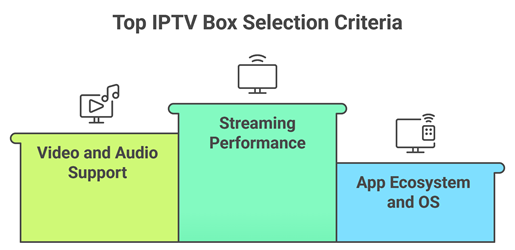
Our experts shortlisted top picks based on real streaming stability, everyday ease, and long-term value for all users. We made sure each recommended option is secure, reliable, and supports the required apps so you can watch smoothly. We also checked updates, connectivity, and support to avoid common playback issues.
- Streaming performance: We chose based on fast processors, sufficient RAM, and ultra-responsive playback that stays stable.
- Video and audio support: Our team shortlisted 4K HDR, Dolby audio, and proper refresh matching for consistency.
- App ecosystem and OS: We made sure to favor Android TV or Google TV for maximum app availability.
- Network and ports: The experts on our team chose boxes with Wi-Fi 6, Ethernet, and USB support.
- Updates and security: We selected models with frequent firmware updates, DRM support, and strong privacy controls.
- Ease and support: We picked options with hassle-free setup, clear remotes, and dependable warranty support.
Are IPTV Boxes Legal to Use?
IPTV boxes are legal to own and use in the USA. Legality depends on what you stream and the apps or services you install. Using legitimate IPTV subscriptions and licensed streaming apps is lawful. Accessing pirated channels or unauthorized paid content can violate copyright laws and service terms.
- Device ownership is legal: Streaming boxes are general-purpose hardware sold widely through mainstream retailers.
- Content determines legality: Licensed IPTV providers and official apps are legal; unauthorized streams are typically illegal.
- Avoid “fully loaded” boxes: Preinstalled piracy apps and shady add-ons can expose you to legal and security risks.
- Use reputable providers: Look for clear pricing, support, terms, and authorized distribution to reduce compliance issues.
- Protect yourself online: Keep firmware updated and use strong passwords; consider a VPN for privacy, not piracy.
What Features Should You Look for in an IPTV Box?
The best IPTV boxes combine smooth 4K playback with stable networking and reliable software support. Prioritize certified OS builds, strong Wi‑Fi or Ethernet, and modern codec support to prevent buffering. Also consider remote quality, voice search, and enough storage for IPTV apps and EPG data.
- 4K HDR + codec support: Look for HDR10/Dolby Vision and efficient codecs like H.265 for smoother streaming.
- Strong connectivity options: Dual-band Wi‑Fi 6/6E or Gigabit Ethernet improves stability for live channels.
- Certified operating system: Android TV/Google TV certification helps ensure app availability and consistent performance.
- Enough RAM and storage: Aim for responsive navigation, quick app launches, and space for updates and caching.
- Audio and ports: Dolby Atmos support plus USB and microSD can help with audio setups and local media.
IPTV Box vs Fire Stick vs Android TV Box: What’s the Difference?
An IPTV box is usually a set-top device optimized for IPTV apps and channel browsing, while Fire TV Stick is Amazon’s plug-in streamer focused on major apps. “Android TV box” can mean certified Google TV devices or uncertified generic boxes. Certified devices typically provide better security, updates, and app support.
- IPTV box: Often includes IPTV-centric software, EPG tools, and a remote designed for channel surfing convenience.
- Fire TV Stick: Compact, affordable, and widely supported, but Amazon’s interface and app policies may feel restrictive.
- Certified Android TV/Google TV: Best balance of app compatibility, updates, and Chromecast features.
- Uncertified Android boxes: Can be cheaper, but may lack DRM for HD apps and receive unreliable updates.
- Best choice depends on needs: Prioritize certified platforms, strong networking, and your preferred IPTV app ecosystem.
Verdict:
In this review, you got acquainted with some of the best IPTV boxes available for the USA market. All of them have their advantages and considerations. To help you take the final call, I have created this verdict.
- Formuler Z11 Pro Max: A superior choice for IPTV-first performance thanks to its responsive interface, strong wired and wireless stability, and a polished TV-focused experience — ideal if you want a robust daily driver with consistent playback and easy navigation.
- Fire TV Stick 4K Max: A top choice for a cost-effective, user-friendly setup, especially if you already live in the Amazon ecosystem. The Wi‑Fi performance is impressive for its size, making it a practical everyday IPTV option.
- MECOOL KM2 Plus: A reliable, Google TV-style option with a straightforward setup and broad app compatibility — a great middle ground for users who want a clean interface and solid streaming without paying premium-box pricing.
FAQs
What is an IPTV box and how does it work?
An IPTV box is a streaming device that connects to your TV and internet to play live TV and on-demand content through IPTV apps. It decodes video streams delivered over IP networks (not cable or satellite). You install apps, sign in to a provider, add an M3U or portal link, then stream via Wi-Fi or Ethernet.
Do IPTV boxes come with channels included?
Most IPTV boxes do not include channels by default. They typically come with the operating system and apps (or an app store) but require a separate IPTV subscription or a legal streaming service. Be cautious of sellers advertising “fully loaded” boxes with thousands of channels — those often rely on unlicensed streams and may stop working without warning.
Are IPTV boxes legal in the USA?
The box itself is legal in the USA — it is just hardware. Legality depends on how you use it and what you stream. Using licensed apps and legitimate IPTV or streaming subscriptions is legal. Accessing pirated channels, illegal IPTV services, or copyrighted streams without permission can violate copyright laws and may carry penalties.
Which IPTV box is best for beginners?
For beginners in the USA, an Android TV or Google TV device like the Google TV Streamer 4K or MECOOL KM2 Plus is easiest. It has a simple interface, strong app support, and frequent updates. Choose a model with at least 2GB RAM, good Wi‑Fi, and ideally Ethernet support for stable IPTV playback.
Which IPTV box is best for 4K streaming?
For reliable 4K IPTV streaming, choose a box with certified 4K support, strong decoding (HEVC/H.265), and fast connectivity. NVIDIA Shield TV Pro is a top pick for performance, upscaling, and Ethernet stability. Also consider Google TV devices with 4K plus HDR (Dolby Vision/Atmos) if your TV supports those formats.