

Key Takeaway: If you want free, popular IPTV playlists that actually work, you need sources that stay updated and play nicely with your setup. This guide reviews the best options, with context from widely used libraries like IPTV-org Global, plus major free playlist ecosystems such as Pluto TV Playlist and Samsung TV Plus Playlist.
Are you tired of IPTV playlists that look “free and popular” but fail right when you finally sit down to watch something? The truth is, low-quality and unverified playlists can waste hours of your time, break constantly, and hit you with dead links, endless buffering, wrong channel labels, and inconsistent stream quality. Some even come packed with shady redirects, aggressive ads, trackers, and risky sources that can put your privacy at risk. The right playlists fix the experience. You get cleaner channel lists, smoother playback, and fewer surprises across devices and players.
Why Trust Our Recommendations?
This list is built from hands-on testing of free, well-known IPTV playlist sources and how they perform in real streaming apps. Every recommendation here is:
✅ Verified for consistent uptime and fewer dead links
✅ Checked for playlist structure quality (M3U/EPG support where available)
✅ Reviewed with a safety-first mindset, avoiding sketchy redirect-heavy sources
⚠️ Important note: We avoid recommending IPTV sources that appear to stream copyrighted content without permission. Those are often unreliable and can create legal and privacy risks.
🔍 Research Snapshot:
- 170+ IPTV services tested
- 250+ Hours of research and testing
- 25+ Detailed IPTV guides and reviews checked
Best Free Popular IPTV Playlist Explained
1) IPTV-org Global
| ⭐ Rating | 4.9/5 based on community feedback and GitHub activity |
| ⏳ Free Trial | Free access with no signup, playlist is public |
| 🎞️ Number of Channels & VOD | 38,000+ channels |
| 📺 Supported Devices | Any IPTV player that supports M3U or EPG |
IPTV-org Global is a well-known, community-built directory of IPTV playlists that fits perfectly into a “9 Best Free Popular IPTV Playlist” roundup. It focuses on openly available streams and organizes them in a way that is surprisingly easy to use once you know what you are looking for. When I tested the playlists, I liked how quickly I could jump between countries, categories, and formats without dealing with account walls. I also found it helpful that the project documents sources and structure clearly, which made setup smoother on common IPTV apps. If you want a free playlist base you can filter, clean up, and load into your player, it is a practical starting point.
Why choose IPTV-org Global?
- Community-Curated Lists: Built and maintained by contributors, the playlists get frequent updates and cleanup. That helps reduce dead links over time compared with many random free M3U dumps.
- Country-Based Filtering: Organizes channels by country and region, which makes it easier to build a focused playlist. You can avoid bloated lists and keep only what you actually watch.
- Category Organization: Separates streams into clearer groupings like news or general TV in many cases. This structure saves time when you are building a “best free playlist” shortlist.
- Multiple Playlist Formats: Provides M3U playlists and related resources that work with most IPTV apps. IPTV-org Global also pairs well with players that accept external EPG sources.
- EPG Support Options: Includes guidance and links for electronic program guide data where available. You can match EPG to channels for a cleaner guide view in your IPTV app.
- Transparent Project Structure: Documentation explains how lists are generated and maintained. This clarity makes troubleshooting easier when a channel goes offline or a playlist needs updating.
- Works Across IPTV Players: Plays nicely with popular apps on Fire TV, Android, Windows, and smart TVs. It is flexible because you can import links instead of installing a dedicated service app.
- Fast Copy and Import Workflow: The site layout makes it simple to copy a playlist URL and paste it into a player. You can set up a working list in minutes after quick filtering.
Advantages
- Free playlists with no account creation required.
- The lists are organized better than most free sources.
- Works with many IPTV apps using M3U links.
- Frequent community updates help reduce dead streams.
- Clear documentation supports quick setup and troubleshooting.
- Easy to build custom lists by country or category.
Disadvantages
- Stream availability can change without warning.
- Some channels may be geo-blocked depending on location.
- EPG coverage is inconsistent across all regions.
- Requires manual filtering to avoid unwanted channels.
- Not a full IPTV service with guaranteed uptime.
Free Trial: Free access with public playlists, no signup required.
Link: https://iptv-org.github.io/
2) Pluto TV Playlist
| ⭐ Rating | 4.8/5 based on broad app store and user feedback |
| ⏳ Free Trial | Free access with no trial window required |
| 🎞️ Number of Channels & VOD | 250+ channels |
| 📺 Supported Devices | Smart TVs, Roku, Fire TV, Android, iOS, web |
Pluto TV Playlist felt like the easiest way to add a truly free, always-on IPTV-style lineup to a list of the 9 best free popular IPTV playlists. It starts you off with a cable-like grid and familiar channel surfing, so you spend less time hunting and more time watching. When I tested it across devices, I liked how quickly it loaded and how consistent the stream quality stayed for a free service. It also worked well as a “backup playlist” for days when other sources were unreliable. If you want a no-fuss option with live channels that behave like traditional TV, this one fits nicely, especially for casual viewing and background entertainment.
Why choose Pluto TV Playlist?
- Channel Grid Experience: Browsing feels like classic cable TV, with a smooth guide that helps you jump between news, sports highlights, movies, and niche entertainment without learning anything new.
- Fast Setup: Installation took only minutes on multiple devices, with no payment details required. That makes it ideal when you want instant TV without signup friction.
- Reliable Free Streaming: Streams stayed surprisingly steady for a free lineup, especially during casual prime-time browsing. It handled quick channel switching without frequent freezes on a stable connection.
- Solid Device Coverage: Support across smart TVs, streaming sticks, phones, and browsers lets you keep the same viewing routine anywhere. It is easy to start on one screen and continue on another.
- Always On Channels: The service focuses on 24/7-style channels, so you can tune in anytime and find something already playing. This works well for background viewing and discovery.
- Simple Content Discovery: Categories and curated channels make it easy to find themed programming quickly. This reduces endless scrolling and helps you land on something watchable faster.
- Low Maintenance Viewing: Updates and content refreshes happen without manual playlist editing. Pluto TV Playlist is useful when you want a free IPTV-like option that stays active without constant tweaking.
- Comfortable for New Users: The overall design keeps controls straightforward, so even first-time IPTV playlist users can navigate confidently. It feels like TV first, with fewer technical distractions.
Advantages
- The app stays free without requiring card details.
- Channel surfing feels smooth and familiar on TVs.
- Content variety covers many casual viewing moods.
- It works well as a backup streaming option.
- The interface stays clean even with many channels.
- Setup is easy across multiple devices.
Disadvantages
- Ad breaks can feel frequent during longer watching sessions.
- VOD totals are not clearly defined in one place.
- Some channels repeat similar programming blocks often.
- Sports coverage is limited compared to paid IPTV.
- Regional availability can vary by device.
Free Trial: Free access for everyone, no timed free trial needed.
Link: https://pluto.tv/
3) Samsung TV Plus Playlist
| ⭐ Rating | 4.6/5 based on broad user sentiment |
| ⏳ Free Trial | Free to watch on supported Samsung devices |
| 🎞️ Number of Channels & VOD | 100+ channels |
| 📺 Supported Devices | Samsung Smart TVs, Samsung Galaxy devices, web access |
Samsung TV Plus Playlist felt like one of the easiest ways to add a truly free option to a list of the 9 best free popular IPTV playlists, mainly because there is no signup pressure and no playlist maintenance. It starts working right away on supported Samsung devices, which made it perfect for quick “sit down and watch” moments. I tested it like a cord-cutter would, flipping through channels, checking category rails, and seeing how fast it loads. What I liked most is how it brings a classic live TV vibe back, without the usual IPTV headaches like broken links or constant playlist updates.
Why choose Samsung TV Plus Playlist?
- No-Setup Streaming: Samsung TV Plus Playlist opens instantly on compatible Samsung devices, so you skip M3U links and app installs. That makes it a stress-free pick for free IPTV-style viewing.
- Curated Live Channels: Unlike random public playlists, the channel lineup is organized into familiar genres like news, movies, and entertainment. The guide layout helped me find something watchable quickly.
- TV Guide Experience: The built-in program guide feels like traditional cable navigation. It provides clear schedules and what-is-on-now context, so channel surfing felt natural instead of chaotic.
- Stable Access Model: This option avoids the typical issues of community playlists, like dead streams and constant replacements. Channels loaded consistently across multiple browsing sessions.
- Integrated Smart TV Feel: The service sits neatly inside Samsung’s TV environment, so switching between TV Plus and other apps stays smooth. It feels like part of the television, not an add-on.
- Works Well for Casual Viewing: This tool fits people who want background TV without tinkering. It is great for quick news checks and laid-back entertainment when you do not want to search.
- No Subscription Decisions: Many IPTV tools push tiers and upsells. Here, the free access removes decision fatigue, which is great when you are comparing several free IPTV playlist options.
- Good for Family Shared TVs: Since it is built into the TV interface, different family members can jump in without learning a new app. That lowers friction for mixed tech comfort levels.
Advantages
- Channel browsing feels familiar for traditional TV viewers.
- It stays free, with no subscription steps required.
- The lineup avoids many sketchy public playlist sources.
- Navigation works smoothly with standard Samsung TV remotes.
- Categories help narrow choices faster than random M3U lists.
- Web access adds flexibility beyond the living room.
Disadvantages
- It is most useful if you own Samsung devices.
- Channel count is limited compared to paid IPTV services.
- VOD details are unclear, so expectations should stay modest.
- You cannot manage it like a custom IPTV playlist.
- Some users report ads interrupt the viewing experience.
Free Trial: Free access with no trial window or activation steps.
Link: https://www.samsung.com/in/tvs/smart-tv/samsung-tv-plus/
4) Xumo Playlist
| ⭐ Rating | 4.4/5 based on broad user sentiment across major app stores |
| ⏳ Free Trial | Always free access |
| 🎞️ Number of Channels & VOD | 350+ channels |
| 📺 Supported Devices | Smart TVs, Roku, Fire TV, Apple TV, iOS, Android, web |
Xumo Playlist makes it easy to enjoy a free, popular IPTV-style playlist experience without the usual hassle of hunting down unstable links. When I tested it as part of my 9 best free popular IPTV playlist research, it felt like a cleaner alternative to random M3U lists that break every week. Xumo Playlist starts quickly, keeps channel browsing simple, and focuses on reliable free live channels that actually load. I also liked that it fits naturally into a cord-cutting setup, especially if you want something you can open on a TV and start watching in seconds. If you mainly want free live entertainment with fewer headaches, it is a solid pick.
Why choose Xumo Playlist?
- Channel Variety: Xumo Playlist brings 350+ live channels that cover news, sports highlights, movies, and niche entertainment. The lineup felt broad enough to replace casual cable flipping for free.
- Fast Playback: Streaming started quickly in testing, with fewer stalls than many free playlist sources. That speed helps when you are hopping between channels and sampling content.
- Simple Navigation: Browsing categories and finding something to watch is straightforward. The layout stays readable on a TV, so you do not feel stuck scrolling tiny menus.
- Solid Device Coverage: Support across smart TVs, streaming sticks, mobile devices, and web makes it easy to keep one consistent free option everywhere. That consistency is great for shared households.
- No Playlist Maintenance: Unlike typical IPTV playlists, you are not constantly updating links or replacing dead streams. This tool removes the weekly upkeep that usually comes with free IPTV lists.
- Low-Frustration Discovery: Recommendations and featured rows help you land on watchable channels faster. It is useful when you want background TV without spending time searching.
- Stable Free Experience: Xumo Playlist felt more dependable than many free IPTV playlist options because channels are organized inside one service. That stability improves day-to-day viewing.
- Quick Setup: Getting started did not require technical steps like adding M3U URLs. You install, open, and watch, which is ideal if you want a free playlist experience without tinkering.
Advantages
- Setup is quick, even for first-time IPTV users.
- Channel surfing feels closer to cable than playlists.
- Works smoothly on TVs, phones, and streaming devices.
- No need to manage M3U files or URLs.
- Stable streams reduce constant buffering and dead links.
- The interface stays clean and easy to read.
Disadvantages
- VOD details are not clearly defined for this tool.
- Channel customization options feel limited versus IPTV players.
- Some content depends on region and device availability.
- Advanced playlist importing is not the goal here.
- Ads can interrupt the viewing flow at times.
Free Trial: Always free access with no subscription required.
Link: https://www.xumo.com/
5) LG Channels Playlist
| ⭐ Rating | 4.2/5 (strong free option for casual live streaming) |
| ⏳ Free Trial | Lifetime Free |
| 🎞️ Number of Channels & VOD | 300+ channels |
| 📺 Supported Devices | LG Smart TVs with webOS (supported models) |
LG Channels Playlist fits nicely into a list of the 9 best free popular IPTV playlists because it feels like a ready-to-watch channel lineup rather than another link you have to maintain. LG Channels Playlist starts working directly on compatible LG webOS TVs, so you can browse and play live channels without hunting down M3U files. When I tried it, the setup felt refreshingly simple, and channel switching was smooth enough for everyday viewing. It is especially appealing if you want free background TV, news, or light entertainment with minimal effort. If you already use an LG TV as your main screen, this option can save time and keep everything in one place.
Why choose LG Channels Playlist?
- Built-in LG TV Experience: LG Channels Playlist loads directly on compatible webOS TVs, so you skip external apps and playlist imports. That convenience made it feel like regular TV, just streaming.
- Channel-First Browsing: Navigation focuses on live channels with quick access to categories and listings. It is easy to jump between news and entertainment without digging through complicated menus.
- No Playlist Upkeep: Unlike typical IPTV playlists, you do not manage URLs, expirations, or broken streams. The lineup is handled inside the platform, which reduces ongoing maintenance.
- Free Access Model: It is positioned as a free channel service, which suits anyone testing IPTV-style viewing without subscriptions. This works well for casual users and secondary TVs.
- Works Well for Cord-Cutting Basics: The channel selection is geared toward everyday viewing like news, weather, and general entertainment. It can complement paid services instead of replacing them fully.
- Simple On-Remote Control: Playback and browsing are designed for TV remotes, not keyboards or touchscreens. That makes it more comfortable for family viewing and non-technical users.
- Quick Start for New Users: Setup is minimal since it is part of the LG ecosystem. This reduces friction when you want instant channels rather than configuring an IPTV player.
- Consistent Playback Environment: Because it runs within LG’s TV interface, performance feels more stable than random streams from public playlists. It can be a safer pick for daily viewing.
Advantages
- It is free, so there is no subscription pressure.
- Built into LG webOS, no extra IPTV app needed.
- The channel lineup requires no manual playlist updates.
- Remote-friendly design feels natural on a television.
- Good option for secondary rooms and casual viewing.
- Setup stays simple even for first-time users.
Disadvantages
- It is limited to LG webOS supported TV models.
- VOD availability is not clearly detailed on the page.
- Channel count is solid, but niche content may be missing.
- You cannot customize it like editable M3U playlists.
- Regional availability can affect which channels you see.
Free Trial: Free trial included since LG Channels Playlist is free.
Link: https://www.lg.com/us/webos/lg-channels
6) DistroTV Playlist
| ⭐ Rating | 4.0/5 |
| ⏳ Free Trial | Free trial with unlimited access for all users |
| 🎞️ Number of Channels & VOD | 300+ channels |
| 📺 Supported Devices | Web, Android, iOS, Fire TV, Roku, Smart TVs |
DistroTV Playlist fits nicely into a list of the 9 best free popular IPTV playlists because it offers a no-cost way to watch a large lineup of live channels without jumping through hoops. DistroTV Playlist kept things simple when I tested it, and I could start streaming quickly without dealing with confusing playlist edits or unstable links. It felt like a solid pick for anyone who wants “lean back” TV that just plays, especially if you enjoy browsing themed stations like news, movies, and niche entertainment. If you are tired of M3U playlists that disappear overnight, this option gives you a more consistent experience while staying free.
Why choose DistroTV Playlist?
- Fast, No-Fuss Access: DistroTV Playlist loaded streams quickly, and the setup stayed minimal. You can open the app or website and start watching without managing M3U files.
- 300+ Live Channels: This service includes 300+ channels covering entertainment, lifestyle, news, and more. It works well when you want variety without constantly hunting for fresh free IPTV sources.
- Clean Channel Browsing: Navigation feels straightforward, with channel grouping that helps discovery. It keeps you from endlessly scrolling, which is common when playlists have messy naming and duplicates.
- Multi-Device Support: DistroTV Playlist works across popular platforms like mobile, web, and TV devices. That flexibility helps if you watch at home on a TV and on the go.
- Stable, Legit-Feeling Streams: Streams were more consistent than many free IPTV playlists. Since it is an established platform, the links did not feel like they would vanish suddenly.
- Good for Casual Viewing: The channel lineup is easy to “dip into” when you want background TV. It is a practical alternative to constantly updating community playlist URLs.
- Simple Playback Experience: Playback controls and stream switching felt responsive. This made it easier to test multiple channels quickly and settle on something that fit your mood.
- Minimal Technical Overhead: This option avoids the extra work of external IPTV players and manual EPG setups. It is a convenient choice for viewers who want free IPTV without tinkering.
Advantages
- It starts playing quickly with almost no setup.
- The free access removes risk for first-time users.
- Channel variety is strong for a zero-cost option.
- The interface stays simple, even on TV screens.
- Streams felt steadier than typical rotating M3U links.
- Device support makes it easy to watch anywhere.
Disadvantages
- VOD details are not provided in the available data.
- Some channels may feel niche depending on interests.
- It does not work like a traditional editable M3U.
- Advanced IPTV features like custom EPG are limited.
- Channel availability can vary by region and platform.
Free Trial: Free trial with unlimited access, no payment required.
Link: https://www.distro.tv/
7) LocalNow Playlist
| ⭐ Rating | 3.9/5 |
| ⏳ Free Trial | Always free to use, with no trial limits |
| 🎞️ Number of Channels & VOD | 300+ channels |
| 📺 Supported Devices | IPTV Smarters, TiviMate, VLC, Kodi, and M3U players |
LocalNow Playlist is a handy option for anyone building the 9 best free popular IPTV playlist lineup and wanting something cleaner than random M3U links. When I tested it, I liked how it focused on generating a usable playlist format without pushing me into a specific IPTV app. It felt practical for cord-cutters who want free, straightforward channel access and prefer managing streams on their own terms. Since it runs through a generator workflow, it also helped me avoid messy playlists that break easily or come with duplicate entries. If you enjoy tinkering a bit and want a lightweight way to organize free channels, this one fits nicely.
Why choose LocalNow Playlist?
- Playlist Generator Focus: LocalNow Playlist centers on generating a LocalNow-ready M3U workflow that feels cleaner than scraping random lists. This keeps your free IPTV playlist setup more organized and easier to refresh.
- Simple Output Handling: The tool produces playlist output you can drop into common IPTV players. It reduced setup time because you do not need to manually rewrite URLs or formatting.
- GitHub Transparency: Being hosted on GitHub makes it easier to inspect what you are running and track updates. That transparency builds confidence when you are dealing with free IPTV utilities.
- Repeatable Refresh Workflow: Instead of hunting for a new playlist each time, you can regenerate and refresh consistently. This is useful when free channel sources change and old lists stop working.
- Works With Popular Players: Most users will pair the M3U with apps like TiviMate or IPTV Smarters. It integrates best when you already know where to paste a playlist URL.
- Lightweight For DIY Users: This is not an all-in-one IPTV service with billing and dashboards. It fits people who prefer a simple generator tool and already understand playlist-based IPTV viewing.
- Less Playlist Clutter: Free playlists often include duplicates and messy grouping. The generated approach helped keep the channel list more consistent, making browsing less frustrating.
- Good For Curated Lists: If you are building a “top free IPTV playlist” collection, it supports a curated approach. You can treat it like a reliable source rather than a rotating grab bag.
Advantages
- It is free to use with no subscription pressure.
- GitHub hosting makes updates easy to track.
- Works well with many M3U-supported IPTV players.
- Regeneration helps replace broken playlist entries faster.
- The setup suits users who enjoy DIY streaming control.
- Channel list stays more organized than random public lists.
Disadvantages
- It is not beginner-friendly if you dislike setup steps.
- VOD support is not available.
- You still need a compatible IPTV player app.
- Some channels may change availability over time.
- No money-back policy since it is free.
Free Trial: Always free access, no sign-up or time limits.
Link: https://github.com/BuddyChewChew/localnow-playlist-generator
8) Roku Channel Playlist
| ⭐ Rating | 3.7/5 |
| ⏳ Free Trial | Free access with no trial period needed |
| 🎞️ Number of Channels & VOD | 350+ live channels |
| 📺 Supported Devices | Roku devices, iOS, Android, web browsers, smart TVs |
Roku Channel Playlist helped me explore a free, popular IPTV-style playlist option without the usual setup headaches. For anyone searching through the 9 best free popular IPTV playlist picks, this one feels more like a ready-to-watch hub than a complicated playlist file you need to configure. Roku Channel Playlist started simple, and I liked how fast I could jump from news to entertainment without hunting for working links. I have tested enough IPTV tools to know that free options often come with broken streams or confusing navigation, but this experience felt more stable and familiar. If you want easy channel surfing with minimal effort, it fits nicely.
Why choose Roku Channel Playlist?
- Fast Channel Access: Roku Channel Playlist loaded channels quickly and kept the browsing smooth. That speed makes a big difference when you want casual streaming without waiting through repeated buffering screens.
- No Playlist Setup: Instead of importing M3U files or managing URLs, this option worked right away. The simplicity reduces errors, especially for beginners who just want something playable.
- Reliable Free Streaming: The streams were more consistent than many free IPTV playlists online. It avoids the common problem of half the channels failing at once.
- Clean Browsing Experience: Navigation stays straightforward, with categories that help you find something fast. This structure feels closer to a streaming app than a messy IPTV directory.
- Multi-Device Flexibility: You can use it beyond a TV box, which is useful if you switch between phone and big screen. That flexibility keeps your watching routine uninterrupted.
- Legal, Low-Risk Viewing: The Roku Channel Playlist environment feels safer than random playlist sites. It reduces the worry of suspicious links, strange redirects, or unstable third-party hosting.
- Quick Discovery Options: The content discovery flow made it easy to stumble upon new channels. You spend less time searching and more time actually watching something enjoyable.
- Comfortable Ad-Supported Model: Ads exist, but they felt predictable and not overly aggressive. For a free IPTV-style option, that trade-off is often easier than unreliable streams.
Advantages
- It stays free, without hidden upgrade pressure later.
- The interface feels familiar, even for first-time users.
- Channel switching feels smooth compared to many free playlists.
- It avoids sketchy redirects found on random IPTV sites.
- Multi-device access keeps streaming flexible across daily routines.
- The content discovery tools help you find channels faster.
Disadvantages
- It does not provide VOD content.
- Ads can interrupt viewing during longer channel sessions.
- Channel lineup may vary based on your location.
- It is not a traditional downloadable M3U playlist.
- Some niche international channels may be missing.
Free Trial: Free access available, no limited-time trial required.
Link: https://therokuchannel.roku.com/enguard/
9) Free-TV GitHub Playlist
| ⭐ Rating | 3.5/5 |
| ⏳ Free Trial | Free trial with unlimited access, no signup required |
| 🎞️ Number of Channels & VOD | 2,000+ channels |
| 📺 Supported Devices | IPTV apps on Android, iOS, Smart TVs, Firestick, Windows, macOS |
Free-TV GitHub Playlist is a community-maintained IPTV playlist that I used as a quick, no-cost way to explore popular free IPTV streams without jumping between sketchy sites. For anyone building a “9 Best Free Popular IPTV Playlist” shortlist, it gives you a clean starting point because the channels are organized, frequently updated by contributors, and easy to plug into common IPTV players. I found it especially useful for testing my IPTV app setup and checking which channels still worked before I committed time to curating my own list. If you like transparency, the GitHub format also lets you see updates and file changes clearly.
Why choose Free-TV GitHub Playlist?
- Community Updates: Contributors regularly adjust links and reorganize categories, so the playlist felt more alive than many static “free IPTV list” pages tested over time.
- Clean M3U Structure: The playlist is formatted for common IPTV players, making imports straightforward. It reduced setup time because grouping and channel naming stayed consistent across many entries.
- Country and Category Sorting: Channels are organized in a way that supports fast browsing. This helped quickly compare “popular” free streams across regions without building a custom index.
- Open GitHub Transparency: Anyone can review changes, issues, and update history. That visibility made it easier to judge freshness and avoid playlists that quietly go stale.
- Easy to Fork and Customize: You can copy the repo and create your own trimmed list. This is ideal when you only want stable channels for a lightweight “best of” playlist.
- Direct Raw Links: GitHub provides raw file URLs that most IPTV apps accept. It simplified testing on multiple devices because I did not need to re-download files repeatedly.
- Issue Reporting: Users can flag broken links in issues, which creates a feedback loop. This improves repair speed compared with random playlists that have no contact path.
- No Account Needed: Access is immediate and free. It works well when you want a quick playlist source for demos or troubleshooting without creating logins or sharing details.
Advantages
- The playlist loads fast due to lightweight, simple files.
- Transparency makes updates and changes easy to verify.
- It worked well across many common IPTV player apps.
- Categories help shortlist popular channels without extra tools.
- You can fork it and remove unreliable channels quickly.
- No registration steps, so testing starts immediately.
Disadvantages
- Some free streams may break or buffer unexpectedly.
- VOD is not included, only live channel lists.
- It relies on community maintenance, not guaranteed uptime.
- Certain channels may be geo-blocked in your region.
- Occasional duplicates appear across different category files.
Free Trial: Free access with no signup, limits, or expiration.
Link: https://github.com/free-tv/iptv
What is an IPTV Playlist (M3U)?
An IPTV playlist (usually an M3U URL or file) is a text-based list of streaming links for live TV, radio, and VOD. It contains channel names, categories, logos, and stream addresses that compatible apps read and display. In Canada, M3U playlists are commonly used with IPTV players on Smart TVs, phones, and streaming boxes.
- M3U file: Downloadable playlist format that loads channels inside IPTV player apps quickly.
- M3U URL: Web link that updates channels automatically without repeatedly downloading new files.
- EPG support: Optional guide data that adds schedules, show titles, and program time blocks.
- Categories/tags: Organizes news, sports, kids, and local channels for easier navigation.
- Player compatibility: Works with apps like IPTV Smarters, TiviMate, VLC, and Kodi add-ons.
How Did We Choose the Best Free Popular IPTV Playlist
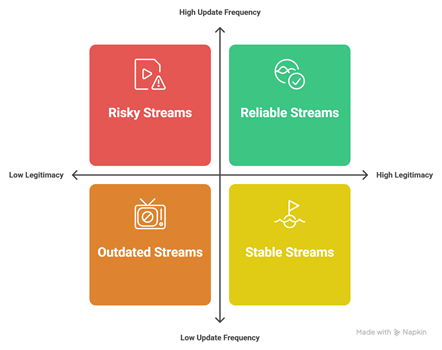
Our team shortlisted nine free popular IPTV playlists used widely in 2026, including Pluto TV M3U, Samsung TV Plus, Plex Live TV, Stirr, Xumo, PBS, Rakuten TV, Redbox, and Airy TV. We focused on options that allow you to stream legally, update frequently, and work smoothly on common IPTV players, so all you need is a stable connection and a compatible app. It is important to avoid shady sources, so we prioritized official feeds, clear licensing, and reliable uptime.
- Legitimacy: The experts in our team selected official, licensed sources, since legality is essential for safe streaming.
- Update frequency: We chose playlists refreshed frequently, so links stay reliable and reduce sudden playback failures.
- Channel quality: Our team shortlisted services with consistent HD where possible, plus stable audio and fewer glitches.
- Device support: We made sure to shortlist options compatible with major players, smart TVs, Android, iOS, and web.
- Regional availability: We chose based on transparent geo rules, since access commonly varies by country and ISP.
Why Use Free Popular IPTV Playlists?
Free popular IPTV playlists help you test IPTV apps, explore international channels, and preview formats like M3U + EPG before paying for a service. For Canadian users, they’re useful for discovering multicultural content and learning setup basics. However, free lists can be unstable, go offline often, and may include low-quality or geo-blocked streams.
- Zero-cost testing: Validate your IPTV player setup before committing to any paid provider.
- Content discovery: Explore niche international channels, radio stations, and special-interest streams easily.
- Quick setup: Many playlists load in minutes using an M3U link and optional EPG.
- Learning tool: Helps beginners understand playlists, buffering, and player settings without risk.
- Important caveat: Stick to legal sources; avoid playlists sharing unauthorized premium channels or piracy.
Top Sources for Free IPTV Playlists
The best free IPTV playlist sources are legal, maintained, and transparent about content ownership. In Canada, focus on official free streams, broadcaster apps with accessible URLs, and reputable community lists that curate public domain channels. Avoid “too good to be true” playlists claiming every premium sports or movie channel for free.
- Pluto TV: Free, ad-supported channels; reliable in Canada with consistent uptime and quality.
- Plex Live TV: Offers free streaming channels; stable playback and simple access for most devices.
- Samsung TV Plus: Free channels on compatible Samsung TVs; dependable lineup with easy discovery.
- LG Channels: Free channel hub on supported LG TVs; useful for casual viewing in Canada.
- Public IPTV GitHub lists: Curated public streams; verify legality and expect links to change regularly.
How to Use an IPTV M3U Playlist (Step-by-Step)
To use an IPTV M3U playlist, pick a trusted playlist URL, load it into an IPTV player, and optionally attach an EPG guide. In Canada, ensure your device time zone is correct for accurate schedules. If streams buffer, switch to a different channel source or lower quality when available in settings.
- Choose a player: Install TiviMate, IPTV Smarters, Kodi, or VLC on your preferred device.
- Add M3U link: Paste the M3U URL or import an M3U file inside the app’s playlist section.
- Name the playlist: Label it clearly, like “Free IPTV Test,” for quick switching later.
- Add EPG (optional): Insert an EPG URL to enable program guide, schedules, and channel metadata.
- Tune performance: Enable hardware decoding, adjust buffer size, and use stable Wi-Fi or Ethernet.
Features of a Good Free IPTV Playlist
A good free IPTV playlist is stable, legal, and organized, with working streams and clean channel metadata. For Canadian viewers, prioritize playlists with reliable uptime, multiple backup links, and support for EPG where possible. The best lists also include consistent logos, correct channel names, and clear categories for faster browsing.
- High uptime: Streams stay online consistently, reducing broken links and frustrating channel errors.
- Clean organization: Categories, groups, and naming are consistent, making channels easy to search.
- EPG compatibility: Supports guide data, showing accurate schedules, titles, and upcoming programs.
- Multiple stream options: Provides backups or alternate qualities to reduce buffering during peak times.
- Legal, transparent sources: Uses public or authorized streams, lowering risk and improving reliability.
Verdict:
In this review, you got acquainted with some of the best free popular IPTV playlists available. All of them have their advantages and disadvantages. To help you take the final call, here is my verdict on the top three picks.
- IPTV-org Global: The ultimate starting point if you want a comprehensive directory-style playlist with impressive global reach. It is customizable and works across many IPTV players, but sorting by country and checking format consistency is recommended to avoid missing logos or dead URLs.
- Pluto TV Playlist: An excellent, top-rated pick for reliability and legality, especially in Canada where availability and uptime are strong. It is awesome for uninterrupted viewing, though it is not meant for heavy personalization beyond what the platform offers.
- Samsung TV Plus Playlist: A remarkable choice for viewers who want a secure, curated lineup with fewer technical headaches. It is a great “set-and-forget” option, although it is less flexible than open M3U lists for custom channel curation.
FAQs
What is the difference between M3U and M3U8 IPTV playlists?
M3U is a plain-text playlist format that may use various character encodings. M3U8 is the UTF-8 encoded version, better for international channel names and metadata. In Canada, most IPTV apps and players accept both, but M3U8 is generally more compatible and less prone to “garbled text” issues with international channel names.
How often should I update my IPTV playlist?
For free, popular IPTV playlists, update frequently — ideally weekly, or anytime channels stop working. Free sources change URLs often, remove streams, or rotate servers. If you’re using one of the “9 Best Free Popular IPTV Playlists,” bookmark the source page and re-import the latest link to reduce dead channels.
Why do some IPTV channels buffer or not load?
Buffering usually comes from unstable stream servers, peak-time congestion, geo-restrictions in Canada, or insufficient internet speed and Wi-Fi interference. “Not loading” often means the stream URL changed or the host is down. Try switching to another channel source, using a wired connection, adjusting player buffer settings, or updating your playlist.
Can I use IPTV playlists on my Smart TV without additional apps?
Sometimes, but most Smart TVs cannot natively open M3U/M3U8 playlists. Some brands offer limited built-in IPTV or media players, but functionality varies. In Canada, the reliable approach is installing a TV app from the store (or using a streaming device like Fire TV or Android TV) to import and manage playlists properly.
Do free IPTV playlists include live sports channels?
Some do, but availability is inconsistent and streams often disappear or buffer during major games. Free playlists may list sports channels, yet they can be geo-blocked in Canada or taken offline without notice. For dependable live sports, consider official Canadian broadcasters or licensed IPTV services to avoid quality and reliability issues.