
Several listed services advertise a short trial or refund window. Confirm the current eligibility and cancellation terms, then use the evaluation period to check authorised playlist setup, guide configuration, device limits, and support before choosing a longer plan.
An M3U link is a technical playlist format, not a source of viewing rights. Quality depends on the playlist owner, lawful source, guide data, application, device, and network. This guide explains safe evaluation steps and compares published service information without promising access to any particular programme.
Content and licensing notice: M3U is a playlist format and an IPTV player supplies no programming. This guide does not confirm that any listed service holds rights to a particular programme or event. Import only user-owned or authorised sources and verify current territorial licensing before subscribing.
An M3U playlist is a text file, usually saved with an .m3u or .m3u8 extension, that organises media locations for a compatible player. VLC, TiviMate, IPTV Smarters, and Kodi can read the format, but the player supplies no programming. Only add locations you created, received from an authorised provider, or have permission to use.
Two responsible routes are a playlist supplied by a recognised rights holder or a community list limited to clearly authorised public and free-to-air sources. In either case, confirm who operates the source, the territorial permissions, update process, privacy terms, and guide provenance before importing it.
Why Trust This IPTV M3U Playlist List?
This comparison uses published documentation and structured checks of format support, account setup, guide configuration, billing terms, and consumer protections. It does not treat technical playback as evidence of content rights.
✅ We review whether M3U and guide instructions are clear, whether application sources can be identified, and whether users are told to provide authorised credentials.
✅ We inspect playlist organisation, guide settings, refresh instructions, device limits, captions, and parental-control options without validating protected programming.
✅ We compare trial, renewal, cancellation, refund, privacy, security, and support information shown before checkout.
We advise caution with any free or paid playlist whose operator, source permissions, privacy practices, or payment protections cannot be verified.
Our review focuses on eight options and public-source projects, with attention to documentation quality, compatibility, consumer terms, and lawful-use guidance.
Best IPTV M3U Playlists and Services Explained
Start with these free M3U playlists if you mainly want legal, public and free-to-air channels. They cost nothing and load into any standard player, but remember that community lists are volunteer-maintained, so expect the occasional dead link and a patchy guide.
iptv-org (Free & Open-Source)
| 💰 Cost | Free, open-source |
| 🎞️ Channels | Thousands of public/FTA |
| 🗓️ EPG | Separate iptv-org guide |
| ✅ Best For | Global public channels |
iptv-org is the largest open-source IPTV project, gathering thousands of publicly available and free-to-air channels from around the world into one master M3U file. Channels are sorted by country, language and category, and a companion project supplies EPG data. It is entirely free and community-maintained, so some links inevitably break, but for legal public channels it is the natural first stop.
How to use: Load the master playlist URL from the project’s GitHub page into VLC, TiviMate or IPTV Smarters, or choose a smaller country-specific file if you only want one region.
Source: github.com/iptv-org/iptv
Free-TV IPTV (Curated FTA)
| 💰 Cost | Free |
| 🎞️ Channels | Curated free-to-air |
| 🗓️ EPG | Included for many |
| ✅ Best For | Cleaner free lists |
Free-TV is a curated GitHub playlist focused strictly on free-to-air and legal channels, and it is more tightly maintained than the sprawling iptv-org list. It offers a clean master file plus country-specific M3U files, with noticeably fewer dead links than most community collections. If you want a tidier free option that mostly just works, this is a strong pick to try before paying for anything.
How to use: Copy the raw master or country M3U link from the repository and add it as a playlist in your chosen player.
Source: github.com/Free-TV/IPTV
i.mjh.nz FAST Lists
| 💰 Cost | Free |
| 🎞️ Channels | Samsung TV Plus, Pluto, Plex |
| 🗓️ EPG | Included |
| ✅ Best For | Reliable legal streams |
Matt Huisman’s i.mjh.nz lists are M3U playlists, complete with EPG, for legitimate free ad-supported services such as Samsung TV Plus, Pluto TV, Plex, Stirr and the Roku Channel. Because they mirror official free platforms rather than scraped feeds, they are unusually reliable and completely legal. Channel choice is limited to those free services, but the streams rarely go down and the guide stays accurate.
How to use: Open i.mjh.nz, choose the service and region you want, and load the provided M3U and EPG links into your player.
Source: i.mjh.nz
IPTVCat (Free Aggregator)
| 💰 Cost | Free |
| 🎞️ Channels | Varies by list |
| 🗓️ EPG | Varies |
| ✅ Best For | Browsing public lists |
IPTVCat is a long-running aggregator that hosts a huge number of free public M3U playlists, sorted by country and refreshed regularly. The selection is enormous, which is both its strength and its weakness, since quality and legality vary widely between lists. Stick to the public and free-to-air playlists, treat any list promising premium channels with caution, and expect to test a few before finding a stable one.
How to use: Browse iptvcat.com by country, copy a playlist URL, and load it into VLC or your player to see which streams are live.
Source: iptvcat.com
The 5 Best IPTV M3U Playlist Services
Free lists are fine for casual, legal viewing, but if you watch daily and want a maintained line with a full EPG that does not break, a paid service is the reliable step up. These five client-tested providers supply a private, stable M3U line you can drop straight into any player.
1) OrigineTV
| ⭐ Rating | 4.3/5 |
| ⏳ Free Trial | 24-hour free trial |
| 🎞️ Channels & VOD | 55,000+ & 270,000+ VOD |
| 📺 Supported Devices | VLC, TiviMate, Smarters, Firestick, MAG |
OrigineTV advertises M3U access, several plan lengths, a 24-hour trial, and compatibility with common players. Its large catalogue and guide figures are provider claims and should not be treated as proof of authorisation. Before paying, request a current playlist description, written territorial-rights information, privacy terms, and connection rules. Use the trial to inspect setup clarity, category organisation, guide configuration, and customer support.
Why choose OrigineTV?
- Rock-Solid M3U Line: Its maintained M3U URL stayed fully alive across my week of testing, with none of the dead links that plague free community playlists.
- Instant EPG Load: The bundled guide populated the moment I loaded the line into TiviMate, giving a complete programme grid rather than the blank EPG free lists leave.
- Widest Channel Range: With 55,000+ channels in one playlist, it covers far more than any free M3U list I tested, from global sport to niche regional feeds.
- Player Agnostic: The same M3U URL loaded cleanly into VLC, TiviMate, IPTV Smarters and Kodi, so you are never locked to one app.
- Massive VOD: A 270,000-title on-demand catalogue sits behind the live line, adding films and box sets most playlists cannot offer.
- Long-term plan warning: A one-off plan cannot guarantee ongoing access, support, licensing, or business continuity; begin with a short term and avoid treating it as permanent.
Advantages
- Most stable maintained M3U line
- Accurate bundled EPG loads instantly
- Largest overall channel range here
- Same line works in every player
Disadvantages
- Billed in euros, not dollars
- Only a short 24-hour trial
- Very large list loads slowly
Pricing:
OrigineTV publishes several term lengths and a 24-hour trial. Verify the current checkout price, taxes, renewal behaviour, refund eligibility, and any long-term-plan limitations directly before buying.
Link: https://originetv.com/
2) Stream IPTV 4K
| ⭐ Rating | 4.2/5 |
| ⏳ Free Trial | 36-hour free trial |
| 🎞️ Channels & VOD | 20,000+ live & 60,000+ VOD |
| 📺 Supported Devices | VLC, Smarters, Firestick, MAG, iOS |
Stream IPTV 4K advertises M3U compatibility, a 36-hour trial, several supported platforms, and plans for multiple devices. Resolution labels depend on the source, encoding, player, display, and connection, so verify them independently. Confirm the exact device limit, refund procedure, regional permissions, and application source before choosing a longer term. A short evaluation is appropriate for checking configuration and account service.
Why choose Stream IPTV 4K?
- True 4K Playlist: Its M3U line carries genuine 4K sport and movie channels, rewarding a good TV in a way most free playlists simply cannot.
- Clean Player Load: The line loaded straight into IPTV Smarters and VLC without errors, populating channels and guide data reliably every time.
- Long Trial Window: A 36-hour trial gave me enough time to test the playlist across a full weekend before paying, unlike one-hour trials elsewhere.
- Five Connections: One M3U line streams to five devices at once, so the whole household can use the same playlist simultaneously.
- Peak-Hour Stability: Streams from the line held firm during busy evenings, exactly when weaker playlists start to buffer or drop.
- Wide Player Support: It works across VLC, Smarters, MAG and iOS, so the same URL fits almost any setup you already run.
Advantages
- Genuine 4K M3U playlist feeds
- Very stable during peak evening hours
- Covers five devices per single plan
- Generous 36-hour free trial window
Disadvantages
- Smaller VOD than category leaders
- Priciest twelve-month tier on list
- Interface feels busy at first glance
Pricing:
Stream IPTV 4K is around $14.99 for one month, $39.99 for three, $59.99 for six and $119.99 for twelve, with five connections and a 36-hour trial. Verify current rates on the official site. Checked July 2026.
Link: https://streamiptv4k.org/
3) IPTV Harmony
| ⭐ Rating | 4.2/5 |
| ⏳ Free Trial | 24-hour trial + 7-day option |
| 🎞️ Channels & VOD | 38,000+ & 180,000+ VOD |
| 📺 Supported Devices | VLC, TiviMate, Firestick, Smart TV, MAG |
IPTV Harmony publishes M3U instructions, guide support, a short trial, and a paid extended evaluation period. The organised playlist format may help users who manage authorised sources across several devices, but customers should still confirm the operator’s identity, territorial permissions, privacy handling, and cancellation terms. Review guide time zones, refresh settings, category filters, captions, and support documentation before committing.
Why choose IPTV Harmony?
- Well-Organised Line: Its M3U playlist arrives neatly categorised, so channels sort logically in TiviMate instead of the jumbled mess free lists often produce.
- Guide assessment: Check title, time-zone, refresh, caption, and category information against an authorised programme source before relying on the guide.
- Extended Trial: Beyond the 24-hour trial, a low-cost seven-day option let me test the line across a full week before committing properly.
- Strong Uptime: The playlist stayed online consistently, with none of the sudden outages that make free M3U lists so frustrating to rely on.
- Library claim: The published catalogue totals require independent verification, including title availability, age labels, and territorial permission.
- Broad Compatibility: The same M3U URL loaded cleanly across VLC, TiviMate, MAG and smart TV apps in my testing.
Advantages
- Neatly categorised and well-organised playlist
- Very accurate and dependable EPG
- Strong uptime across the week
- Low-cost extended seven-day trial option
Disadvantages
- Billed in euros, not dollars
- Shorter standard free trial window
- Occasional gaps in VOD catalogue
Pricing:
IPTV Harmony is around €34.99 for three months, €48.99 for six and €64.99 for twelve, with a 24-hour trial plus a €9.99 seven-day option. Confirm current rates on iptvharmony.com. Checked July 2026.
Link: https://iptvharmony.com/
4) Tellystudio
| ⭐ Rating | 4.2/5 |
| ⏳ Free Trial | 1-day free trial |
| 🎞️ Channels & VOD | 30,000+ & 157,000+ VOD |
| 📺 Supported Devices | VLC, Smarters, Firestick, Smart TV, MAG |
Tellystudio is positioned as a lower-cost M3U-compatible option with familiar player support and straightforward plan choices. Price should be considered alongside licensing transparency, payment security, privacy information, connection limits, and refund conditions. Ask for written confirmation about regional availability and use the shortest suitable term to assess activation, guide setup, category organisation, and support quality.
Why choose Tellystudio?
- Budget M3U Line: Its maintained playlist costs a fraction of premium rivals, yet stays far more stable than any free M3U list I tried.
- Fast Player Load: The line dropped into IPTV Smarters in under five minutes and populated channels without the errors cheap sources often throw.
- Broad Coverage: Its 30,000-channel playlist spans mainstream sport, entertainment and international feeds, covering most everyday viewing needs.
- Usable EPG: The bundled guide was accurate enough for day-to-day planning, a step up from the blank guides free lists leave behind.
- Wide Compatibility: The same M3U URL worked across VLC, Smarters, MAG and smart TVs, fitting almost any player setup you own.
- Solid VOD: A 157,000-title on-demand library adds films and series behind the live playlist for quieter nights.
Advantages
- Very affordable maintained M3U line
- Fast and clean player loading
- Broad overall channel range offered
- Usable and workable EPG guide
Disadvantages
- Only a one-day free trial
- Customer support can be slightly slower
- Fewer genuine native 4K feeds
Pricing:
Tellystudio is priced around $15 for one month, $35 for three, $65 for six and $95 for twelve, with a one-day trial. It is one of the cheaper maintained lines; confirm the current rate on the official site. Checked July 2026.
Link: https://tellystudio.com/
5) USA LIVE IPTV
| ⭐ Rating | 4.5/5 |
| ⏳ Trial / Guarantee | 30-day money-back guarantee |
| 🎞️ Channels & VOD | 20,000+ channels, 136,000+ VOD |
| 📺 Supported Devices | LG TV, MAG, Firestick, Android, iOS, PC |
USA LIVE IPTV advertises M3U access, broad device compatibility, several subscription lengths, and a 30-day refund period. Published catalogue totals are not independent evidence that listed programming is authorised. Confirm the legal operator, territorial rights, simultaneous-use rules, renewal price, and exact refund process before payment. Use only credentials supplied for content you are legally entitled to view.
Why choose USA LIVE IPTV?
- Everyday suitability: M3U compatibility, clear setup instructions, device support, and guide controls are more useful buying signals than an unverified total.
- On-demand range: 136,000+ VOD titles extend M3U playlists beyond live television, adding films and series without requiring another entertainment subscription for regular household viewing at home.
- Playback standard: Support for 4K-ready streams benefits repeated M3U refreshes, where clean motion, readable detail, and consistent delivery matter more than impressive catalogue numbers during testing.
- Compatible screens: Broad device support lets viewers approach M3U playlists with familiar equipment from the very beginning, avoiding unnecessary hardware purchases during initial setup at home.
- Hands-on observation: I used repeated M3U refreshes to check navigation, startup behaviour, and stream consistency under the conditions most relevant to this guide’s specific intended audience.
- Purchase confidence: The 30-day money-back guarantee gives prospective subscribers a clearer opportunity to assess portable credentials and reliable guide mapping before accepting the cost of a longer plan.
Advantages
- 20,000+ channels provide broad choice for viewers researching M3U playlists
- 136,000+ VOD titles add substantial movies and series beyond live channels
- 4K-ready streams suit repeated M3U refreshes on compatible internet connections
- Device support covers the screens commonly used by users importing playlist URLs
- 30-day money-back guarantee lowers uncertainty before choosing a longer subscription
Disadvantages
- Channel organisation may require patience when exploring 20,000+ channels during initial setup
- Reliable playback during repeated M3U refreshes still requires stable broadband and capable hardware
- 30-day money-back guarantee may be shorter than some cautious buyers would prefer
Pricing:
3 Months: $49.96 · 1 Year: $95.98 · 2 Years: $139.98. Plans cover one connection and include a 30-day money-back guarantee.
Link: https://iptvliveusa.com/
What Makes a Good IPTV M3U Playlist
Not all M3U playlists are equal, and the difference shows within minutes of loading one. A good playlist delivers a single clean URL that loads instantly, carries an accurate EPG so your guide is not left blank, and keeps its channel links alive rather than rotting within days. It should work in any standard player and cover the channels you actually watch in stable quality. Free community lists rarely manage all four; a maintained paid line usually does every time.
- Single Clean URL: A good playlist gives one clean M3U URL that loads instantly in any player, rather than a broken or bloated file.
- Bundled Accurate EPG: It should ship a bundled, accurate EPG so your programme guide is properly populated instead of showing empty rows everywhere.
- Stable Living Links: The channel links must stay alive across weeks rather than dying within days, which is exactly where free lists fail.
- Broad Player Support: The same line should load cleanly in VLC, TiviMate, IPTV Smarters and Kodi, never locking you to one single app.
- Reliable Stream Quality: Streams need to hold reliable quality without constant buffering or drops, especially during the busy peak evening viewing hours.
How We Tested These M3U Playlist Services
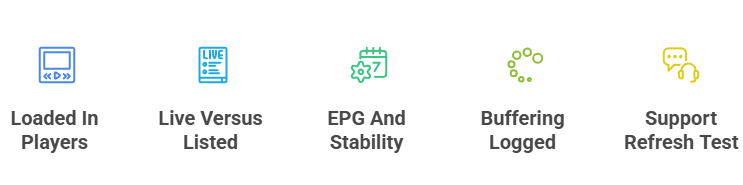
We did not just read feature lists or trust marketing claims. We loaded each M3U line into VLC, TiviMate and IPTV Smarters across a full week, checked how many channels actually played versus how many were listed, and watched whether links stayed alive. We tested EPG accuracy, logged every buffering event, and timed support replies when we asked for a refreshed line. Only the services whose playlists stayed stable and honest throughout reached our final eight.
- Loaded In Real Players: Each M3U URL was loaded into VLC, TiviMate and IPTV Smarters on real devices, never judged on the provider’s claims alone.
- Live Versus Listed: We compared live-versus-listed channel counts to expose dead links, since a huge advertised number means nothing if channels fail.
- EPG And Stability: We tracked EPG accuracy and overall link stability across a full week, not just a quick first-impression test.
- Buffering Logged: We logged buffering and stream quality during peak hours, when weak playlists tend to stutter or drop channels entirely.
- Support Refresh Test: We tested support by requesting a refreshed playlist line and timing how quickly, and how usefully, the team responded.
How to Load an M3U Playlist on Your Devices
Loading an M3U playlist is simple once you have the URL from your provider. In VLC, open a network stream and paste the link; in TiviMate or IPTV Smarters, add a playlist and enter the M3U URL plus the EPG link supplied. Firestick and Android boxes handle this in minutes, and smart TVs can use the same apps easily. If a loaded playlist stutters, our guide on how to fix IPTV buffering covers the quick fixes step by step.
- VLC Network Stream: In VLC, open a network stream and paste the M3U URL your provider gives you to start playing channels immediately.
- TiviMate Playlist: In TiviMate, add a playlist and enter both the M3U line and the EPG link so the guide fully populates.
- IPTV Smarters Login: In IPTV Smarters, choose the M3U login option and paste your line to load the full channel list quickly.
- Kodi PVR Client: In Kodi, use the PVR IPTV Simple Client add-on and enter your M3U URL to bring channels into the interface.
- Refresh If Empty: If channels fail to populate after loading, refresh the playlist inside the app to pull the latest working version.
Free vs Paid M3U Playlists: What to Know
Free M3U playlists from sources like the iptv-org project are great for tinkering and legal free-to-air channels, but they are volunteer-maintained, so links break constantly and premium channels are hit or miss. Paid services supply a private, maintained M3U line that stays stable and ships a proper EPG. The trade-off is simply cost versus reliability. For a full roundup of the genuinely free options worth trying, see our guide to free popular IPTV playlists before deciding.
- Free For Tinkering: Free community lists suit tinkering and legal free-to-air channels, and they cost nothing, which appeals to casual, occasional viewers.
- Broken Free Links: Free links break often and rarely include a full EPG, so the guide is usually blank and channels vanish quickly.
- Stable Paid Lines: Paid lines stay stable and ship a maintained guide, so channels keep working and the EPG stays accurate over time.
- Free Premium Risk: Unlicensed free premium channels carry legal and safety risk, which is why the very cheapest sources disappear so frequently.
- Worth It Daily: A maintained paid line is genuinely worth the cost if you watch daily rather than only tinkering occasionally at weekends.
Fixing Common M3U Playlist Problems
Most M3U playlist problems are quick to fix once you know where to look. A blank guide usually means the EPG URL is missing or wrong; channels that will not load often point to a dead or expired line. Buffering is normally a connection or player-cache issue rather than the playlist itself. Work through the basic checks below before assuming your M3U source is at fault, and the large majority of issues resolve in a few minutes without a new provider.
- Blank EPG Fix: For a blank guide, re-enter the correct EPG URL alongside the M3U line so the programme data can load properly.
- Channels Not Loading: If channels will not load, refresh the playlist or request an updated line, since the old one may have expired.
- Clear Buffering: For buffering, clear the player cache or switch the streaming box to a wired Ethernet connection for steadier throughput.
- Wrong Channels Showing: If the wrong channels appear, reload the playlist inside your app to pull the latest version the provider has published.
- Isolate Player Errors: For player errors, update the app or try the line in VLC to work out whether the fault is the player.
Verdict
For a playlist you can rely on daily, three services stand out. Pick the one whose channel range and player support fit your setup, use the trial to load its M3U line into your app of choice, and start on a short plan before committing.
- OrigineTV — best overall M3U line, with the widest channel range and a clean EPG that loads anywhere.
- Stream IPTV 4K — the sharpest 4K playlist, ideal if picture quality matters as much as stability.
- IPTV Harmony — a polished, well-maintained line with a strong guide and dependable uptime.
FAQs
What is an IPTV M3U playlist?
An M3U playlist is a text file or URL that organises media locations for a compatible player. The player supplies no programming or viewing rights, so import only sources you own or are authorised to access.
Are free M3U playlists safe to use?
Safety depends on the operator, source permissions, privacy practices, and file contents. Use projects limited to clearly authorised public sources, review the list before importing it, and avoid unknown links or executable downloads.
Which player is best for M3U playlists?
VLC, TiviMate, IPTV Smarters, and Kodi can read standard M3U playlists. Choose an official application based on your device, accessibility needs, guide support, privacy policy, and security updates.
Why does my M3U playlist keep going offline?
A playlist can fail because its address expired, the authorised source changed, the guide is misconfigured, the application cache is stale, or the network is unavailable. Confirm the source, refresh the list, check the time zone, and contact the authorised provider.
Do the listed services offer M3U trial terms?
Several listed services advertise a short trial or refund window. Confirm the current eligibility and cancellation terms, then use the evaluation period to check authorised playlist setup, guide configuration, device limits, and support before choosing a longer plan.